
StS
1
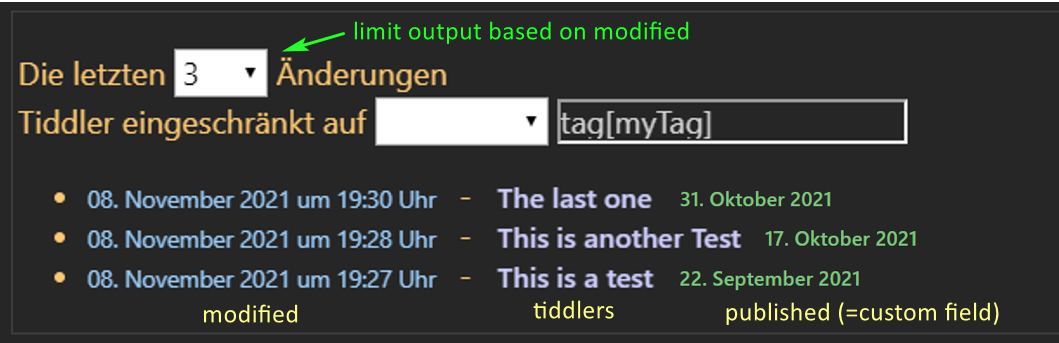
The idea is, to display
- modified
- tiddler title
- published (=custom field)
and limit the output by
- number of lines (pulldown)
- on tags (pulldown)
- sorted by modified
like:
I started with:
<$vars modif="[get[modified]]">
<span style="color: rgb(255,201,102); font-size: 1em">
<nav>
<label>Die letzten
<$select field=max default=5>
<$list filter="3 10 20 50 100 200 500" variable=limit>
<option value=<<limit>>><<limit>></option>
</$list>
</$select> Änderungen <br>
Tiddler eingeschränkt auf
@@.combobox
<$select field=selection>
<option value='tag[myTag]'> </option>
<option value='2021'>Jahr 2021</option>
<option value='2020'>Jahr 2020</option>
</$select>
<$edit-text field=selection placeholder=“type or select”/>
@@
</label>
</nav>
<ul>
<$list variable=output filter="[!is[system]has[erstellt]sortsub:date<modif>reverse[]limit{!!max}]">
<li>
<span style="color: rgb(150, 204, 255);font-size: 0.75em">
<$view tiddler =<<art>> field=modified format=date template="0DD. MMM YYYY um 0hh:0mm Uhr"/>
</span>
<span style="color: rgb(255, 201, 102)"> -
</span>
<span style="font-size: 0.9em">
<$link to=<<output>>/>
</span>
</li>
</$list>
</ul>
</span>
and hang at that point to apply the choosen tag into the filter and to display the published field to the output list.
Thanks for any hint and support.
Stefan
Mark_S
2
I don’t see that you’ve used ‘selection’ anywhere. I don’t know what field ‘2021’ is meant to filter?
In any event, if you change the value of items in the selection to filters,
<option value='[[published[2021]]'>Jahr 2021</option>
then maybe you could use
<$list variable=output filter="[!is[system]has[erstellt]filter{!!selection}sortsub:date<modif>reverse[]limit{!!max}]">
StS
3
Thanks for feedback @Mark_S.
I don’t know what field ‘2021’ is meant to filter?
This is a readable option to select the tag.
<$list variable=output
filter="[!is[system]has[erstellt]filter{!!selection}sortsub:date<modif>reverse[]limit{!!max}]">
This shows no changes in the output.
I think, ‘selection’ assigned to the ‘tag’ is missing → dropdown has no effect.
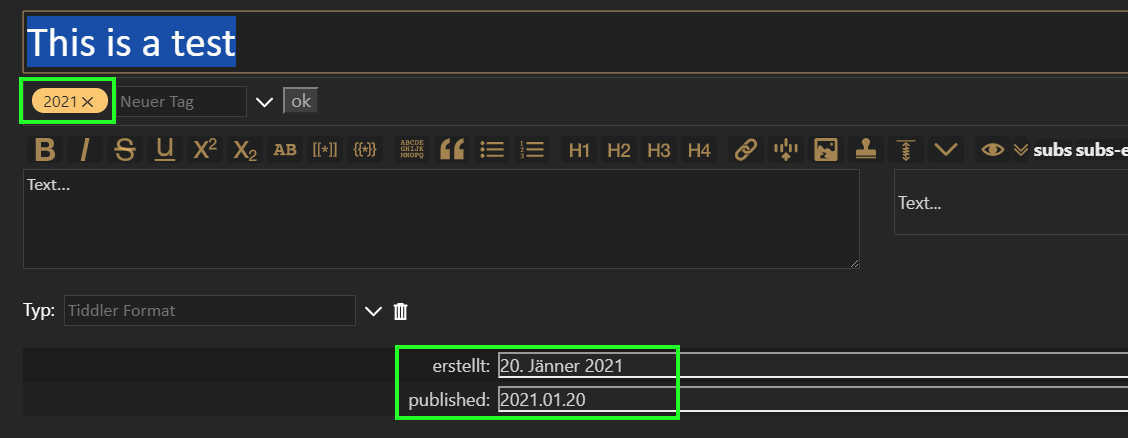
My tiddlers looks like:
The content of ‘erstellt’ should also be shown.
Thanks.
Mark_S
4
This version works, if I understand what you want. It should at least show how to set up the select widget to use filters.
<$vars modif="[get[modified]]">
<span style="color: rgb(255,201,102); font-size: 1em">
<nav>
<label>Die letzten
<$select field=max default=5>
<$list filter="3 10 20 50 100 200 500" variable=limit>
<option value=<<limit>>><<limit>></option>
</$list>
</$select> Änderungen <br>
Tiddler eingeschränkt auf
@@.combobox
<$select field=selection>
<option value='[tag[myTag]]'>myTag </option>
<option value='[tag[2021]]'>Jahr 2021</option>
<option value='[tag[2020]]'>Jahr 2020</option>
</$select>
<$edit-text field=selection placeholder=“type or select”/>
@@
</label>
</nav>
<ul>
<$list filter="[!is[system]has[erstellt]subfilter{!!selection}sortsub:date<modif>reverse[]limit{!!max}]">
<li>
<span style="color: rgb(150, 204, 255);font-size: 0.75em">
<$view field=modified format=date template="0DD. MMM YYYY um 0hh:0mm Uhr"/>
</span>
<span style="color: rgb(255, 201, 102)"> - </span>
<span style="font-size: 0.9em">
<$link/>
</span>
<span style="color: rgb(255, 201, 102)"> - </span>
<span style="font-size: 0.9em">
{{!!erstellt}}
</span>
</li>
</$list>
</ul>
</span>
</$vars>
StS
5
Great @Mark_S - you did it, thanks!
One small thing. The entered option value should corespond exactly to the tag.
Typing in 2021 under option ‘myTag’ should be translated to [tag[2021]] in the background.
Is this possible too?
Thanks