
How to Increase the Height and Button Size in the Menu Bar?

Hi everyone,

I’m using the official TiddlyWiki menu bar plugin and I find the default height and button sizes a bit too small for my liking.

Here’s a screenshot of my current menu bar:

I have some preliminary knowledge of CSS and managed to increase the bar’s height by adding the following to my custom stylesheet (not sure if I followed the best practice though):

nav.tc-menubar li.tc-menubar-item > a, nav.tc-menubar li.tc-menubar-item > button {
	line-height: 1.5;
}

While this successfully made the bar taller, it didn’t scale the buttons or the text accordingly, so the overall look is now a bit unbalanced.

Could anyone please help me with the CSS to increase the size of all buttons and font size in the menu bar?

Any guidance would be much appreciated!
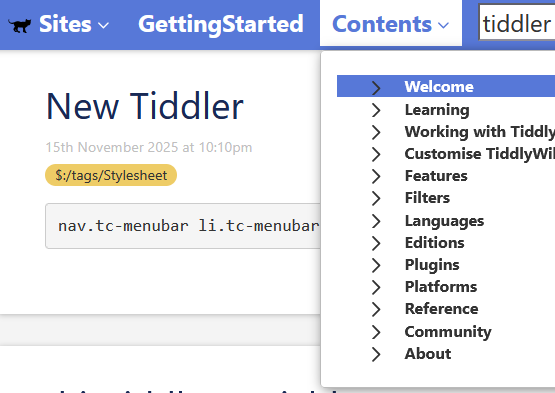
I found a solution:

nav.tc-menubar li.tc-menubar-item {
    font-size: 150%;   /* or 1.5em */
}
1 Like

this may be a silly question but have you tried zooming your wiki in or out to suit?

I use ctrl-mouse roller a lot.

I found that my above style setting also scales the font size in the drop-down menu (which does not look good, as it breaks the visual balance). More tuning is needed for the stylesheet…

You are probably right. Zooming in the wiki is a more straightforward solution.

I don’t use the menubar myself so I only did a little testing, but I think the following might work (in place of your previous rules):

nav.tc-menubar li.tc-menubar-item { line-height: 1.5; font-size: 150%; }

Here’s what it looks like on TW-com:
image

The “Sites” and “Contents” drop downs show the normal font size… but the search results drop down shows the larger font size.

This is because the search results .tc-block-dropdown element is a direct decendent of the .tc-menubar-item that renders the search input controls, while the other dropdowns use $reveal widgets that are rendered after all the .tc-menubar-item elements.

To address this, try the following CSS:

.tc-menubar-item { line-height:1.5; font-size:150%; }
.tc-menubar-item .tc-block-dropdown { line-height:initial; font-size:initial; }

-e

1 Like

Thanks for your suggestions, guys!

I made a slight change (added .tc-reveal as well) and found it look good :grinning_face_with_smiling_eyes:

.tc-menubar-item { line-height:1.5; font-size:150%; }
.tc-menubar-item .tc-reveal, .tc-menubar-item .tc-block-dropdown { 
	line-height:initial; font-size:initial; 
}

Thank you for the information