I have modified tiddler through external program and PUT into server. I understand I can reduce $:/config/SyncPollingInterval to reduce internal pull from server to browser.
But I want to force to sync from server to browser in js. I tested $tw.syncer.syncFromServer, which seems not working as expected.
Any ideas how to force sync from server to browser using js?
Right. That’s what I don’t think can be done. To do it would require triggering the startup mechanism, and that could well interfere with your running system.
As I understand it, this is not possible. The node TW design is about polling - initiated by the client (browser) to the server. There is no mechanism for the server to push changes to the client.
I believe the bob.exe version did utilise websockets (maybe?) for a constant connection and thus the server to push changes instantly, but afaik, bob is no longer maintained.
I’ve memory of this type of thing being discussed in context of MWS, but I dont know if it’s been implemented
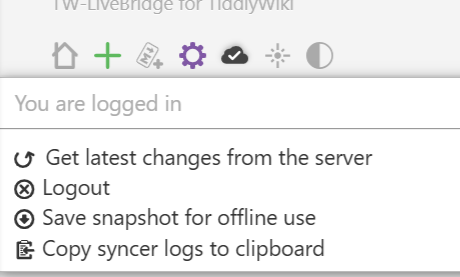
In the debug mode, Get latest changes from the server calls function $tw.syncer.syncFromServer. But this feature is not working for me (not sure about the reason).
And the browser also sync from server with interval $:/config/SyncPollingInterval which works for me. Not sure how to trigger this sync with js.
I’m not sure if I’ve understood your intent correctly. If you want to trigger sync from the browser, my suggestion is syncer.forceSyncFromServer=true; syncer.syncFromServer() (the relevant logic can be found in the Syncer function and chooseNextTask function in $:/core/modules/syncer.js). (By the way, syncer.numTasksInProgress can control the syncer on/off.)