Hi guys,
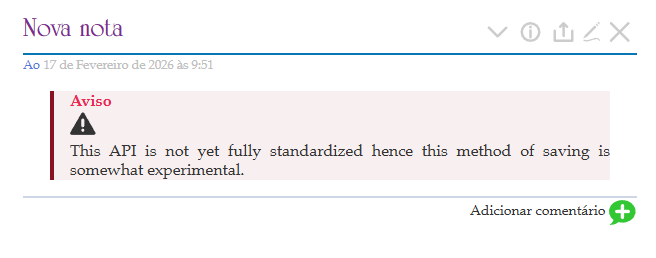
Sorry for always asking this type of questions, but how i can set this type of Warning in my wiki?

Thank you in advance!
In a tiddler tagged $:/tags/Macro include this definition (extracted macro elements from tw-com):
\whitespace trim

\procedure .infoBox(text:"", title, icon:"$:/core/images/info-button", class, iconSize:"1.4rem")
\function _f.tipClass() [[doc-icon-block]] [<class>!is[blank]then<class>] +[join[ ]]
<div class=<<_f.tipClass>>>
	<%if [<title>!is[blank]] %><div>''<<title>>''</div><%endif%>
	<div class="doc-block-icon"><$transclude $tiddler=<<icon>> size=<<iconSize>>/></div>
	<<text>>
</div>
\end

\procedure .warning(_:"", title:"Warning", icon:"$:/core/images/warning", class:"doc-warning", iconSize:"22pt")
<$macrocall $name=".infoBox" text=<<_>> title=<<title>> icon=<<icon>> class=<<class>> iconSize=<<iconSize>>/>
\end


\end
You can customize the style however you like, but this is roughly what’s there at tw-com (tagged $:/tags/Stylesheet):
.doc-icon-block.doc-warning {
	border-left: 4px solid #881122;
 padding-left:2em;
	background: #88112211;
}
Then, when you want to invoke it, invoke it like this:
<<.warning "This API is not yet fully standardized hence this method of saving is somewhat experimental.">>
There are other solutions to this kind of problem. One such solution is @Mohammad’s Shiraz Callouts Subplugin
Thank you @Springer, it worked, but the final result is a little different, the icon is inside the box, not on the left
Try adding this CSS:
.doc-block-icon {
    position: absolute;
    left: -3em;
    top: 0.2em;
}
Thank you @Scott_Sauyet , that worked. However, I had to add an extra step: I needed to set fixed margins on my wiki to ensure it remained correctly positioned during resizing
The absolute position become a problem because i fixed the width of my wiki, and somo titles have two lines, so i changed the macro:
\whitespace trim

\procedure .infoBox(text:"", title, icon:"$:/core/images/info-button", class, iconSize:"1.3rem")
\function _f.tipClass() [[doc-icon-block]] [<class>!is[blank]then<class>] +[join[ ]]
<div class=<<_f.tipClass>> style="display: flex; align-items: flex-start; gap: 12px; margin: 1em 0;">
	<div class="doc-block-icon" style="flex: 0 0 auto; line-height: 1; padding-top: 3px;">
		<$transclude $tiddler=<<icon>> size=<<iconSize>>/>
	</div>

	<div style="flex: 1 1 auto;">
		<%if [<title>!is[blank]] %>
			<div style="color: #881122; font-weight: bold; margin-bottom: 5px;">
				<<title>>
			</div>
		<%endif%>

		<<text>>
	</div>
</div>
\end

\procedure .warning(_:"", title:"Aviso!", icon:"$:/core/images/warning", class:"doc-warning", iconSize:"18pt")
<$macrocall $name=".infoBox" text=<<_>> title=<<title>> icon=<<icon>> class=<<class>> iconSize=<<iconSize>>/>
\end
And used this in my stylesheet
.doc-icon-block {
    display: flex;
    align-items: flex-start;
    gap: 12px;
    padding: 10px;
    border: 1px solid #881122;
    border-radius: 4px;
    fill: #881122
}

.doc-warning {
    background-color: #88112211;
    border-left: 5px solid #881122;
}
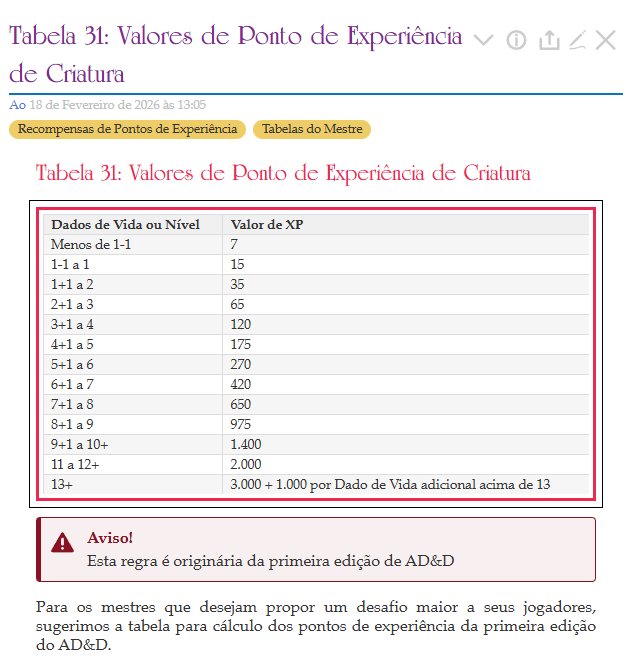
This is the final result and i can use in any point of the tiddler
Absolute positioning is actually relative to the nearest positioned containing node. So I think alternatively, you should be able to do something like this:
.doc-icon-block.doc-warning {
    position: relative;
}
but I haven’t tested this.