Any Ideas for this?
Let us say the group is defined by the indexes of a dictionarytiddler ( $:/temp/students )
and the number of groups is {$:/temp/groupnumber}
My quick testing suggests that the shuffle operator reorders the list with each wiki interaction, so you’ll probably want to print or otherwise save your results if you’ll need to be able to refer back to them later!
This works for any number of students. Whatever students remain after integer division puts an equal number of students per group, each of the remaining individuals will be added to a group such that all groups have:
integer (number of students / number of groups)
OR integer (number of students / number of groups) + 1
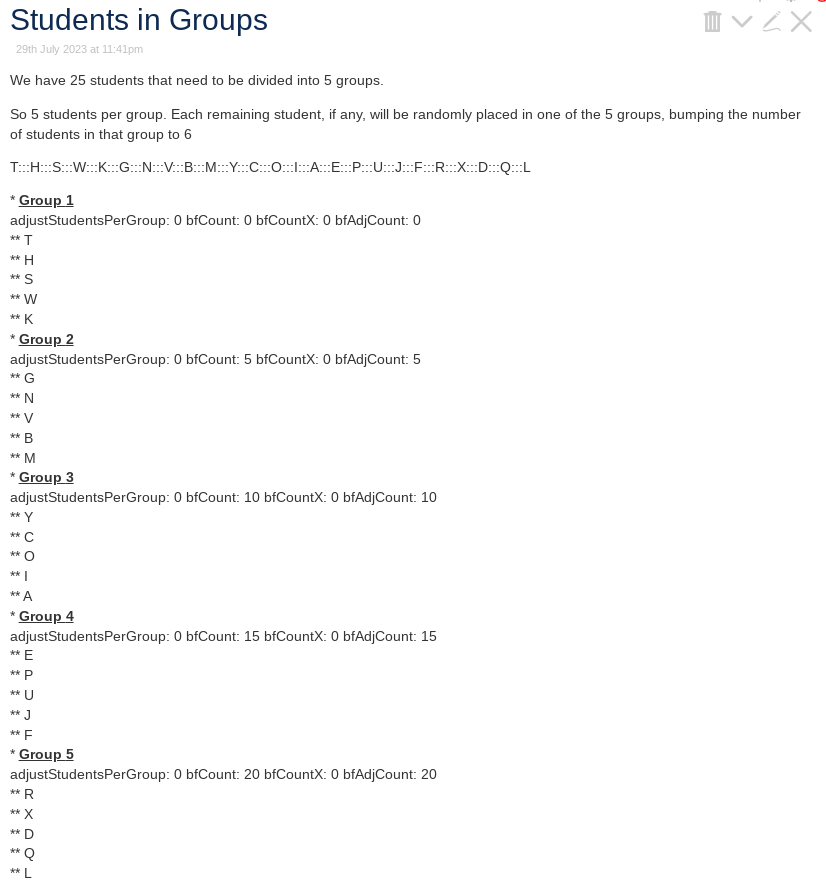
The code, followed by screenshot of sample render:
\define Students() A B C D E F G H I J K L M N O P Q R S T U V W X Y
\define Groupings() 5

<$let studentCount={{{ [enlist<Students>count[]]  }}}
         studentsPerGroup={{{ [<studentCount>divide<Groupings>floor[]] }}}
         remaining={{{ [<studentCount>remainder<Groupings>] }}}
         studentsPerGroupPlus1={{{ [<studentCount>divide<Groupings>floor[]add[1]] }}}>

We have <<studentCount>> students that need to be divided into <<Groupings>> groups.

So <<studentsPerGroup>> students per group.  Each remaining student, if any, will be randomly placed in one of the  <<Groupings>> groups, bumping the number of students in that group to <<studentsPerGroupPlus1>>


<$vars shuffledStudents={{{ [enlist<Students>] +[shuffle[]] +[join[:::]] }}}>

<<shuffledStudents>>

<$list variable="thisGroup" filter="[range[1],<Groupings>]" counter="ind">
* __''Group <<thisGroup>>''__<br>
<$let bfCount={{{ [<thisGroup>!match[1]subtract[1]multiply<studentsPerGroup>] +[else[0]] }}}
         bfCountX={{{ [<ind>compare:number:lteq<remaining>then<ind>subtract[1]] +[else<remaining>] }}}
         bfAdjCount= {{{ [<bfCount>] [<thisGroup>!match[1]then<bfCountX>] +[sum[]]  }}}
         adjustSPG={{{ [<ind>compare:number:lteq<remaining>then[1]else[0]] }}}
         adjStudentsPerGroup={{{ [<studentsPerGroup>add<adjustSPG>] }}}>
adjustStudentsPerGroup: <<adjustSPG>> bfCount: <<bfCount>> bfCountX: <<bfCountX>> bfAdjCount: <<bfAdjCount>> <br>
<$list variable="thisStudent" filter="[<shuffledStudents>split[:::]butfirst<bfAdjCount>first<adjStudentsPerGroup>]">
** <<thisStudent>><br>
</$list>
</$let>
</$list>

</$vars>

</$let>
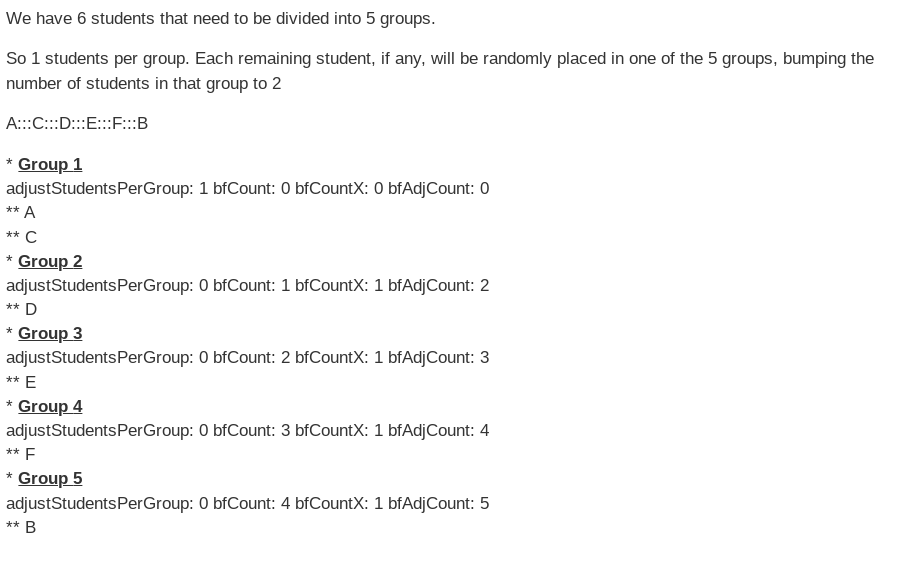
The fixed code, needed to add an “=” in there. See if you can spot Waldo:
\define Students() A B C D E F G H I J
\define Groupings() 5

<$let studentCount={{{ [enlist<Students>count[]]  }}}
         studentsPerGroup={{{ [<studentCount>divide<Groupings>floor[]] }}}
         remaining={{{ [<studentCount>remainder<Groupings>] }}}
         studentsPerGroupPlus1={{{ [<studentCount>divide<Groupings>floor[]add[1]] }}}>

We have <<studentCount>> students that need to be divided into <<Groupings>> groups.

So <<studentsPerGroup>> students per group.  Each remaining student, if any, will be randomly placed in one of the  <<Groupings>> groups, bumping the number of students in that group to <<studentsPerGroupPlus1>>


<$vars shuffledStudents={{{ [enlist<Students>] +[shuffle[]] +[join[:::]] }}}>

<<shuffledStudents>>

<$list variable="thisGroup" filter="[range[1],<Groupings>]" counter="ind">
* __''Group <<thisGroup>>''__<br>
<$let bfCount={{{ [<thisGroup>!match[1]subtract[1]multiply<studentsPerGroup>] +[else[0]] }}}
         bfCountX={{{ [<ind>compare:number:lteq<remaining>then<ind>subtract[1]] +[else<remaining>] }}}
         bfAdjCount= {{{ [<bfCount>] =[<thisGroup>!match[1]then<bfCountX>] +[sum[]]  }}}
         adjustSPG={{{ [<ind>compare:number:lteq<remaining>then[1]else[0]] }}}
         adjStudentsPerGroup={{{ [<studentsPerGroup>add<adjustSPG>] }}}>
adjustStudentsPerGroup: <<adjustSPG>> bfCount: <<bfCount>> bfCountX: <<bfCountX>> bfAdjCount: <<bfAdjCount>> <br>
<$list variable="thisStudent" filter="[<shuffledStudents>split[:::]butfirst<bfAdjCount>first<adjStudentsPerGroup>]">
** <<thisStudent>><br>
</$list>
</$let>
</$list>

</$vars>

</$let>
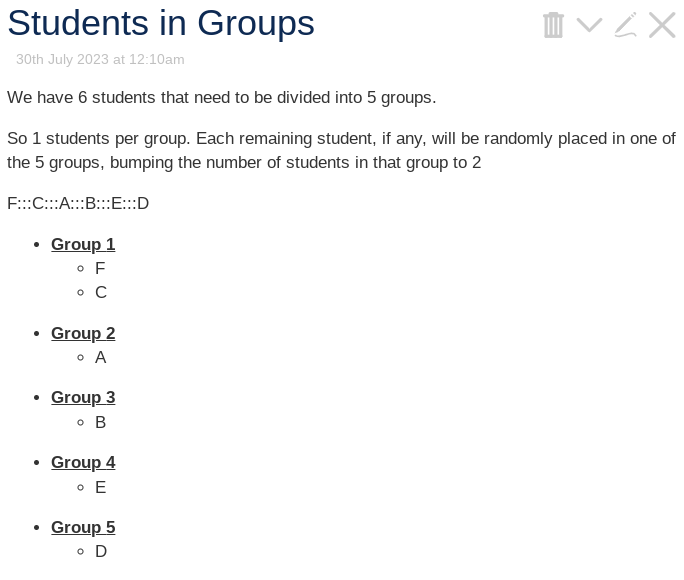
(I’ve left the display of internal variables there to check on what the code is doing. The bullets, I did not bother trying to make them pretty. If you’d like the “pretty” version: Students in Groups _pretty.json (1.6 KB) )
Thank you @Charlie_Veniot , @etardiff for the great solutions. I chose the etardiff’s solution for the simplicity an the greater ease to adapt it.
This is how I modified it:
This solution isn’t as “smart” as Charlie’s: it still doesn’t know the position or the actual group assignment of any given student in the list. But using a grid layout rather than an unordered list will give us more control over the column display, and it lets us add an appropriate number of headers to the start.
This is great! I really like the concept that it is still one list because it makes it easier to store the result and swap persons between groups. But for this I will need a drag-swap macro …which should be another thread to be found more easily
With which class can I style the divs to give them borders and make them smaller? Do you see a smart way to give them different colors for text border and background?
You can use div.groupings div to target each list item inside the grid. Grouping by column is a little trickier, but doable since we can use TW features within the stylesheet. For instance:
What we’re doing here is using the list to programmatically generate class definitions before applying them. You could also use :filter[divide[2]search[.]] to select the inverse set of columns, or :filter[divide[3]!search[.]] to select every third column, etc.
If you end up moving your CSS into a separate CSS tiddler, do make sure that you’re not using the text/css type for it! Static stylesheets don’t get passed through the widget parser before they’re applied, so they can’t take advantage of dynamic features like this.
After testing for a while, I switched to a modified version of @Charlie_Veniot 's solution - because I needed more stable way to store the groups in fields.
And because I found out that I often have to modify the groups manually afterward, I wanted the groups to be managable by the list-draggable-macro… but somehow modifying by drag and drop does not work yet - does anyone see why?
\define Students() A B C D E F G H I J K L M N O P Q R S T U V W X Y
\define Groupings() 7

<$let studentCount={{{ [enlist<Students>count[]]  }}}
         studentsPerGroup={{{ [<studentCount>divide<Groupings>floor[]] }}}
         remaining={{{ [<studentCount>remainder<Groupings>] }}}
         studentsPerGroupPlus1={{{ [<studentCount>divide<Groupings>floor[]add[1]] }}}>

We have <<studentCount>> students that need to be divided into <<Groupings>> groups.

So <<studentsPerGroup>> students per group.  Each remaining student, if any, will be randomly placed in one of the  <<Groupings>> groups, bumping the number of students in that group to <<studentsPerGroupPlus1>>[$ _plugins_JJ_classroom_widgets_groups.json|attachment](upload://gg1YvFeDMmplcFgMGeyLeiAWnib.json) (3.5 KB)


<$vars shuffledStudents={{{ [enlist<Students>] +[shuffle[]] +[join[:::]] }}}>

<<shuffledStudents>>

<$button class="tc-btn-big-green">
Build New Groups
<$action-deletefield 1 2 3 4 5 6 7 8 9 10 11 12/>
<$list variable="thisGroup" filter="[range[1],<Groupings>]" counter="ind">
<$let bfCount={{{ [<thisGroup>!match[1]subtract[1]multiply<studentsPerGroup>] +[else[0]] }}}
         bfCountX={{{ [<ind>compare:number:lteq<remaining>then<ind>subtract[1]] +[else<remaining>] }}}
         bfAdjCount= {{{ [<bfCount>] [<thisGroup>!match[1]then<bfCountX>] +[sum[]]  }}}
         adjustSPG={{{ [<ind>compare:number:lteq<remaining>then[1]else[0]] }}}
         adjStudentsPerGroup={{{ [<studentsPerGroup>add<adjustSPG>] }}}>
<$list variable="thisStudent" filter="[<shuffledStudents>split[:::]butfirst<bfAdjCount>first<adjStudentsPerGroup>]">
<$action-listops $field=<<thisGroup>> $subfilter="[<thisStudent>]"/>
</$list>
</$let>
</$list>
</$button>

</$vars>

</$let>

<$list filter="[range[1],<Groupings>]" variable="fieldnum">
<div style="width:8em; display:inline-block;border: 1px solid black;vertical-align:top">

!!Group <<fieldnum>>
<$macrocall $name="list-links-draggable" field=<<fieldnum>>/>
</div>
</$list>
This works … the list draggable macro seems not to be able to add and remove…
Thanks again @Charlie_Veniot and @etardiff for the help
\define dragdroplist()
<$droppable actions=<<groupalizer>> >
<div>
Liste
<$list filter="[list[!!$(fieldnum)$]]">
<$link> • {{!!title}}</$link>
</$list>
</div>
</$droppable>
\end
\define remover() <$action-listops $field="$(delfield)$" $subfilter="-[<actionTiddler>]"/>
\define groupalizer()
<$list filter="[range[1],<Groupings>]" variable="delfield">
<<remover>>
</$list>
<$action-listops $field="$(fieldnum)$" $subfilter="+[insertbefore:currentTiddler<actionTiddler>]"/>
\end
\define Students() A B C D E F G H I J K L M N O P Q R S T U V W X Y
\define Groupings() 7
<$let studentCount={{{ [enlist<Students>count[]] }}}
studentsPerGroup={{{ [<studentCount>divide<Groupings>floor[]] }}}
remaining={{{ [<studentCount>remainder<Groupings>] }}}
studentsPerGroupPlus1={{{ [<studentCount>divide<Groupings>floor[]add[1]] }}}>
We have <<studentCount>> students that need to be divided into <<Groupings>> groups.
So <<studentsPerGroup>> students per group. Each remaining student, if any, will be randomly placed in one of the <<Groupings>> groups, bumping the number of students in that group to <<studentsPerGroupPlus1>>
<$vars shuffledStudents={{{ [enlist<Students>] +[shuffle[]] +[join[:::]] }}}>
<<shuffledStudents>>
<$button class="tc-btn-big-green">
New Random Groups
<$action-deletefield 1 2 3 4 5 6 7 8 9 10 11 12/>
<$list variable="thisGroup" filter="[range[1],<Groupings>]" counter="ind">
<$let bfCount={{{ [<thisGroup>!match[1]subtract[1]multiply<studentsPerGroup>] +[else[0]] }}}
bfCountX={{{ [<ind>compare:number:lteq<remaining>then<ind>subtract[1]] +[else<remaining>] }}}
bfAdjCount= {{{ [<bfCount>] [<thisGroup>!match[1]then<bfCountX>] +[sum[]] }}}
adjustSPG={{{ [<ind>compare:number:lteq<remaining>then[1]else[0]] }}}
adjStudentsPerGroup={{{ [<studentsPerGroup>add<adjustSPG>] }}}>
<$list variable="thisStudent" filter="[<shuffledStudents>split[:::]butfirst<bfAdjCount>first<adjStudentsPerGroup>]">
<$action-listops $field=<<thisGroup>> $subfilter="[<thisStudent>]"/>
</$list>
</$let>
</$list>
</$button>
</$vars>
</$let>
<$list filter="[range[1],<Groupings>]" variable="fieldnum">
<div style="width:8em; display:inline-block;border: 1px solid black;vertical-align:top">
<span style="font-size:1.5em">Group <<fieldnum>></span>
<<dragdroplist>>
</div>
</$list>
I have now finished the grouptool based on @Charlie_Veniot 's proposition which I post as a permaview below, because it relies on language-dictionary-tiddler you would have to adapt to have your language.
New features:
it now allows reordering groups and by drag and drop and for the big classroom-touchscreen also by dropdown.
and it allows absent students not assigned to any group.