TW version: 5.3.8
Hi everyone!
I’m trying to create a custom “Stamp/Snippet” button for the EditorToolbar that groups my snippets by a custom field called “categoria”.
To do this safely, I cloned the core $:/core/ui/EditorToolbar/stamp button and changed the dropdown field to point to my custom tiddler. The functionality works perfectly (it inserts the text using replace-selection inside an <$action-sendmessage>), but I am having a nightmare with the CSS/styling.
Here is the code of my custom dropdown tiddler:
<$list filter="[all[shadows+tiddlers]tag[$:/tags/TextEditor/Snippet]!has[draft.of]has[categoria]each[categoria]get[categoria]sort[]]" variable="cat">
  <div style="font-weight: bold; color: <<colour muted-foreground>>; padding: 6px 14px 2px 14px; font-size: 0.8em; text-transform: uppercase; border-bottom: 1px solid <<colour table-border>>;">
    <<cat>>
  </div>
  <$list filter="[all[shadows+tiddlers]tag[$:/tags/TextEditor/Snippet]!has[draft.of]categoria<cat>sort[caption]]">
    <$button class="tc-btn-invisible" tooltip={{!!caption}}>
      <$action-sendmessage $message="tm-edit-text-operation" $param="replace-selection" text={{!!text}}/>
      <$view field="caption"><$view field="title"/></$view>
    </$button>
  </$list>
</$list>
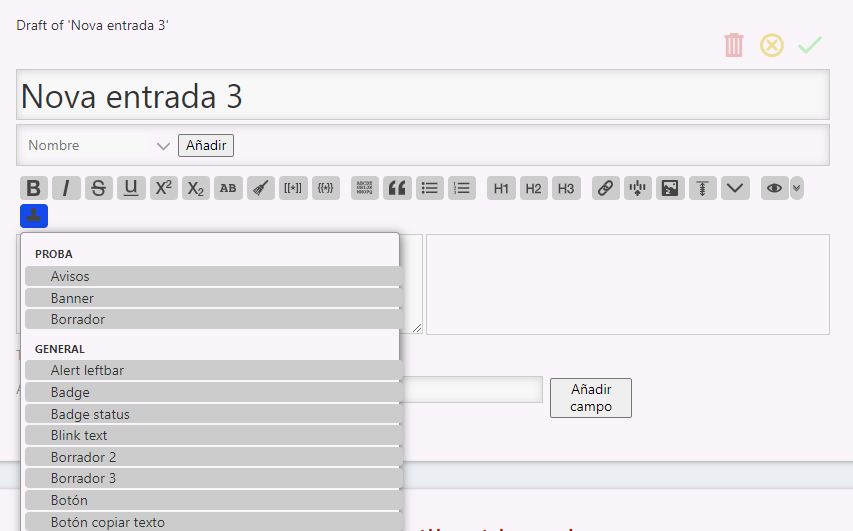
See attached screenshots:
-
Gray Pills: Despite trying to use class=“tc-btn-invisible”, the buttons often render as native browser buttons (gray pills with borders) instead of the flat, transparent, full-width items with the blue hover effect that native TW dropdowns have.
-
Overflow: If the snippet name is long, it overflows and breaks out of the right side of the dropdown box, instead of the box expanding to fit the text (or cleanly truncating it).
-
If I try to force inline CSS (like display: block, width: 100%, etc.), TiddlyWiki seems to fight it or disable the invisible class entirely.
Could someone point me to the correct “TiddlyWiki way” to structure these <$button> widgets inside a dropdown so they inherit the exact native look and layout of the core menus?
Thanks in advance!
The $button class="tc-btn-invisible" styling is being overridden by a TWCore CSS rule that has greater specificity:
.tc-editor-toolbar button {
    vertical-align: middle;
    background-color: #cccccc;
    color: #444444;
    fill: #444444;
    border-radius: 4px;
    padding: 3px;
    margin: 2px 0 2px 4px;
}
Fortunately, there is a VERY easy way to avoid this by changing the $button widget’s generated HTML element from “button” to “a” (i.e., a link) by changing just ONE line!
Change this:
<$button class="tc-btn-invisible" tooltip={{!!caption}}>
to:
<$button tag="a" tooltip={{!!caption}}>
enjoy,
-e
Thank you so much,
I was going crazy. Changing it to <$button tag=“a”…> as you suggested worked perfectly.
Thanks again for your time.
\whitespace trim

<$list filter="[all[shadows+tiddlers]tag[$:/tags/TextEditor/Snippet]!has[draft.of]has[categoria]each[categoria]get[categoria]sort[]]" variable="cat">
  <div style="font-weight: bold; color: <<colour muted-foreground>>; padding: 6px 14px 2px 14px; font-size: 0.8em; text-transform: uppercase; border-bottom: 1px solid <<colour table-border>>;">
    <<cat>>
  </div>
  <$list filter="[all[shadows+tiddlers]tag[$:/tags/TextEditor/Snippet]!has[draft.of]categoria<cat>sort[caption]]">
    <$button tag="a" tooltip={{!!caption}}>
      <$action-sendmessage $message="tm-edit-text-operation" $param="replace-selection" text={{!!text}}/>
      <span style="opacity: 0.5; margin-right: 4px;">•</span><$view field="caption"><$view field="title"/></$view>
    </$button>
  </$list>
</$list>

<$list filter="[all[shadows+tiddlers]tag[$:/tags/TextEditor/Snippet]!has[draft.of]!has[categoria]limit[1]]" variable="ignore">
  <div style="font-weight: bold; color: <<colour muted-foreground>>; padding: 10px 14px 2px 14px; font-size: 0.8em; text-transform: uppercase; border-bottom: 1px solid <<colour table-border>>;">
    Xeral
  </div>
</$list>

<$list filter="[all[shadows+tiddlers]tag[$:/tags/TextEditor/Snippet]!has[draft.of]!has[categoria]sort[caption]]">
  <$button tag="a" tooltip={{!!caption}}>
    <$action-sendmessage $message="tm-edit-text-operation" $param="replace-selection" text={{!!text}}/>
    <span style="opacity: 0.5; margin-right: 4px;">•</span><$view field="caption"><$view field="title"/></$view>
  </$button>
</$list>