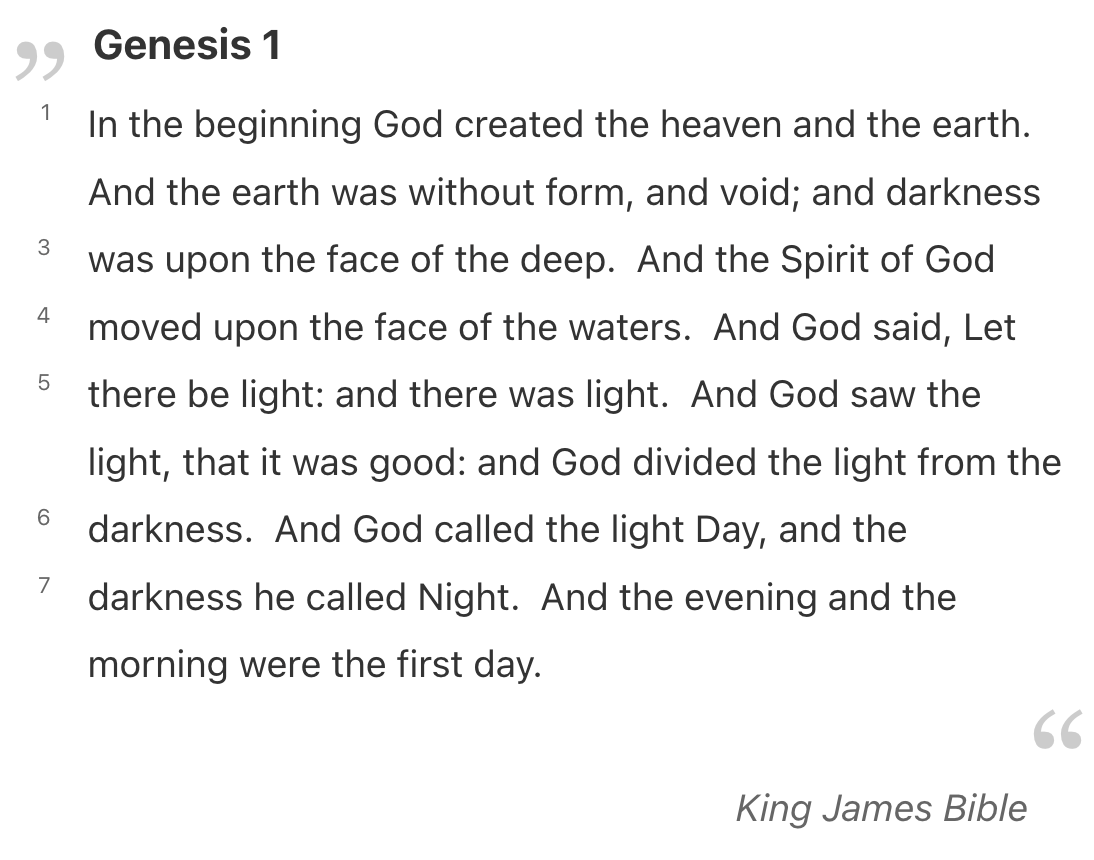
Floating associated content beside main text

First of all, this is not a TiddlyWiki, although I could do the same there. It is a plain HTML page that stole a lot of TW CSS.

The HTML has two divs side-by-side, #gutter and #content. Each verse numbers’ markup inside the gutter looks like this:

      <div class="verse-number" style="margin-top: 36px">
        <a class="tc-tiddlylink" data-verse="Genesis 1:3" title="Genesis 1:3" href="#Genesis 1:3">3</a>
      </div>

And the verse content markup looks like this:

      <p>
        <span class="verse" data-verse="Genesis 1:3">And God said, Let there be light: and there was
          light.</span>
        <span class="verse" data-verse="Genesis 1:4">And God saw the light, that <em>it was</em> good: and
          God divided the light from the darkness.</span>
        <span class="verse" data-verse="Genesis 1:5">And God called the light Day, and the darkness he
          called Night. And the evening and the morning were the first day.</span>
      </p>

The part that really needed hardcoding was verse numbers’ margin-top, which I simply eyeballed one-by-one, pushing them down the page to match with the verse content.

I only did it to create this demonstration. I never found a good way to automate it. In fact, I’m pretty sure this is a dead-end, unless I want to run some JS to calculate these offsets based on the actual rendered layout of the verses. While I’m fairly certain I could figure this out, it seems fragile and very much not in the spirit of TiddlyWiki.

Additional HTML content
  <div class="chapter side-by-side tc-eventcatcher">
    <div class="gutter">
      <div class="verse-number" style="margin-top: 15px">
        <a class="tc-tiddlylink" data-verse="Genesis 1:1" title="Genesis 1:1" href="#Genesis 1:1">1</a>
      </div>
      <div class="verse-number" style="margin-top: 0px">
        <a class="tc-tiddlylink" data-verse="Genesis 1:2" title="Genesis 1:2" href="#Genesis 1:2">2</a>
      </div>
      <div class="verse-number" style="margin-top: 36px">
        <a class="tc-tiddlylink" data-verse="Genesis 1:3" title="Genesis 1:3" href="#Genesis 1:3">3</a>
      </div>
      <div class="verse-number" style="margin-top: 0px">
        <a class="tc-tiddlylink" data-verse="Genesis 1:4" title="Genesis 1:4" href="#Genesis 1:4">4</a>
      </div>
      <div class="verse-number" style="margin-top: 0px">
        <a class="tc-tiddlylink" data-verse="Genesis 1:5" title="Genesis 1:5" href="#Genesis 1:5">5</a>
      </div>
      <div class="verse-number" style="margin-top: 38px">
        <a class="tc-tiddlylink" data-verse="Genesis 1:6" title="Genesis 1:6" href="#Genesis 1:6">6</a>
      </div>

      <!-- ... -->

      <div class="verse-number" style="margin-top: 59px">
        <a class="tc-tiddlylink" data-verse="Genesis 1:31" title="Genesis 1:31"
          href="#Genesis 1:31">31</a>
      </div>
    </div>
    <div class="content">
      <p>
        <span class="verse" data-verse="Genesis 1:1">In the beginning God created the heaven and the
          earth.</span>
        <span class="verse" data-verse="Genesis 1:2">And the earth was without form, and void; and
          darkness <em>was</em> upon the face of the deep. And the Spirit of God moved upon the face of
          the waters.</span>
      </p>
      <p>
        <span class="verse" data-verse="Genesis 1:3">And God said, Let there be light: and there was
          light.</span>
        <span class="verse" data-verse="Genesis 1:4">And God saw the light, that <em>it was</em> good: and
          God divided the light from the darkness.</span>
        <span class="verse" data-verse="Genesis 1:5">And God called the light Day, and the darkness he
          called Night. And the evening and the morning were the first day.</span>
      </p>

      <!-- ... -->
      
      <p>
        <span class="verse" data-verse="Genesis 1:31">And God saw every thing that he had made, and,
          behold, <em>it was</em> very good. And the evening and the morning were the sixth day.</span>
      </p>
    </div>
1 Like

Hi @Scott_Sauyet ,
could you also post the css?

Sure, but first, please remember that this was a proof of feasibility, and one that I was not able to turn into a production technique. It only works because it was hand-crafted, and it will fail as the content width changes.

You can always see the full source code with CTRL-U in most browsers.

I use a copy of the TW vanilla theme/palette to lay out the page and choose colors, etc. The custom CSS looks like this:

.side-by-side {
  display: flex;
  flex-direction: row;
  .gutter {
    flex: 0 1 2em;
    padding: 0 1em 0 0;

    .verse-number {
      display: inline-block;
      width: 100%;
      text-align: right;
      opacity: .5;
      a {width: 100%; padding: 0 .25em;}
    }

    .verse-number:hover, .verse-number.highlight, .verse-number.highlight2 {
      background: #999;
      opacity: 1;
      a {text-decoration: none; color: white;}
    }

    .content {flex: 8 1 auto;}
  }
  span.verse.highlight, span.verse.highlight2 {background: #cfc;}
}

And the JavaScript used for this is

const gutters = [...document.querySelectorAll('.side-by-side .gutter')]
gutters.forEach(gutter => {
  gutter.addEventListener("pointerover", (event) => {
    if (event.target.nodeName == 'A') {
      const verseNbr = event.target.dataset.verse
      const content = event.target.closest('.side-by-side').querySelector('.content')
      const verse = [...content.querySelectorAll('.verse')].find(v => v.dataset.verse == verseNbr)
      verse.classList.add('highlight')
    }
  })
  gutter.addEventListener("pointerout", (event) => {
    if (event.target.nodeName == 'A') {
      const verseNbr = event.target.dataset.verse
      const content = event.target.closest('.side-by-side').querySelector('.content')
      const verse = [...content.querySelectorAll('.verse')]
        .find(v => v.dataset.verse == verseNbr)
      verse.classList.remove('highlight')
    }
  })
})


const content = [...document.querySelectorAll('.side-by-side .content')]
content.forEach(c => {
  c.addEventListener("pointerover", (event) => {
    if (event.target.nodeName == 'SPAN' && event.target.classList.contains('verse')) {
      event.target.classList.add('highlight2')
      const verseNbr = event.target.dataset.verse
      const gutter = event.target.closest('.side-by-side').querySelector('.gutter')
      const link = [...gutter.querySelectorAll('.verse-number a')]
        .find(v => v.dataset.verse == verseNbr).closest('.verse-number')
      link.classList.add('highlight2')
    }
  })
})

content.forEach(c => {
  c.addEventListener("pointerout", (event) => {
    if (event.target.nodeName == 'SPAN' && event.target.classList.contains('verse')) {
      event.target.classList.remove('highlight2')
      const verseNbr = event.target.dataset.verse
      const gutter = event.target.closest('.side-by-side').querySelector('.gutter')
      const link = [...gutter.querySelectorAll('.verse-number a')]
        .find(v => v.dataset.verse == verseNbr).closest('.verse-number')
      link.classList.remove('highlight2')
    }
  })
})

If this were to be made production-ready, then the above would probably be better done with some sort of event delegation. (The native JS equivalent to TW’s $eventcatcher widget.)

1 Like

Just a question: could most of the script be done with onhover: ? This would bring us closer to a tw solution?

Probably. But please remember what this code was for: simply to show the UI I was hoping to be able to build. It was definitely not meant to be scaffolding for a TW version.

I’m sure with a little work we could use the CSS :has pseudo-class and some dynamic CSS (the maximum number of verses in any chapter is 176) to handle the hovering behavior. That’s not what I was focused on here. I did something quick and easy to display the hovering.

What I was trying to figure out was how to place the verse numbers in their column so that they aligned with the appropriate verse. The demo was just written as markup in which I could easily update those values. The rest of it, I’m pretty sure I can do. But that question stymied me, and I never really went back to it, moving on to other things in the project, and never quite deciding between two other layouts.

I do hope to look at this again soon. And I do have some hope. But a real system will not be built on this codebase.

3 Likes

Hi @Scott_Sauyet
phrasenumbers.json (17.2 KB)
This is an attempt to do this within tw by automatically segmenting a text by periods.

PhraseQuoteMacroDemo.json (2.3 KB)
Voilà. Mas beautifull. Only the first phrase of the line appears, if clicked, the number of the active phrase appears.

and a final version with typographic quotes. Final.json (4.6 KB)

It looks nice. I’ll have to investigate soon how you did it. It doesn’t capture everything I was trying to do, but it captures a lot.

Very exciting!

phrase-quote-final.json (5.0 KB)
Sorry for flooding this thread with “last versions” . This last version is better on smartphones and solves the problem of … triple periods and (no real phrase.) brackets.

By the way the name wrappit is due to this: wrappit — . A dropdown that I use in my editor to wrap expressions with macros.

1 Like

@Scott_Sauyet I think from Add Notes and Figures to Tiddlers in View Mode - Tufte Style - #40 by Scott_Sauyet it should be moved to a new thread. Can you split it?

1 Like

OK, Here they are! :slight_smile:

1 Like

A bit persnickety, but… the typographic quotes are rendering backwards — the “close quote” at the beginning, and the “open quote” at the end.

Hi @Springer , you can alter this in the code. But for me it looks completely correct.

The variant of quotation marks depends on the language. For example, in German and Russian one should use two lower nines and two upper sixes, „ “, while in English that would be two upper sixes and two upper nines: “ ”.

Don’t worry; we all know that something like this is never really finished. There’s always “just one more tweak!”

This is very interesting. It’s not quite the layout I was looking for, better in a few ways and in other ways missing features I do want.

I don’t know if the original context of this was clear. The reason for that hard-coded example was to provide a layout that captured the best of two different but both useful versions. (Discussion in a long thread.)

The first version has the verse numbers inline, just preceding the verse text. They are (very small) links to the verse tiddlers themselves. I find them somewhat intrusive when reading the text, and they get included (often unnecessarily, IMHO) when text is copied and pasted. The second version fixes these problems by making the entire verse text highlight on hover and serve as a link—with tooltip—to the verse tiddler. But this doesn’t offer you a quick visual clue of where verses start and stop.

The demo version you were playing with is meant to solve all these problems. You can tell approximately where a verse starts and ends at a glance, and precisely so on hover. The verse numbers are visible but less intrusive.

One of the important things about these designs is that they’re built on Verse tiddlers, which look like this:

book: Genesis
chapter: Genesis 1
para: 2
seq: 5
tags: Verse [[Genesis 1]]
title: Genesis 1:3
verse: 3

And God said, Let there be light: and there was light.

So I probably shouldn’t use auto-generated sequence numbers. For instance, it’s easy enough to imagine a virtual tiddler that takes the title 1 John 4:7-8 and display the two verses 1 John 4:7 and 1 John 4:8, or even more complicated bits that don’t involve sequential verses. I do think we could easily enough adapt your approach to this. But I would also not want to change the method of building Chapters out of Verse tiddlers and Books out of Chapter ones. That’s crucial to the design.

I very much like your smaller verse numbers and more subtle hover changes. I’m not sure what I think of the slight position animation/change on hover.

However, while it’s quite clever and perhaps even elegant, the overlaying of verse numbers is a big miss from my perspective. I really want all the verse numbers to remain visible at all times. I understand that a fully general solution might not be possible: one can imagine a paragraph only a few lines long that still had a dozen or more verses included. There would be no way to squeeze all of those into the margins. But I’m aiming at practicality in my context: a layout of Christian bibles. There I don’t think such would come up.

If I were to consider removing the Verse tiddlers in favor of formatted Chapters like this, there is one improvement I would suggest to this style. The markup looks like this:

<<phrase-quote "Genesis 1" "In the beginning God created the heaven and the earth.And the earth was without form, and void; and darkness was upon the face of the deep.

And the Spirit of God moved upon the face of the waters.
And God said, Let there be light: and there was light.And God saw the light, that it was good: and God divided the light from the darkness. 
And God called the light Day, and the darkness he called Night. And the evening and the morning were the first day." "King James Bible">>

These are split into verses at period/full-stop characters (.). This is altered for three periods representing an ellipsis character, but it doesn’t take into account the possibility of periods used as decimal separators, as used in many languages (pi is about 3.141593, e is about 2.718281828)

And this has several issues when it comes to rendering the verses. Because verses aren’t sentences; it’s possible that a verse spans several sentences or that one sentence includes all or parts of several verses. There actually are such issues in the text included. (Note that the passage includes only five verses, but this period-splitting creates seven.)

I think there is an easy solution. Just use newlines as markers instead of periods. A double newline introduces a paragraph, and a single one introduces a verse. We might skip initial and final ones for readability. Thus:

<<phrase-quote "Genesis 1" """
In the beginning God created the heaven and the earth. 
And the earth was without form, and void; and darkness *was* upon the face of the deep. And the Spirit of God moved upon the face of the waters.

And God said, Let there be light: and there was light. 
And God saw the light, that *it was* good: and God divided the light from the darkness. 
And God called the light Day, and the darkness he called Night. And the evening and the morning were the first day.
"""  "King James Bible">>

And we could then also be explicit about verse numbers if we choose:

<<phrase-quote "Genesis 1" """
1: In the beginning God created the heaven and the earth. 
2: And the earth was without form, and void; and darkness *was* upon the face of the deep. And the Spirit of God moved upon the face of the waters.

3: And God said, Let there be light: and there was light. 
4: And God saw the light, that *it was* good: and God divided the light from the darkness. 
5: And God called the light Day, and the darkness he called Night. And the evening and the morning were the first day.
""" "King James Bible">>

I think this would be both simpler to use and simpler to code accurately. The second version would also handle my partial chapter scenario easily:

<<phrase-quote "1 John 4" """
7: Beloved, let us love one another: for love is of God; and every one that loveth is born of God, and knoweth God.
8: He that loveth not knoweth not God; for God is love. 
""" "King James Bible" >>

Or we can imagine a variant of this where we don’t want lines to be very long and we use double-newlines to represent verses and triple or more ones for paragraph changes:

<<phrase-quote "Genesis 1" """

1: In the beginning God created the heaven and the earth. 

2: And the earth was without form, and void; and darkness 
*was* upon the face of the deep. And the Spirit of God moved
upon the face of the waters.


3: And God said, Let there be light: and there was light. 

4: And God saw the light, that *it was* good: and God 
divided the light from the darkness. 

5: And God called the light Day, and the darkness he called 
Night. And the evening and the morning were the first day. 

"""  "King James Bible">>

Again, this is probably nothing I will use for my Verse-tiddler-based solutions, but it would be useful for marking up chapters or small passages.

And most of all, thank you for the very interesting alternative!

I had no idea, though, that there were so many variants!

Good Point. Maybe I will do a final final Version escaping these.

Don’t you think you will keep running into problems? William Strunk, Jr. and E. B. White would surely agree. (And, Dorothy Parker said, regarding their book, “If you have any young friends who aspire to become writers, the second-greatest favor you can do them is to present them with copies of The Elements of Style. The first-greatest, of course, is to shoot them now, while they’re happy.”)

Let’s try that again:

Don’t you think you will keep running into problems? William Strunk Jr. and E. B. White would surely agree. (And, Dorothy Parker said, regarding their book, "If you have any young friends who aspire to become writers, the second-greatest favor you can do them is to present them with copies of The Elements of Style. The first-greatest, of course, is to shoot them now, while they’re happy.")

I think this is a difficult feat to automate. That’s one of the reasons for my suggestion of using line-breaks instead.

Yup. The Biblical text was deceptively compliant with letting periods serve reliably as end-of-sentence, while ordinary and academic language is full of other uses of the period as noted by Mr. Sauyet… But also (!) we find other things like exclamation points (etc.) that may or may not mark the end of a sentence, right? And three periods in a row may — or may not! — mark the end of a sentence… so…

2 Likes