Filter issue after mind lapse

I apologise to this group in advance, I have been focusing on data conversion and uploading of the guns data and have let my filter knowledge slip.

I am trying to do the following (and failing after several attemps over the past few days)

  1. find all tiddlers having the field tiddlertype = “Landing Page”
  2. for those tiddlers, find all tiddlers having the field parentGun = field ID of the Landing Page tiddler and all tiddlers with the title “Map” (at present there should only be 1)

The aim is to populate a series of tabs on the landing page tiddler pointing to related tiddlers.

This used to work when the landing page tiddler was titled with the gunID with the following code:

<$list filter="[<currentTiddler>tag[All Guns]]" >
<<tabs "[tag<currentTiddler>] [title[Map]]" template:"$:/TLS/ViewTemplateGun"  explicitState="$:/temp/tabs" >>
</$list>

I now need the all tiddlers to have a tiddlertype field and the title to reflect the gun ID and the tiddler type, hence MGA123456_LandingPage, with tiddlertype field = “Landing Page”

My changed code (not working at all)

<$list filter="[<currentTiddler>[field:tiddlertype[Landing Page]]]" >
<$let gunID = {{!!ID}} >
<<tabs "[all[current]field:parentGun<gunID>] [title[Map]]" template:"$:/TLS/ViewTemplateGun"  explicitState="$:/temp/tabs" >>
</$let>
</$list>

This code in a viewtemplate tiddler should only run on Landing Page tiddlers

I have tried looking for only a specific gun ID as follows, with no success either

<$list filter="[<currentTiddler>[field:tiddlertype[Landing Page]]]" >
<$let gunID = {{!!ID}} >
<<tabs "[all[current]field:parentGun[MGA0319381]] [title[Map]]" template:"$:/TLS/ViewTemplateGun"  explicitState="$:/temp/tabs" >>
</$let>
</$list>

All assistance greatly appreciated.

bobj

I can’t easily try this, but does it work if you fix the following?:

(updated to point out the extra opening bracket too)

<$list filter="[<currentTiddler>[field:tiddlertype[Landing Page]]]" >
<!--           ^                                                 ^--- extra closing bracket -->
<!--            `---- extra opening bracket                                                 -->
<!--    Fixed:                                                                              -->
<$list filter="[<currentTiddler>field:tiddlertype[Landing Page]]" >

And as Tony notes, you can skip field:, which is assumed if what follows isn’t a known operator.

<!--    Better:                                                                             -->
<$list filter="[<currentTiddler>tiddlertype[Landing Page]]" >

Thats incorrect, try [<currentTiddler>field:tiddlertype[Landing Page]] or even better [<currentTiddler>tiddlertype[Landing Page]] is valid.

1 Like

Yes, I noticed only the closing bracket, not the extra opening one as well. I updated my response with it.

Thanks people, but the overall effect doesn’t work. The tab list is displayed but only with the Map tiddler none of the others, History, Local History, etc. The others all have a parentGun field set to the ID field of the Landing Page tiddler, ie. MGA123456

Obviously the problem is getting the ID field from the Landing Page tiddler and inserting that into filter of the tabs macro. The [title[Map]] bit obviously works as the Map tab is displayed. Suggestions?

bobj

You realize that the outer <$list> widget is changing the value of currentTiddler, right? If you’re just using it to limit your template to work only on the proper tiddlers, then – while you could solve this problem by adding a variable field to it – I would suggest instead that you use an <% if %> statement instead. I find it much more readable:

<% if [<currentTiddler>tiddlertype[Landing Page]] %>
<$let gunID = {{!!ID}} >
<<tabs "[all[current]parentGun<gunID>] [title[Map]]" template:"$:/TLS/ViewTemplateGun"  explicitState="$:/temp/tabs" >>
</$let>
<% endif %>

And since you’re only using it once, you could probably skip the gunID variable:

<% if [<currentTiddler>tiddlertype[Landing Page]] %>
<<tabs "[all[current]parentGun{!!ID}] [title[Map]]" template:"$:/TLS/ViewTemplateGun"  explicitState="$:/temp/tabs" >>
<% endif %>

I’m not entirely sure I understand your desired tab structure, but does this work as intended?

<$let gunID = {{!!ID}} >
<<tabs "[parentGun<gunID>] Map" template:"$:/TLS/ViewTemplateGun"  explicitState="$:/temp/tabs" >>
</$let>

Notes:

  • removed all[current] from the first filter run in the tabsList — you’re looking for all tiddlers with the parentGun field <gunID>, not just the current tiddler (and in fact I suspect the current/parent tiddler doesn’t have that field value, which is why “Map” was the only tab that showed up.)
  • removed [title[ ]] around Map — it’s redundant, assuming that “Map” is the actual title of the tiddler you want to display as a tab.

You could also go a step further, remove the $let widget, and simplify the tabs filter to <<tabs "[parentGun{!!ID}] Map" .... If you’re only using <gunID> in this context, there’s no real benefit to defining a variable over using the transcluded value directly.

While this is a common issue, and it’s good to be aware of, I don’t think it’s likely to cause an issue in Bob’s current code — as long as his filter syntax is otherwise correct.

<$list filter="[<currentTiddler>tiddlertype[Landing Page]]">

will output <<currentTiddler>> unchanged if it has tiddlertype: Landing Page, so it should be functionally equivalent to <% if [<currentTiddler>tiddlertype[Landing Page]] %>.

That said, I agree the conditional is more semantically transparent than the $list!

1 Like

@etardiff

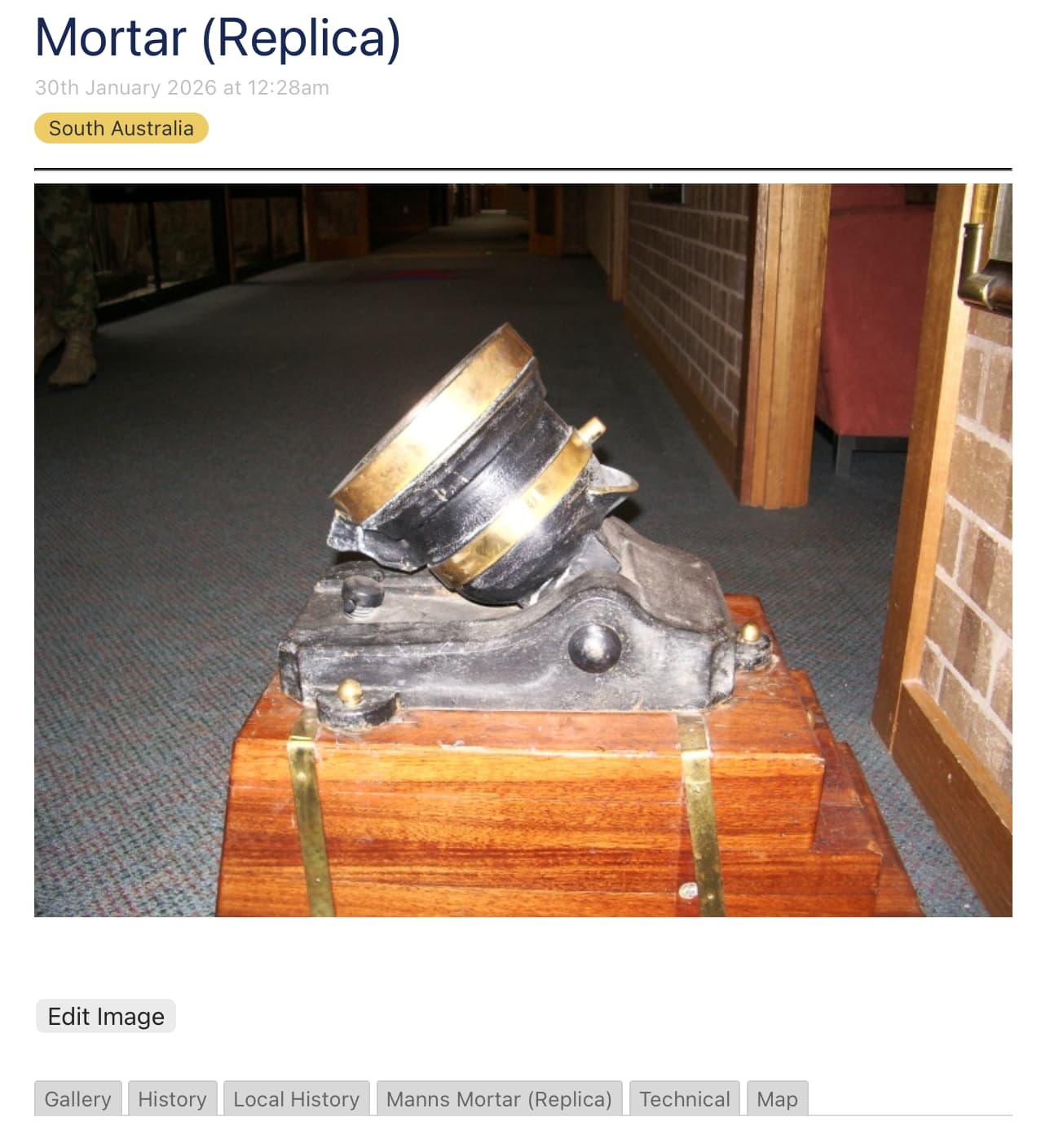
this is what I am trying to achieve, see the tab structure at the bottom

bobj

@etardiff

your suggestion worked. Thanks

bobj

1 Like

Very true. Jumping to conclusions is my very favorite sport!

Glad to hear it!

I didn’t originally read past the point at which I thought I’d found the error in your tabsList filter, but on closer examination you’ve also got an issue here:

explicitState="$:/temp/tabs" >>

Since you’re using the short-form macrocall <<tabs...>> (cf. <$macrocall $name=tabs ... /> you need to use a colon : rather than an equals sign = to define named parameters. So this would be syntactically correct:

... explicitState:"$:/temp/tabs" >>

However, if you’re using this code in a template that will be rendered across a number of different tiddlers, you may or may not want to use the same tab state for all your tab sets. If you’d like to be able to set the tab state independently on each tiddler while still providing an explicit state, I’d recommend switching to $macrocall so you can define a variable state:

<$macrocall $name=tabs
	tabsList="[parentGun{!!ID}] Map"
	template="$:/TLS/ViewTemplateGun"
	explicitState=`$:/temp/tabs/$(currentTiddler)$`
/>

Here I’m using a substituted attribute value to dynamically generate an explicitState value that includes the <<currentTiddler>> value. So for tiddler MGA123456, for instance, this would output the state tiddler $:/temp/tabs/MGA123456.

Of course, if you do want all your tiddlers to display the same tab at the same time, using the static value $:/temp/tabs in your template will do the trick!

I have been playing around with permutations of the viewtemplate code as I don’t understand @Scott_Sauyet 's statement about the initial filter.

I changed the code to the following and it also works.

<$list filter="[<currentTiddler>tag[All Guns]]" >
<$let gunID = {{!!ID}} >
<<tabs "[parentGun<gunID>] Map" template:"$:/TLS/ViewTemplateGun"  explicitState="$:/temp/tabs" >>
</$let>
</$list>

So I still don’t appreciate @Scott_Sauyet 's comment and how it affects my code.

What is the different between @Scott_Sauyet 's If…Then structure and my initial filter? Is there a performance issue cause I can’t detect one?

bobj

In your specific case, almost nothing — but we could construct a hypothetical where it would make a difference, due to the way $list works. First, some background information:

  • As you’re probably aware, the “default” value of <<currentTiddler>> is the title of the tiddler you’re currently viewing.
  • However, also by default, <<currentTiddler>> is redefined within the context of a $list (i.e. the widget’s content) to refer to each result. For instance:

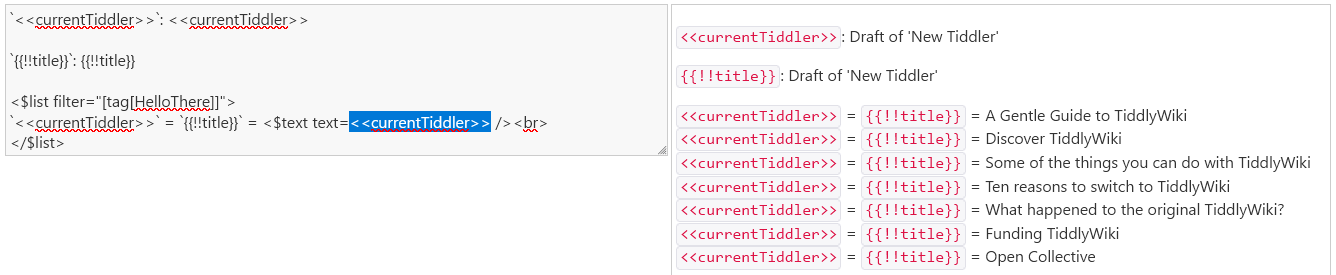
code used above
<$list filter="[tag[HelloThere]]">
`<<currentTiddler>>` = `{{!!title}}` = <$text text=<<currentTiddler>> /><br>
</$list>

Because the filter [tag[HelloThere]] produces a new list of titles, we lose the original value of <<currentTiddler>> within the context of the list.

To preserve the original value of <<currentTiddler>> within the $list content, we can use the variable attribute of $list to nominate a variable name that will be used for each result:

code used above
`<<currentTiddler>>`: <<currentTiddler>>

`{{!!title}}`: {{!!title}}

<$list filter="[tag[HelloThere]]" variable="myVar">
`<<myVar>>` = <$text text=<<myVar>> />;
`<<currentTiddler>>` = `{{!!title}}` = <$text text=<<currentTiddler>> /><br>
</$list>

The conditional shortcut syntax is a shortcut for this variable-definition step. When you type this…

<% if [<currentTiddler>tiddlertype[Landing Page]] %>
... displayed only if the above filter produces at least one result ...
<% endif %>

… behind the scenes, it’s converted to a $list widget that looks like this:

<$list filter="[<currentTiddler>tiddlertype[Landing Page]]" variable="condition" limit="1">
... displayed only if the above filter produces at least one result ...
</$list>

Since the conditional shortcut syntax always generates a $list with variable="condition", you don’t have to worry about selecting an alternate variable: the first output (see limit="1") of the filter is always available within the conditional as <<condition>>, and <<currentTiddler>> always retains its original value. So Scott’s suggestion is a good one as far as “best practice” is concerned, because a) you don’t have to worry about losing the original context of <<currentTiddler>>, and b) the <% if %> syntax makes it more visually obvious that this piece of code is being used to display content conditionally, not to iterate over a number of titles in a list.

However, as I’d nodded to in my edit above…

His suggested alternative — though very sound generally speaking — doesn’t make any material difference in this instance because of the specific filter you used: [<currentTiddler>tiddlertype[Landing Page]]

Here, the sole input is <<currentTiddler>>, and the sole operator is (field:)tiddlertype. field:.. belongs to a group of what I like to call “pass-through” operators, along with other operators like search and has. Pass-through operators don’t transform their input values in any way; they simply filter out those titles that don’t meet the specified condition. Thus, if <<currentTiddler>> has the tiddlertype field value “Landing Page”, [<currentTiddler>tiddlertype[Landing Page]] = <<currentTiddler>>… and while the $list widget redefines <<currentTiddler>>, its effective value doesn’t change.

Final takeaway: In this case, you should feel free to use either your original $list or Scott’s <% if %> equivalent. When working with more complex filters that transform their input values (e.g. get[fieldname] or split[ ] or multiply[5]), you may need to use either a $list with a named variable or an <% if ... %> construction if you will need access to the original value of <<currentTiddler>> inside a filtered segment.