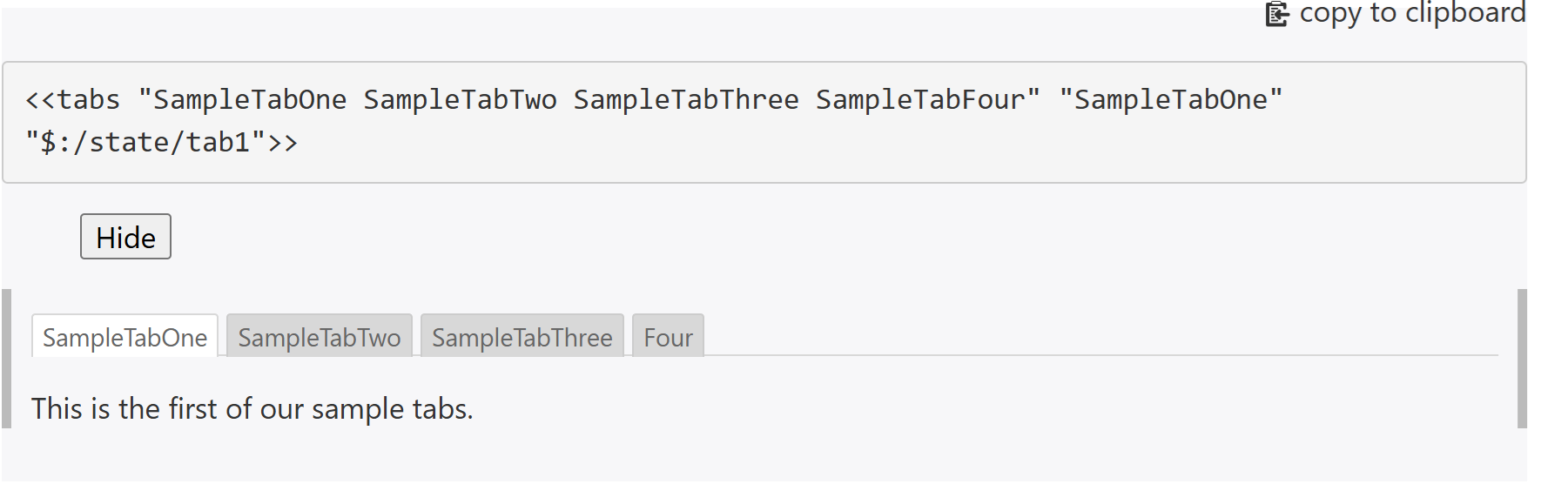
I would like to export my TW which have lots of tabs macro into static html file. However, it seems TW can only view the first tab in the generated html file.
Step to reproduce it
All tabs are shown, but cannot click/view other tabs.
Are there any solutions for this problem?
buggyj
January 24, 2025, 11:24am
2
The tabs macro uses the reveal widget which is js based. When creating static tiddlers no js is exported, so the standard tabs macro will not work.
You could write a css based tabs macro. As a starter you could try this macro and style tiddler:
macro:
\procedure csstabmacro(list)
<div class="tabs">
<div class="tab-buttons tc-tab-buttons ">
<$list filter="[enlist<list>]" variable=ind counter="count">
<%if [<count>compare:number:lt[2]] %>
<input type="radio" id=<<ind>> name=<<currentTiddler>> checked />
<%else%>
<input type="radio" id=<<ind>> name=<<currentTiddler>> />
<%endif%>
<label for=<<ind>>><$transclude tiddler=<<ind>> field=caption><<ind>></$transclude></label>
</$list>
</div>
<div class="tab-content">
<$list filter="[enlist<list>]" variable=ind>
<div>
<$transclude tiddler=<<ind>>/>
</div>
</$list>
</div>
</div>
\end
style tiddler
.tabs {
display: block;
}
.tab-buttons {
display: block;
white-space: nowrap;
}
.tab-buttons input {
display: none; /* Hide the radio buttons */
}
.tab-buttons label {
display: inline-block;
padding: 10px 20px;
cursor: pointer;
background: #ddd;
border: 1px solid #ccc;
font-size: 16px;
}
.tab-buttons label:hover {
background: #ccc;
}
.tab-content > div {
display: none;
padding: 20px;
background: #f5f5f5;
border: 1px solid #ddd;
}
/* content for the selected tab */
.tabs:has(.tab-buttons input:nth-child(1):checked ) .tab-content > div:nth-child(1),
.tabs:has(.tab-buttons input:nth-child(3):checked ) .tab-content > div:nth-child(2),
.tabs:has(.tab-buttons input:nth-child(5):checked ) .tab-content > div:nth-child(3),
.tabs:has(.tab-buttons input:nth-child(7):checked ) .tab-content > div:nth-child(4),
.tabs:has(.tab-buttons input:nth-child(9):checked ) .tab-content > div:nth-child(5),
.tabs:has(.tab-buttons input:nth-child(11):checked ) .tab-content > div:nth-child(6){
display: block;
}
/* selected tag */
.tab-buttons input:nth-child(1):checked + label,
.tab-buttons input:nth-child(3):checked + label,
.tab-buttons input:nth-child(5):checked + label,
.tab-buttons input:nth-child(7):checked + label,
.tab-buttons input:nth-child(9):checked + label,
.tab-buttons input:nth-child(11):checked + label {
background: #ccc;
font-weight: bold;
}

See also this discussion: Exemplary doc structure
Thanks It is what I want.
This is a modify version for csstabmacro to
use a filter instead a list of tiddlers
fix a bug if there are multiple tabs in the story river.
\function tabID() [<uniqueId>] [[_tab_]] [<count>] +[join[]]
\procedure csstabmacro(filter)
<$vars uniqueId=<<currentTiddler>> >
<div class="tabs">
<div class="tab-buttons tc-tab-buttons">
<$list filter=<<filter>> variable="ind" counter="count">
<$vars tabId=<<tabID>> >
<%if [<count>compare:number:lt[2]] %>
<input type="radio" id=<<tabId>> name=<<uniqueId>> checked />
<%else%>
<input type="radio" id=<<tabId>> name=<<uniqueId>> />
<%endif%>
<label for=<<tabId>>><$transclude tiddler=<<ind>> field=caption><<ind>></$transclude></label>
</$vars>
</$list>
</div>
<div class="tab-content">
<$list filter=<<filter>> variable="ind" counter="count">
<div>
<$transclude tiddler=<<ind>> />
</div>
</$list>
</div>
</div>
</$vars>
\end
Updates
Remove space in the tab unique ID
Fix css which does not show dynamic content generated by js library (e.g. leaflet map although leaflet still cannot be exported).
csstabmacro:
\function tabID() [<uniqueId>] [[_tab_]] [<count>] +[join[]]
\procedure csstabmacro(filter)
<$set name="uniqueId" filter="[<currentTiddler>search-replace:g:regexp[ ],[]]" >
<<uniqueId>>
<div class="tabs">
<div class="tab-buttons tc-tab-buttons">
<$list filter=<<filter>> variable="ind" counter="count">
<$vars tabId=<<tabID>> >
<%if [<count>compare:number:lt[2]] %>
<input type="radio" id=<<tabId>> name=<<uniqueId>> checked />
<%else%>
<input type="radio" id=<<tabId>> name=<<uniqueId>> />
<%endif%>
<label for=<<tabId>>><$transclude tiddler=<<ind>> field=caption><<ind>></$transclude></label>
</$vars>
</$list>
</div>
<div class="tab-content">
<$list filter=<<filter>> variable="ind" counter="count">
<div class="tab-panel" data-tabid=<<tabID>>>
<$transclude tiddler=<<ind>> />
</div>
</$list>
</div>
</div>
</$set>
\end
csstabstyle:
.tabs {
display: block;
position: relative; /* Ensures sticky positioning works */
min-height: 300px; /* Ensures enough height for scrolling */
}
.tab-buttons {
display: block;
white-space: nowrap;
position: sticky;
top: 0;
z-index: 100;
padding: 5px 0;
}
.tab-buttons input {
display: none; /* Hide the radio buttons */
}
.tab-buttons label {
display: inline-block;
padding: 10px 20px;
cursor: pointer;
background: #ddd;
border: 1px solid #ccc;
font-size: 16px;
border-radius: 8px 8px 0 0; /* Rounded corners on the top */
}
.tab-buttons label:hover {
background: #ccc;
}
.tab-content > div {
opacity: 0;
visibility: hidden;
height: 0;
padding: 0 20px;
background: #f5f5f5;
border: 1px solid #ddd;
border-radius: 0 0 8px 8px;
transition: opacity 0.3s ease-in-out, height 0.3s ease-in-out, padding 0.3s ease-in-out;
overflow: hidden; /* Keep overflow hidden when not active */
}
/* content for the selected tab */
.tabs:has(.tab-buttons input:nth-child(1):checked ) .tab-content > div:nth-child(1),
.tabs:has(.tab-buttons input:nth-child(3):checked ) .tab-content > div:nth-child(2),
.tabs:has(.tab-buttons input:nth-child(5):checked ) .tab-content > div:nth-child(3),
.tabs:has(.tab-buttons input:nth-child(7):checked ) .tab-content > div:nth-child(4),
.tabs:has(.tab-buttons input:nth-child(9):checked ) .tab-content > div:nth-child(5),
.tabs:has(.tab-buttons input:nth-child(11):checked ) .tab-content > div:nth-child(6){
opacity: 1;
visibility: visible;
height: auto;
padding: 20px; /* Ensure padding is correctly applied */
overflow: visible;
}
/* selected tag */
.tab-buttons input:nth-child(1):checked + label,
.tab-buttons input:nth-child(3):checked + label,
.tab-buttons input:nth-child(5):checked + label,
.tab-buttons input:nth-child(7):checked + label,
.tab-buttons input:nth-child(9):checked + label,
.tab-buttons input:nth-child(11):checked + label {
background: #ccc;
font-weight: bold;
}