Dynamically creating function/procedure/widget?

Hi,

is there an “official” way to create function/procedure/widget (for the beginning: at least their names) in a dynamic fashion?
The doc states somewhere a promising “Functions are usually defined with the Pragma: \function:” what makes me hope :wink:
But so far i wasn’t able to find a different way (e.g. a FunctionWidget?) than the pragma-approach to achieve that by TW5’s core means. Do i oversee something?

Idea: “Next level” would be the possibility to even make their content/logic “template-able”. I know this would mean to create a meta-notation “above” TW5-syntax and \define already went some steps into that direction (by it’s $- and $(-syntax). But if i understand the doc correctly, \define should go to a “deprecating branch” regarding future dev.

Thanks in advance,
Mirko

as I understand it all though functions are also variables pragmas are presently the only way to define them. I believe some flag is set to indicate this. there was talk at some point of being able to change this later but I don’t believe this has happened yet for 5.4.0

however since functions can reference variables and fields they are somewhat dynamic already. however there are ways of defining or redefining them inside transclusions, custom widgets etc.

what dynamic behaviour were you looking for. perhaps a concrete example would help

Hi @TW_Tones,

thanks for your feedback!

Regarding your example-request: the idea is to generate/register functions like execute.state4section or execute.state4selector dynamically based on the list state section in that case. The contents then could currently vary based on variables etc. (as you already explained by yourself). A real dynamic within the function’s code on a template-level would also be very much appreciated - but there is no mechanism currently i’m aware of.

Important for me is that i do not oversee a mechanic or something within TW5 core, and your feedback helped very much!

Thanks,
Mirko

1 Like

Hi @rimi

Although not really dynamic, because code was predefined, I’ve used a kind of dynamic behavior in some wikis by using the \import pragma (doc here) or the <$importvariables> widget (doc here).

Both use a parameter which is a filter, so you can trick them to import a set of procedures/functions/macros from a tiddler whose title -or titles- is based on variable content returned by the filter.

Example where the code tiddler is computed based on a field value:

\import [<currentTiddler>get[myField]addprefix[$:/me/my-code-tiddlers/]]

Then you have 2 options:

  1. each function/procedure has a standard interface (ie name+parameter set) so you already know how to use it
  2. functions/procedures define their interfaces in fields or data tiddlers that you’ll use to call them

Example of option 1:
In tiddler $:/me/my-code-tiddlers/code1 you define

\procedure btn-click(template)
<$action-createtiddler $basetitle="base1" $template=<<template>> tags="tag1"/>
\end

In tiddler $:/me/my-code-tiddlers/code2 you define

\procedure btn-click(template)
<$action-createtiddler $basetitle="base2" $template=<<template>> tags="tag2"/>
\end

And in the calling tiddler, you import one of these code tiddlers based on myField field value and you use it like this:

\import [<currentTiddler>get[myField]addprefix[$:/me/my-code-tiddlers/]]

<$button actions="""<$transclude $variable="btn-click" template={{!!myTemplate}}/>""">New tiddler</$button>

Example of option 2:
In tiddler $:/me/my-code-tiddlers/code1 you define

\procedure addtiddler()
<$action-createtiddler $basetitle="base1" $template="template1">> tags="tag1"/>
\end

In tiddler $:/me/my-code-tiddlers/code2 you define

\procedure deletetiddler()
<$list filter="[<todel>!is[blank]is[tiddler]]" variable=none>
<$action-deletetiddler $tiddler=<<todel>>/>
</$list>
\end

In the calling tiddler, you import one of these code tiddlers based on myField field value, and you call a procedure whose name is in action-proc-name field, like this:

\import [<currentTiddler>get[myField]addprefix[$:/me/my-code-tiddlers/]]

<$let
  todel={{{[[some filter based on context]]}}}
>
<$button actions="""<$transclude $variable={{!!action-proc-name}}/>""">Go!</$button>
</$let>

Not sure all this is clear, as those example are quite weak, but I hope you get the point anyway… :sweat_smile:

Fred

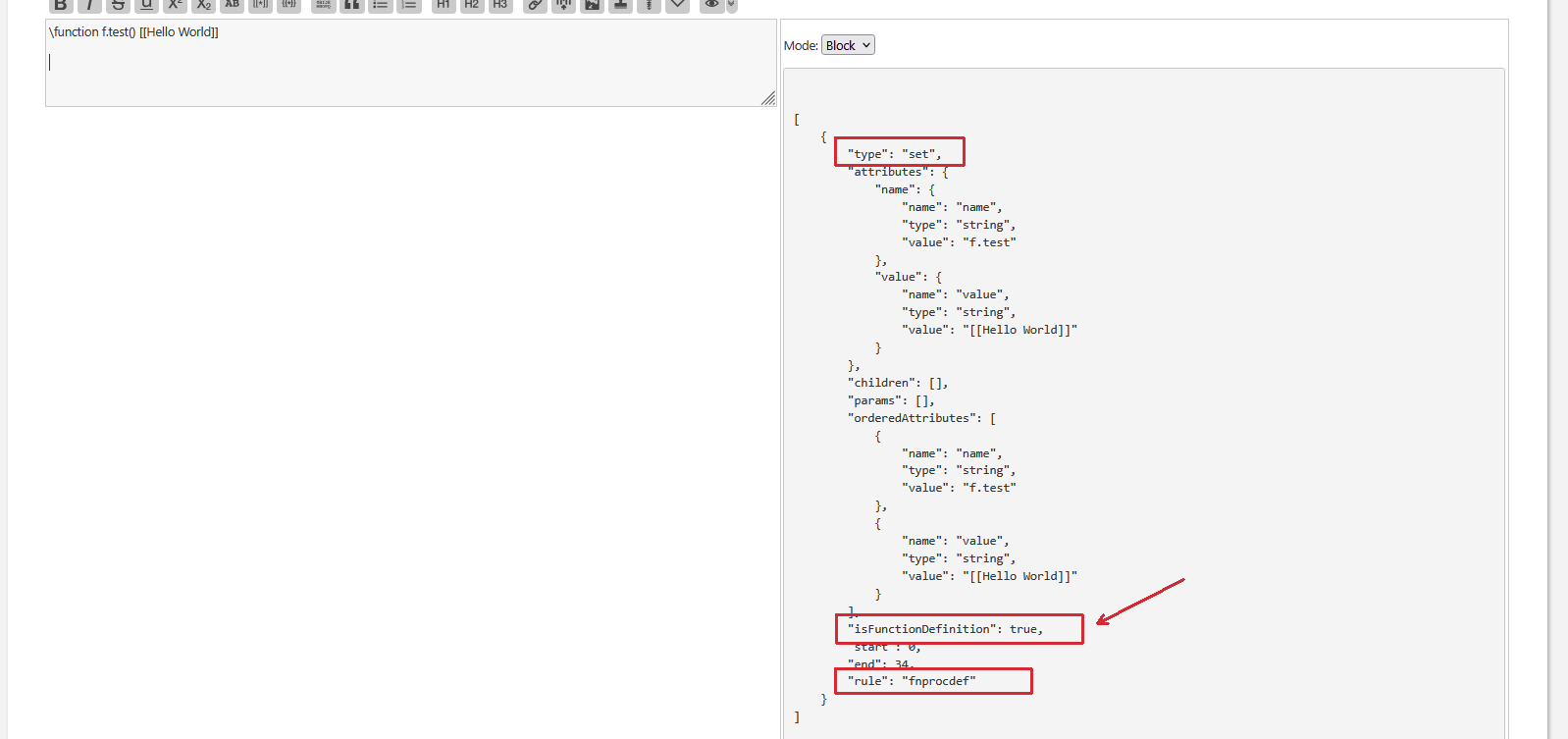
If you have a closer look about at the parse-tree of the following code, you will see, that technically it defines a set-widget with some “special sauce”.

There is a "isFunctionDefinition": true element, which is needed at the moment. I think for backwards compatibility. …

The set-widget has no mechanism to create a “real” function at the moment. As Tony wrote, there has been some discussion at GitHub, to make that happen. But there where more important improvements.

\function f.test() [[Hello World]]

You should raise an issue at GitHub, to get this discussion going. If it stays here, it will be forgotten.
-m