
Display the cascades used for a given tiddler

If, like @Springer (and @TW_Tones?) and me, you do a lot of work with cascades, you may have had the question I have semi-regularly: Which template tiddler is being used to render this one? (And how do I quickly access it to make changes?)

After going into the Control Panel one too many times just to work out the answer, it finally occurred to me that I could present this information on the tiddler itself. Here’s the template I came up with, ready for testing on TW-com or in your own wiki: Tiddler Cascade Info.tid (1.2 KB)

Raw code under the fold
tags: $:/tags/TiddlerInfo/Advanced
title: $:/emt/ui/TiddlerInfo/Advanced/CascadeInfo

\procedure cascade(label, tag)

\define cascade-filter() [{!!title}] :cascade[all[shadows+tiddlers]tag<tag>!is[draft]get[text]] +[!is[blank]]
\function get.filter() [{!!title}get[text]]
\function using.filter() [all[shadows+tiddlers]tag<tag>!is[draft]] :filter[<..currentTiddler>filter<get.filter>]

\function config() [<tag>trim:suffix[Filter]trim:suffix[Template]search-replace[tags/],[core/ui/ControlPanel/]]

<tr>
	<td><$link to=<<config>>>''<<label>>''</$link></td>
	<td><$list filter=<<cascade-filter>> emptyMessage="//none//" /></td>
	<td><$link to=<<using.filter>> /></td>
</tr>
\end

<br>''Cascade Info''

Currently using the following cascade templates:

<table>
<tr>
	<th>Cascade</th>
	<th>In use</th>
	<th>Source filter</th>
</tr>
<<cascade "Story Tiddler Template" $:/tags/StoryTiddlerTemplateFilter>>
<<cascade "View Template Title" $:/tags/ViewTemplateTitleFilter>>
<<cascade "View Template Body" $:/tags/ViewTemplateBodyFilter>>
<<cascade "Edit Template Body" $:/tags/EditTemplateBodyFilter>>
<<cascade "Tiddler Icon" $:/tags/TiddlerIconFilter>>
<<cascade "Tiddler Colour" $:/tags/TiddlerColourFilter>>
</table>

Bonus: it also works for missing or “virtual” tiddlers!

I chose to display my template as part of the “Advanced” tab in the tiddler info section…
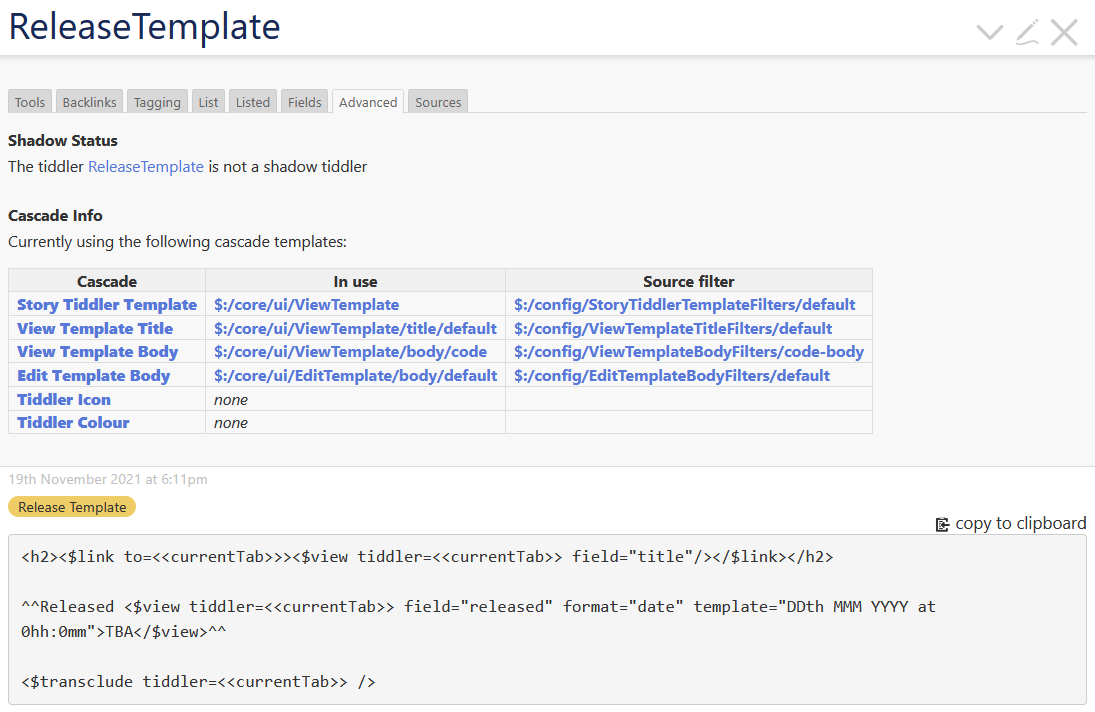
But if you’d prefer it somewhere more visible, you can replace the $:/tags/TiddlerInfo/Advanced tag — e.g., with $:/tags/ViewTemplate to make it a default ViewTemplate section — or incorporate it elsewhere (as in @TW_Tonestiddler card system?)

Please feel free to use this however you like, and let me know if you think of any clever enhancements!

6 Likes

@etardiff lovey work. Perhaps you could submit a version of this as a core enhancement? It has previously been suggested as a desirable improvement.

3 Likes

Cool!

I had been manually adding a field called in-cascade to anything template-like, because I wanted to make sure I could easily reconstruct these relations, since backlinks don’t easily read inside filters. (Maybe this is the opposite of your direction of concern, but related!)

I also started including a tiny template-link icon tucked into most of my templates. During the tinkering phase of a project they’re so handy! (EDIT: But only if the template is actually showing!)

[I’ll take a closer look at your approach! …]

FOLLOW-UP: I love that tucking all this into the info panel makes it available no matter what other weirdness has been happening with my view templates. So often, when a template isn’t showing, it takes a while to navigate to the right cascade-tag for checking / reordering. The fact that this table is packed with these links makes troubleshooting is much more friendly.

1 Like

That’s serendipitous! I’m not sure what modifications would be needed for the core (<<lingo>> macros at minimum, I imagine?), and even less sure I have time to relearn how to use GitHub right now. :sweat_smile: But I left a comment in hopes that it might be a good jumping-off point, at least. Thank you for bringing it to my attention!
1 Like
tiny fix was needed, now done

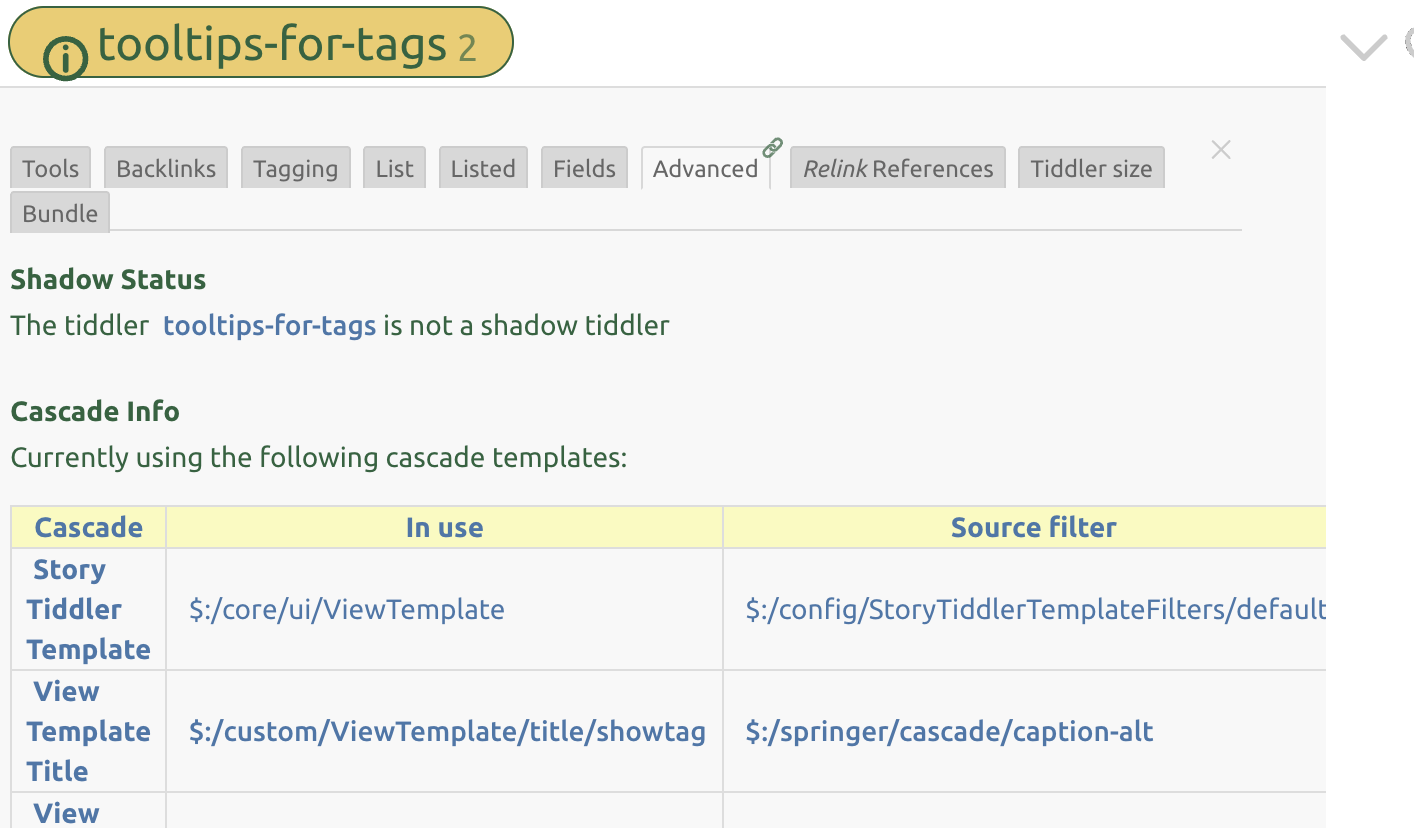
Somehow at least one cascade condition isn’t connecting properly… I’m set up to display a tag-pill in titlebar if the tiddler functions as a tag. The “in use” heading captures the tag template properly, but the source filter is missing the active filter, and instead yielding the cascade-condition that’s one further down the chain (in this case, the filter that prefers the caption if there is one)…

Interesting, I hadn’t noticed that one! I admit I haven’t yet worked out why it’s happening, but I think replacing

\function using.filter() [all[shadows+tiddlers]tag<tag>!is[draft]] :filter[<..currentTiddler>subfilter<get.filter>]

with

\function using.filter() [all[shadows+tiddlers]tag<tag>!is[draft]] :filter[<..currentTiddler>filter<get.filter>]

(that is, replacing subfilter with filter) yields the correct results. If you can confirm all looks good on your end, I’ll update my OP as well. Now updated in the .tid file and the codeblock, both in my OP here and in my GH comment. Thank you for catching that!

1 Like

That seems to clear it up!

Lovely @etardiff a great resource. I will have to put it into my TiddlyWiki Research bundle until and if it goes into the core.

I have also found the need to explore the tiddlers that are iterated as a result of these cascades such as the $:/tags/ViewTemplate tag.

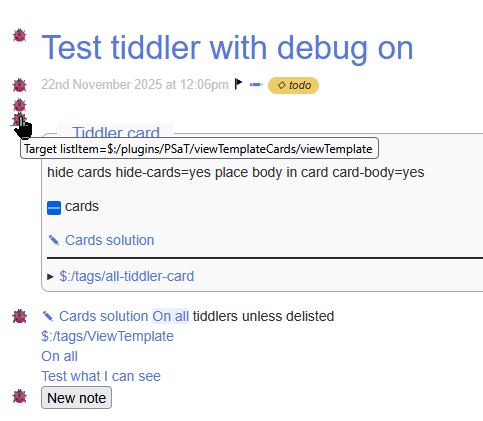
2025-11-22_12-09-02

It results in a (lady) bug floating to the left of each view template item iterated, and mouse over shows what tiddler the content is generated from, and click to open.

  • Later if a get a nice local delist of an element, that is indicate I dont want this particular item display on this tiddler only, I may allow that with a control click.
    • First I will test this inside the card mechanism

This is done with very few bytes but does need to edit a core tiddler, so in some ways it would make sense to incorporate in the core, and toggled on/off.

  • Or installed by plugin that is disabled when not in use (thus restores the core)
1 Like

Actually, I’d initially wondered about including a list of relevant $:/tags/ViewTemplate segments in the tiddler info, alongside the cascade information. As you can see, I ultimately abandoned that idea; since segments are often wrapped in conditionals to control their display, I couldn’t figure out an easy way to construct such a list without first wikifying each segment. But rendering the link inline with the segment itself is very clever! I do think it would merit its own stand-alone plugin for designers, if not a core setting that could be toggled.

Thanks for sharing your preview here! I’m sure it will be of interest to a similar group of tinkerers. :slight_smile:

1 Like

That’s the problem for which I created a little “phone home” icon within most of the custom view-templates I’ve designed (especially for virtual tiddlers, as they are all rendering conditionally, and stacked vertically in complex ways).

It’s not hard to make such a “take me to the template” icon relatively inconspicuous — and for a wiki with author and reader roles, to make it display only in author/editor mode.

For example, the “linkstyle” tiddler has a field-description at top, and other field-related overview stuff at bottom, but it’s also a tag, and also has a text field. There’s a :memo: icon that functions, in any of those places, to get me to the template. (The ladybug icon used by @TW_Tones would be cuter and more visually salient, of course!)

1 Like

I have long included in my own content a link to the template when $:/config/design-mode=yes however the one I discussed above gives me a link to “any template” item, from the core, plugins or some fancy play I did. However in this case these lady bugs are toggled off with $:/config/debug-mode=off/hide or something. And the are off almost always, except in design or research mode.

1 Like

Wow, I’m off of TW for a long weekend and come back to some amazing goodies!

Thank you for sharing, @etardiff and everyone else!

1 Like