[This has been edited since first posted to the 2 succeeding replies may refer to previous info]
Checklists are a big deal in TW so it ought to be really smooth to create them. Think bullet lists! Checklist are, after all, very similar looking to bullet lists.
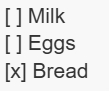
As a markdown addition to the full checkbox widget, I imagine this syntax:
[] foo
[x] bar
[] frotz
So what is supposed to happen if a checkbox is checked?
If the user then, in edit view, checks the previously unchecked item, then the string next to the checkbox - the âcheckbox promptâ - is added to a checked field in the tiddler hosting the list, i.e the current tiddler. (That field is created if it didnât exist)
âŚand, conversely, unchecking a [x] in view mode adds the checkbox prompt to an unchecked field in the hosting tiddler. (Again, that field is created if it didnât exist)
The same two checked/unchecked fields are used for all checklists in the one hosting tiddler.
If there are multiple instances of â[] fooâ, either in one checklist or spread over multiple checklists in the current tiddler, then checking one instance of âfooâ will make all those checkboxes be checked. (If both [] foo and [x] foo appears in the same edit view tiddler, then I guess the last click decides where the string is added and removed.
âŚ
How are things like bullet lists implemented in TW anyways?
Why not directly change tiddler text from [] foo to x foo?
Itâs approximately what happens in TW5-Checklist, with a slightly different syntax:
[ ] unchecked item
[x] checked item
I like it very much that, for simple checkboxes, no fields or external tiddlers are needed to store the checkbox state.
See also my answer in a recent topic here: Simple checklist macro - #36 by tw-FRed
Aha, interesting! I had not seen this before. Yeah, both that approach and my proposed store-in-a-field approach modify the current tiddler. However, my approach would also let you access and manipulate the checked titles, which is often desirable in TW, and it would allow this without adding any downside to the simplicity of this markdown checkbox approach.
âŚbut your reference gives me an idea for an improvement to the OP so Iâm updating it!
Your new proposal has several flaws as you already mentioned in the OP.
Dealing with the same text in edit mode
Syncing field and text.
Syncing problems in general are complex. As soon a field and text are involved changing the whole concept to a tiddler approach will be much simpler, since it already exists.
IMO the âbeautyâ of the checklist approach is itâs âsimplicityâ. If you need to change the state of the elements from a different view, the tiddler approach wins.
@pmario thanks for input but Iâm not sure I fully understand, could you elaborate?
Dealing with the same text in edit mode
I interpret this to refer to if [] foo appears several times, perhaps also mixed checked and unchecked. But what is âflawedâ about the proposed way to handle this? It makes full sense to me that there is one status of foo that controls if it is rendered as checked or not, with fallback to the literal edit view value if no value exists in the checked/unchecked fields. Or what is the âflawâ?
Syncing problems in general are complex. As soon a field and text are involved changing the whole concept to a tiddler approach will be much simpler, since it already exists.
Yeah, but the existing methods are not satisfactory for what Iâm after: Often times lists and checklists in TW are generated but this is not the case for the discussed types of checklists. Compare it to bullet lists; bullet lists can sometimes be generated but are often hand made. The listed items may or may not be tiddlers and the user may, or may not, want them to be tiddlers. For example a quick todo list with an entry to [] Tell Suzy about the cat - is probably less appropriate as a tiddler but it could well be a checklist entry. It is total overkill to <$checkbox etc> but that is currently what is demanded if a user wants to make this in native TW.
Hm. I think you misunderstand the OP, sorry if I was unclear: The idea is not to replace the checkboxwidget but to complement the TW system with an additional, and significantly simpler, way to create checkboxes.
We, of course, have several short form commands but sometimes theyâre insufficient, which is to be expected. Even * is more limited than <li></li>. Obviously, none of these are âregressionsâ in any way.
[Iâve added to the OP that the idea is a proposed *addition* to the current widget ]
Forget the fields. They are not needed. They only make everything extremely complicated.
There can be only 1 âsource of truthâ, which in this case is the text. [ ] or [x] â This marker contains the state.
The UI in TW5-Checklist may be to complex, but that can be configurable. The concept is done right.
The problem with the OP is, that what you describe is not simple at all. It is complex to implement. It needs to deal with text and field synchronisation problems that are not trivial to resolve.
Eg: Who wins?
The checked field?
The unchecked field?
The text?
Every user will give you a different answer depending on their preference or usecase â So letâs make it configurable â Thatâs not simple.
The new OP is even more complex, since it uses 2 different fields for that influence the same state. checked and unchecked, which creates new problems. Eg:
What if the users changes the âcheckbox promptâ in the text, but not the checked and unchecked fields?
What if a users uses the set-widget to change the checked field, but not the unchecked field.
Who changes the text representation?
Thatâs not simple.
I am 100% sure, that our users will not accept, that the same âprompt textâ triggers all checkboxes. This will be the first bug-report we will get.
The solution to deal with those problems is. Remove them
OK, my interpretation of what you write is primarily that the implementation of fields for this would be overly complex. Fair enough.
So, would a scaled down TW5-Checklist variant make sense for native TW?
I.e thisâŚ
âŚand this circled bit (the other bits are perfect for a opinionated plugins or, I guess, possibly natively via some flag or so. Never mind that now though.)
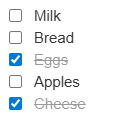
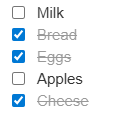
I donât know if that can be altered to make it configurable, but I agree that itâs on the right track. Allowing for [ ] / [X] to markup a checkbox which has no action outside rendering sounds perfect to me. I might insist they be preceded by a * to make it eminently clear that we mean to make a list here. While TW5-Checklist is brilliant, it is too opinionated for what Iâd want. I donât think Iâd want the add/remove affordances in View Mode, and I definitely would not want the automatic rearrangement when they are checked and unchecked. I would be very happy if this:
Iâm not even sure that I like the strikethrough and faded color for the checked ones. But that would be easy to override with simple CSS.
This would be entirely independent of the $checkbox widget, the same way our * list item markup is independent of the $list widget. Itâs just a way to easily mark up checklist items, plus a little magic to allow the check/uncheck actions to edit the source from view mode. I would even sacrifice that magic if necessary, and have a view-only checklist that has to be altered from edit mode.
I agree with most of what you write but I donât really understand this bit.
First, it actually isnât sure you want a list but maybe just one instance, just like with e.g a single bullet. IMO it should also work then. Second, that would require resolving the conflict with the regular * bullet. And third, what is not clear with the following?
[ ] milk
[ ] bread
[X] eggs
[ ] apples
[X] cheese
I agree with everything else, even if that magic bit to modify the checklist source from viewmode would be nice.
I think thatâs probably for me just a matter of familiarity. The places where Iâve seen this mark it up as a list item. One example, GitHub Flavored Markdown Spec, which uses - rather than * for a list item, but is otherwise exactly what I presented.
I donât think this is important.
But perhaps a parser could be smart enough to turn * [X] into a checkbox in a list item inside an unordered list and turn [X] into a checkbox in a paragraph.
Yes, but I would like a way to turn it off in any sort of read-only mode.
But IMO the beauty is in the âmagicâ, that elements can be checked in view-mode, without all the âEdit UIâ.
The âAdvanced Edit UIâ could be an option on a âper itemâ basis. So
Enable âNew list itemâ input
1.1 Enable âDeleteâ button.
Enable âClear allâ button
Enable âSort alphabeticallyâ
The code already exists. Only some more configuration options would need to be implemented.
There is a pending PR at the original repository, which would change the âDeleteâ button into a âComment Actionâ. So deleting would result in <!-- [ ] Bananas -->. So the bananas checkbox would not show up, but would still be in the text. (I think thatâs an interesting idea, because removing the comment markup is much less work, than writing a lot of text again. ⌠)
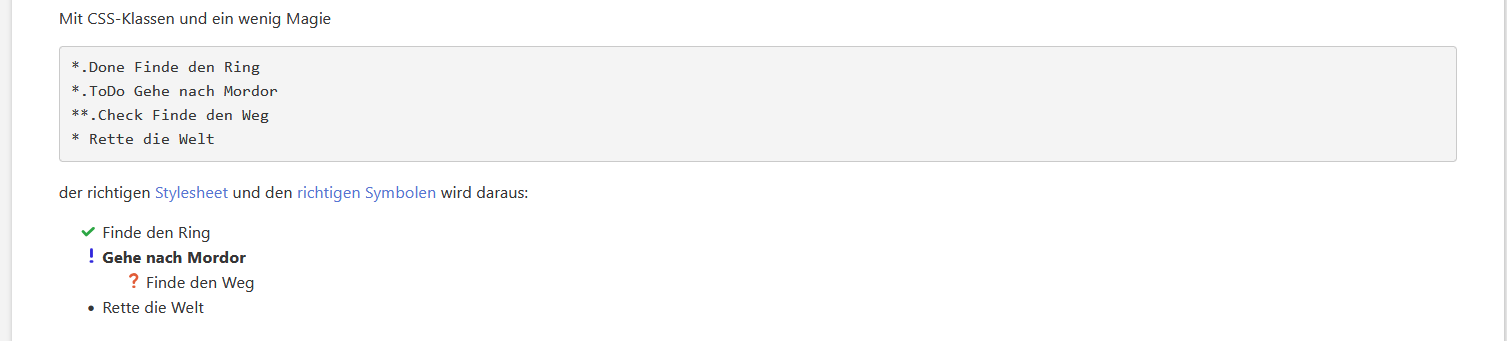
* [ ] milk
** [ ] bread
Creating indented lists is also interesting. Not sure how much more complex the code would get.
This TWClassic plugin was originally written way back in December, 2005 (!!!). Initially, it used âinline Xâ handling that modified the tiddlerâs source text to change between [_] (unchecked) and [x] (checked).
It was then extended to support using other methods of tracking the checkbox state:
[x=id] uses the TWClassic internal âconfig.options[âŚ]â javascript array. Note that if the id begins with âchkâ then the TWClassicCore would automatically track the option setting via a cookie.
[x(title|tag)] uses tiddler tags, where omitting the âtitle|â syntax ([x(tag)]) sets the tag on the current tiddler and omitting the âtagâ syntax ([x(title|)]), uses âcheckedâ as the tag value. Omitting both ([x()]) sets the âcheckedâ tag on the current tiddler.
[_(tiddler@field)] to use tiddler fields. Similar to the tagging syntax, omitting the âtiddlerâ title ([x(field@)]) sets a field with a value of true or false in the current tiddler and omitting the field name ([x(@tiddler)]) uses âcheckedâ as the field name. Omitting both ([x(@)]) sets the âcheckedâ field on the current tiddler.
I have a hard time letting go of my years of Markdown work, where a top-goal was source-level readability. To my eyes, either of these two syntaxes more clearly describes a checklist than the above:
* [X] milk
* [ ] bread
or
[X] milk
[ ] bread
This is not nearly as important in TW, where source and rendering are just a click apart. But knowing that intellectually is not the same as feeling it. I still absolutely prefer those versions.
By âitemâ, do you mean one contiguous block of checklist items?
That sounds like a wonderful idea, but Iâm struggling with determining a UI that lets you know its there to be restored.
Another idea would be a editor toolbar button that cycles between three states: my text, * [ ] my text, and * [X] my text. Do we have editor toolbars that cycle between more than two states?
If I wrote that, it was by accident! But it definitely is an interesting concept. The trouble is then Iâd want to consider more complex behavior, where checking/unchecking a parent check/unchecks all its children, and there might be an intermediate half-checked state for those items that have a mixture of checked and unchecked children. Iâve written that before, and it was reasonably complex, although doable. But I really donât think we want to go down that road.
⌠and therefore probably not worth it. This is nice to have. Itâs not critical.
Thatâs fascinating stuff! For our purposes now, we have the $checkbox widget for anything more complex than display and toggle. I would hope this could remain simple.
While definitely interesting, I think this is a step away from some the âreadability over formattingâ principle for markdown. Also, I think these âshortformsâ should have as highest priorities: âeffortless to remember and to typeâ. IMO, [] and [x] are so far the clearest suggestions. (Maybe [] and [ ] could be synonyms - the former is of course smoother to type quickly (imagine a 20 items list!) and the latter has smilar width as when checked.)
If that is to be done, then maybe a similar tactic to what we use for tables could be used, i.e various âflagsâ to signify e.g h(eader) and f(ooter).
..but for a checkbox list it wouldnât concern ârowsâ but instead, as you indicate, more be a matter of adding âsurrounding functionalityâ (- âclear allâ, âsortâ, etc). So it could maybe be invoked with keywords, something like:
I think I would too. Having check/uncheck items in view mode, but add/remove items in edit mode, feels like the right demarkation to me (though if I got into using checklists heavily, I may change my mind)