Happy New Year! To celebrate the start of 2026, I built a Bingo Card generator (demo) inspired from this website: https://bingocardsfree.com
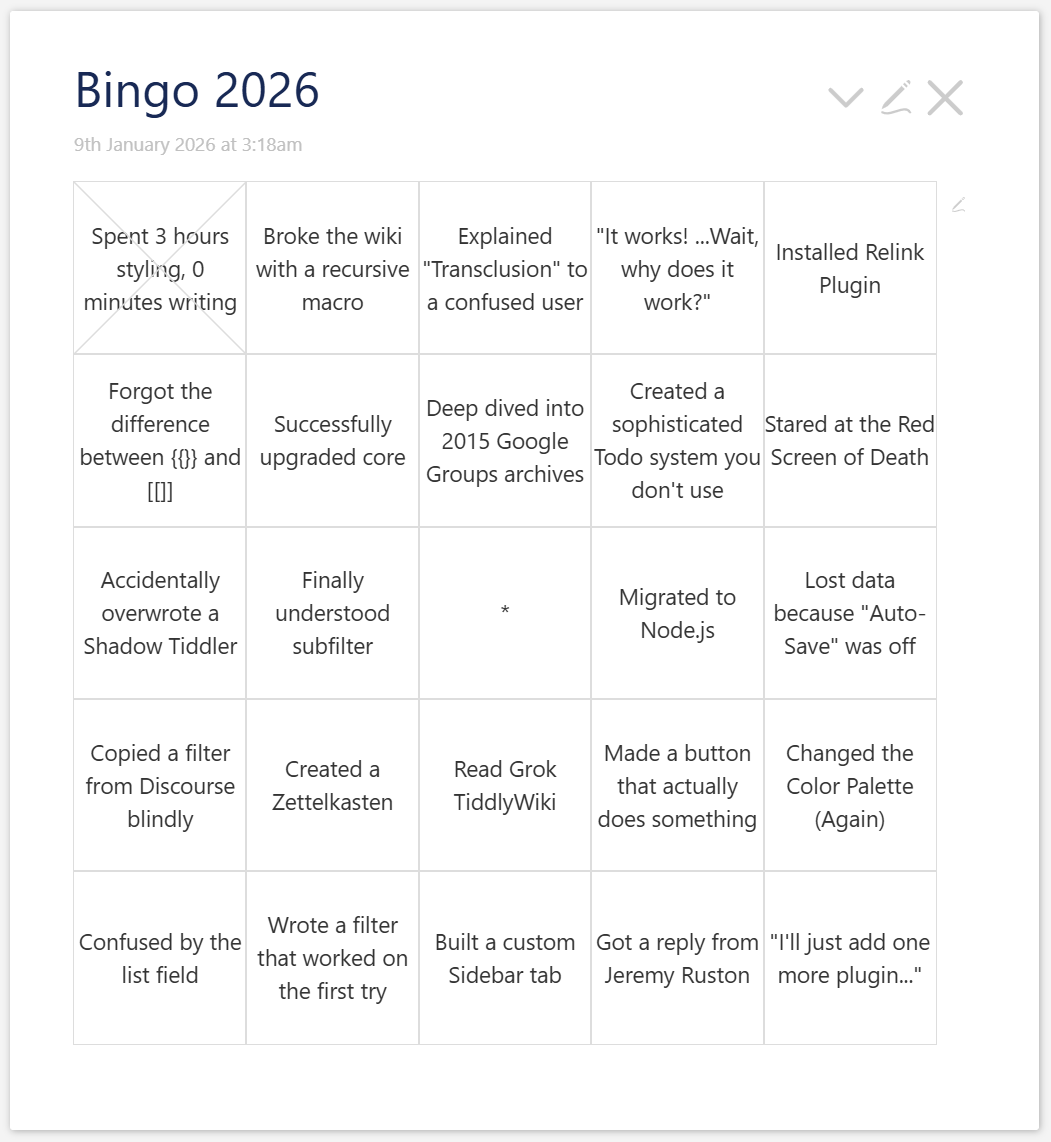
It will automatically calculates the grid size based on your list of items. If the math works out (odd grid size + spare room), it inserts a “Free Space” in the center. Click a cell to cross it off:
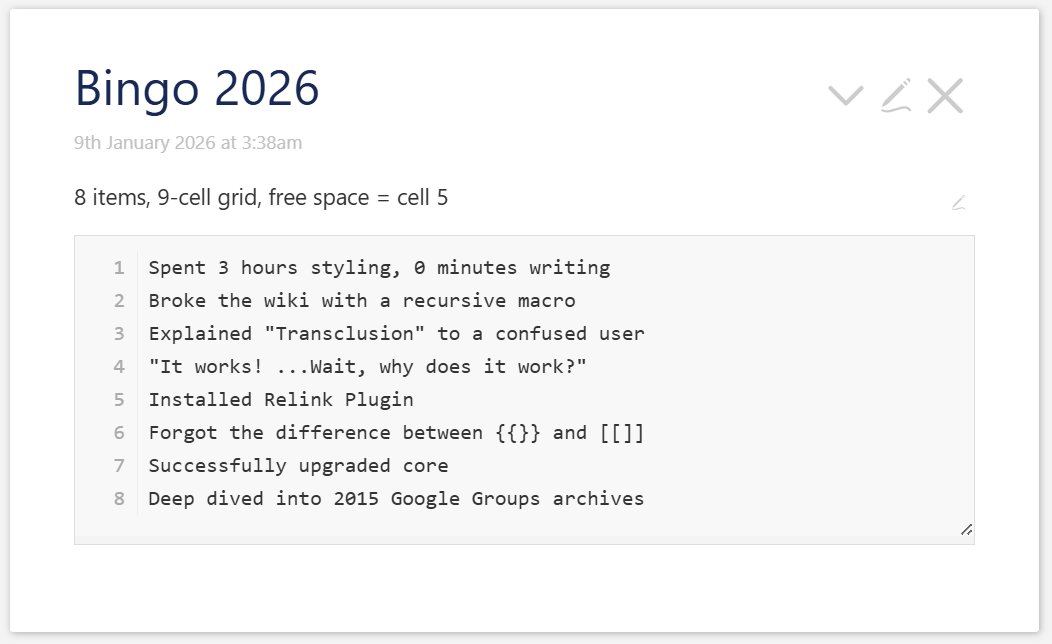
Click the edit button  to toggle a text area and paste your list:
To add it to your wiki, copy-paste the wikitext bellow in a new tiddler, or drag-and-drop the “Bingo 2026” tiddler from the demo link above into your wiki.
Enjoy 
\function get.items(tiddler, field)
[<tiddler>get<field>splitregexp[\n]!is[blank]trim[]]
\end

\function get.all.lines(tiddler, field)
[<tiddler>get<field>splitregexp[\n]]
\end

\function count.items(tiddler, field)
[function[get.items],<tiddler>,<field>count[]]
\end

\function grid.dim(item_count)
[<item_count>power[0.5]ceil[]]
\end

\function total.cells(item_count)
[function[grid.dim],<item_count>power[2]]
\end

\function center.index(cell_count)
[<cell_count>remainder[2]match[1]then<cell_count>add[1]divide[2]]
\end

\function show.star(cell_count, item_count, center_index)
[<cell_count>subtract<item_count>!match[0]]
:filter[<center_index>!is[blank]]
:map[then[yes]else[no]]
\end

\function get.adjusted.index(cell_index, center_index, show_star)
[<show_star>!match[yes]then<cell_index>]
:else[<cell_index>match<center_index>then[free]]
:else[<cell_index>compare:number:gt<center_index>then<cell_index>subtract[1]else<cell_index>]
\end

\function get.display.text(tiddler, field, adjusted_index)
[<adjusted_index>match[free]then[*]]
:else[function[get.items],<tiddler>,<field>nth<adjusted_index>]
\end

<$let
    targetTiddler=<<storyTiddler>>
    targetField="bingo-list"
>

<$checkbox tiddler=`$:/temp/$(thisTiddler)$` field="editing-bingo-list" checked="true" unchecked="false" class="tc-cbx-invisible tc-tiddler-controls"><span title="Edit bingo list"><button class="tc-btn-invisible" style="pointer-events:none">
{{$:/core/images/edit-button}}</button></span>
</$checkbox>


<%if [[$:/temp/$(thisTiddler)$]substitute[]get[editing-bingo-list]] :else[[false]] +[match[true]]%>
<$let
    itemCount={{{ [function[count.items],<targetTiddler>,<targetField>] }}}
    cellCount={{{ [function[total.cells],<itemCount>] }}}
    sideCount={{{ [<cellCount>power[.5]] }}}
    centerIndex={{{ [function[center.index],<cellCount>] }}}
    showStar={{{ [function[show.star],<cellCount>,<itemCount>,<centerIndex>] }}}
>

<<itemCount>> items, <<cellCount>>-cell grid<%if [<showStar>match[yes]] %>, free space = cell <<centerIndex>><%endif%>

</$let>

<div class="bingo-editor-wrapper">
    <ol class="bingo-line-numbers">
        <$list filter="[function[get.all.lines],<targetTiddler>,<targetField>]">
            <li></li>
        </$list>
    </ol>

    <$edit field="bingo-list" tag="textarea" class="tc-edit-texteditor bingo-textarea" wrap="off"/>
</div>

<%endif%>

<$let
    itemCount={{{ [function[count.items],<targetTiddler>,<targetField>] }}}
    cellCount={{{ [function[total.cells],<itemCount>] }}}
    sideCount={{{ [<cellCount>power[.5]] }}}
    centerIndex={{{ [function[center.index],<cellCount>] }}}
    showStar={{{ [function[show.star],<cellCount>,<itemCount>,<centerIndex>] }}}
>

<%if [[$:/temp/$(thisTiddler)$]substitute[]get[editing-bingo-list]] :else[[false]] +[!match[true]]%>

<ul class="bingo" style=`--sideCount:$(sideCount)$`>
<$list filter="[range<cellCount>]" variable="currentCell">
<$let
    adjustedIndex={{{ [function[get.adjusted.index],<currentCell>,<centerIndex>,<showStar>] }}}
    displayText={{{ [function[get.display.text],<targetTiddler>,<targetField>,<adjustedIndex>] }}}
>
    <li>
        <%if [<displayText>!is[blank]] %>
            <%if [<adjustedIndex>!match[free]] %>
                <$checkbox class="tc-cbx-invisible" listField="items-done" checked=<<displayText>>>
                    <$text text=<<displayText>> />
                </$checkbox>
            <%else%>
                <span aria-label="Free Space">
                   <$text text=<<displayText>> />
                </span>
            <%endif%>
        <%endif%>
    </li>
</$let>
</$list>
</ul>

<%endif%>

$$$text/vnd.tiddlywiki
\rules only filteredtranscludeinline transcludeinline macrodef macrocallinline html

<style>
/* --- EDITOR STYLES --- */
.bingo-editor-wrapper {
    position: relative;
    --line-height: 22px;
    --font-size: 14px;
    --vertical-padding: 10px;
    margin-top: 1em;
    border: 1px solid #ddd;
    background: #f4f4f4; /* Subtle background for numbers area */
}

.bingo-textarea {
    width: 100%;
    min-height: 200px;
    resize: vertical;
    border: none !important;
    box-shadow: none !important;

    /* Force Alignment */
    font-family: monospace !important;
    font-size: var(--font-size) !important;
    line-height: var(--line-height) !important;
    white-space: pre !important; /* Prevents wrapping breaking alignment */
    overflow-x: auto !important;

    /* Padding */
    padding-top: var(--vertical-padding) !important;
    padding-bottom: var(--vertical-padding) !important;
    padding-left: 3.5em !important;
    margin: 0 !important;
    background: white; /* Keep text area white */
}

.bingo-line-numbers {
    position: absolute;
    top: var(--vertical-padding);
    left: 0;
    width: 3em;
    margin: 0;
    padding: 0;
    text-align: right;
    pointer-events: none;
    color: #aaa;
    border-right: 1px solid #eee;

    /* Match textarea metrics */
    font-family: monospace !important;
    font-size: var(--font-size) !important;
    line-height: var(--line-height) !important;

    counter-reset: line;
    list-style: none;
    z-index: 2;
}

.bingo-line-numbers li {
    height: var(--line-height);
    line-height: var(--line-height);
    box-sizing: border-box;
    padding-right: 8px;
}

.bingo-line-numbers li::before {
    counter-increment: line;
    content: counter(line);
}

/* --- GRID STYLES --- */
ul.bingo {
    list-style: none;
    padding: 0;
    margin-inline: auto;

    display: grid;
    aspect-ratio: 1;
    grid-template-columns: repeat(var(--sideCount), 1fr);
    grid-template-rows: repeat(var(--sideCount), 1fr);
    gap: 0;

    li {
        outline:solid 1px <<color table-border>>;
        outline-offset: -.5px;
        padding: 0;
        display: grid;
        align-items: center;
        text-align: center;

        &:has(:focus-visible) {
            outline: solid highlight 1px;
            z-index: 1;
        }

        label {
            display: grid;
            width: 100%;
            height: 100%;
            justify-content: center;
            align-content: center;

            &.tc-checkbox-checked {
                user-select: none;
                position: relative;

                &:after {
                    content: "";
                    position: absolute;
                    inset: -.5px;
                    mask-image: <$text text="""url("data:image/svg+xml;utf8,<svg xmlns='http://www.w3.org/2000/svg' viewBox='0 0 100 100' preserveAspectRatio='none'><path d='M0 0 L100 100' stroke='black' stroke-width='1' vector-effect='non-scaling-stroke'/><path d='M100 0 L0 100' stroke='black' stroke-width='1' vector-effect='non-scaling-stroke'/></svg>")"""/>;
                    background-color: <<color table-border>>;
                    background-repeat: no-repeat;
                    background-position: center center;
                    background-size: 100% 100%, auto;
                }
            }
        }
    }
}

.tc-cbx-invisible {
    cursor: pointer;
    input {
        clip: rect(0 0 0 0);
        clip-path: inset(50%);
        height: 1px;
        overflow: hidden;
        position: absolute;
        white-space: nowrap;
        width: 1px;
    }
}
</style>
$$$
</$let>
Edit: Added numbered rows and info on the bingo grid while in edit mode