I need your help and advice. I run a tea house / cafe and English school in rural Japan.
I wondered if I could use TiddlyWiki as a way to keep track of the orders and the prices. Because it has a created time stamp. Could I maybe create a new tiddler for every order? Then to speed things up, I simply have tags for all my items (there aren’t many) and the tags would include the prices: Example 1 cup of coffee: 200 yen. If a customer ordered 2 cups, I’d have another tag for that. And other tags for other items. Even tags for the age group of the customers, perhaps. And also a tag for “paid” so that I know the order is not active.
Then, if a customer asks for a receipt, I could export the tiddler to HTML and have it printed out or if it’s a regular customer, I could email it. (without the age group thing, of course).
What do you think. When tax time comes (April, here), I won’t be missing information.
And I could also keep track of purchases and inventory. Although, I haven’t thought of a way to do that. Have any of you tried something like this?
I have to agree with @buggyj that this is likely not the best idea. The dedicated tools for this are a better bet. You might search for “point of sale” systems. There are plenty of sites that will give you best-of comparisons.
But it is still fun to imagine how we might do this in TiddlyWiki!
I don’t think tags on an order would do. Imagine a group of five that comes in and spends some time, consuming seven teas, three coffees, two bottled waters and one fruit juice along with four scones, three muffins, and five pastries. How could you use tags to capture this?
Instead, I would expect an Order to consist chiefly of a collection of Line items. Each of these would hold an Item, a quantity, a unit price. The Order would also connect to payments. It’s easy enough to imagine a UI for this.
I fiddled with this design in my SQL Playground. Open up any of the Order tiddlers, say #110, to see it on action.
TiddlyWiki is just a data container just like anything else (a plain text file, a database etc), hence I perceive your question more about generally preserving the history of changes. For this you make abstraction of TiddlyWiki and focus on
Version control
Backups
If you want to use TiddlyWiki because you feel like you are fluent enough to solve your use case, there’s nothing wrong about using it.
My only concern about versioning the changes in TiddlyWiki would be if single HTML encrypted wikis are involved. Diffs of those would not be view friendly.
That tiddler is tagged with every type of item that is part of the order.
Each type of item in the order dynamically adjusts the order form (i.e. a custom interface for an order that fits the types of items ordered.)
Each type of item related to an order has a dedicated tiddler. The tiddler for a type of item has fields related to the purchase of such an item. The fields depend on the type of item: count and unit price for some types of items; weight and cost per weight unit for some other types of items, etc.
Something like that. Fun for discussion, but I wouldn’t use a TiddlyWiki for anything that involves legal requirements (for tax or other purposes).
Good link, Scott. Thank you. As to your question: A group comes in and orders 7 teas (I wish!!) I would have a tag for that: 7 teas 2100 yen. Waiting for Eric or Mohammed (God bless him) to tell us how to add the numbers in tags…
The POS (point of sale) software looks tempting in that they are comprehensive. I’m looking into that.
Have you ever been an employee? I certainly have. Hated it. But whenever they tried to show me some “application”, I would… Well let’s just say I walked out. Me, ipad… doesn’t work.
I have an opportunity here to do something. I may or may not have said this, but T-A-L (my tea house) is a TiddlyWiki project. It’s a real shop. If you find yourselves in Japan, I want to have you guys come and give a talk sometime.
I guess so long as you’re not trying to predefine these tags but generate them dynamically, this might work. I think it would be awkward, though. When you have an order with a party of three tagged 3 teas, ¥900, and they order another round, you cannot simply add another 3 teas, ¥900 tag, as you can’t have duplicate tags. You would presumably have to remove the first tag and add a 6 teas, ¥1800 one. I do think a LineItem implementation would be more resilient, and easier to write and maintain.
If you’re dynamically generating them, then this isn’t an issue, since tags can be (almost?) any string.
I have seen some of your earlier posts about this, and find it very exciting. If you do really want to use TW as your cash register, I wish you well, and will try to help when and if I can. But I still believe POS software is likely a better bet.
I see. Multiple tiddlers might do. As you said: group orders something: one tiddler. Another round: another tiddler. Tiddlers would have “customer” tag: 202601-280026.
Please explain the lineItem and how it might be expressed in a tiddler.
The other answer to this question is yes, because it’s all about your situation, time and preferences. Primarily if you are also comparing it to other very low tech solutions like a spreadsheet application, or paper solutions. - and how advanced your business is.
There are one or two free of cost open source point of sale systems, and you would need to try installing them and testing them out to see if they are too technical or too complex for your needs.
These systems might have various other features built in that TiddlyWiki will not have, like idk connectivity and database import/export pdf and form printing features, product classification, ready-made tables and forms.
A TiddlyWiki system would require that you learn it and invest a lot of time to be able to create your own forms and interfaces to create these systems you describe, but it would be very possible.
You would want to keep duplicates and backups of TiddlyWikis which is a very easy thing to do.and it could be portable on a USB if you wanted to obviously. TiddlyWiki has an encryption ability.
You don’t have to pay an IT person or consultant to manage your TiddlyWiki system, but you might have some kind of payment plan or technical database issues with a point of sale application. There is something to be said for simplicity vs a point of sale application if that’s how a comparison ends up.
Cost and having it fully customized to your exact needs would be a driver to using TiddlyWiki, but it would require you 6 or so months to a year of regular time to learn how to build the system yourself in addition to your business time, or during your business time.
Another answer is that TiddlyWiki is not especially ready to go for number forms and tables - not nearly as much as might think for the general concept of TiddlyWiki being so well suited for that type of thing.
The things it seems you want are:
Number calculations
Input Forms
Display Forms
Classifications
Most anything is possible with numbers in TiddlyWiki, but it’s still nowhere near the conveniences of spreadsheets for number calculations and tables. Spreadsheets can sort of accomplish forms with some effort, but not like TiddlyWiki’s custom web css and infinite possibilities with tags and fields and stuff.
You can use an application like LibreOffice Base which is a very generic tool for local databases and forms, but that can also require a lot of time and customization of tools, still something like 3 to 8 months of steady time investment. The forms will not be fully customized like you could do with TiddlyWiki. The databases can be a little awkward to work with compared to office documents and text files. Classifications can be accomplished through database table fields.
It’s a very similar idea to the first paragraph I quoted above. Those tiddlers with the customer tag are similar to what I’m calling LineItems.
SQL Playground
My SQL Playground has a collection of LineItems for each Order. Note that the Order/Invoice concept in that document is not an exact match to your Cash Register one, but it’s reasonably close. You can see the basic idea by examining these tiddlers.
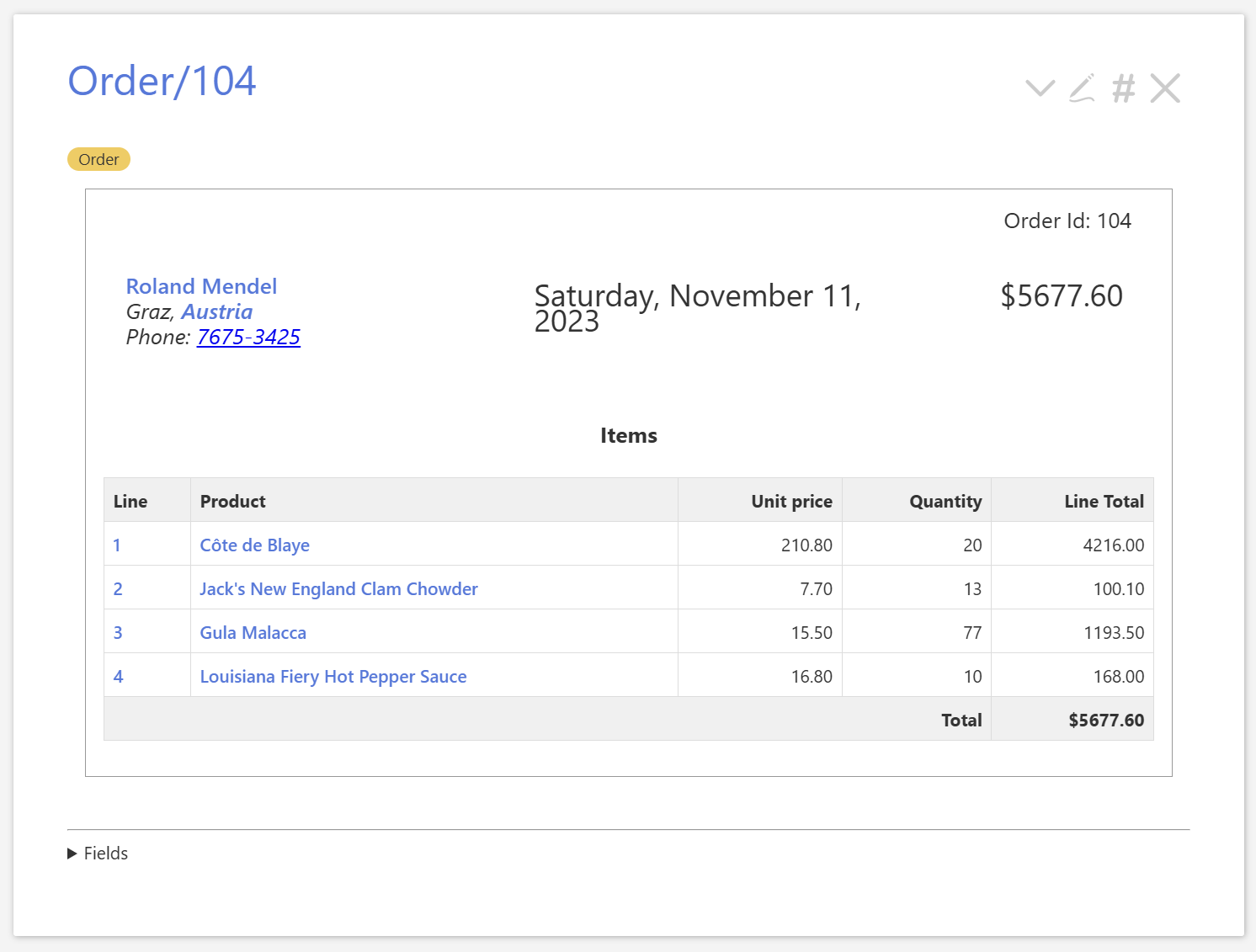
This represents an Order or Invoice: details of who purchased it (quite possibly you wouldn’t have this), a list of the items purchased and their quantities, as well as the date of the order and the total amount. It looks like this:
But if you edit the tiddler, you will see only these fields:
title: Order/104
tags: Order
customer-id: 20
order-date: 20121111120000000
total-amount: 5677.60
(plus a caption and an order-number which are no longer relevant.)
If it seems to you that this is not a lot of data to show the invoices, you’re correct. The rest of the data is scattered across the wiki in data stored in other tiddlers, under other tags. That is the point. SQL has a similar notion to TW’s Philosophy of Tiddlers, where it goes by the term normalization. The idea is to have atomic entities and make any composite items simply pull in the atomic ones as needed. One field here actually disregards that notion: because total-amount is derivable from the OrderItem data discussed below, it is what might be considered denormalized, and sometimes frowned on by SQL purists. I would consider removing this field, except that it is in the sample database I’m trying to emulate.
In essence, we look for the Customer tiddler whose id that matches the current Order's customer-id field, and then transclude the CustomerCard template for that tiddler. We’ll look at the rest of the Order template below, but first…
represents a customer in the database, one who we might send invoices to. Here is the data in the current one:
title: Customer/20
tags: Customer
id: 20
caption: Roland Mendel
city: Graz
country: Austria
first-name: Roland
last-name: Mendel
phone: 7675-3425
While TW uses the title for a primary id, we do a little duplication here in the id field, which will be easier to use for some things.
There is a template to display a Customer Tiddler, which we won’t look at. There is another one to display just the Customer contact info, which is used in both the Customer tiddler template, and in the Order tiddler template.
Country Virtual Tiddlers
We won’t discuss how Countries are displayed, but you can search these forums for “Virtual Tiddlers” to get the basic idea.
OrderItems are extremely simple. (These are what I’ve been calling “LineItems” in the discussion, as that is the most common industry term, I believe.) In our Order above, we have four of them – the numbered rows in the table.
We arbitrarily focus on the second row. The tiddler for this one one looks like:
For that last, note that prices might change over time, so we can’t depend on the unit price of the product itself to detail this order. Thus it ends up in the OrderItem.
Now, if we look again at the Order template, the larger block looks like this:
We define a variable holding the id of our Order, and then list all OrderItems whose order-id field matches that id. These then are converted into table rows.
For completeness, we can also look at the Product definition. It looks like this:
title: Product/41
tags: Product
caption:Jack's New England Clam Chowder
id: 41
is-discontinued: no
package: 12 - 12 oz cans
product-name: Jack's New England Clam Chowder
supplier-id: 19
unit-price: 9.65
Neither the Product nor the Supplier are central to this discussion, but together with the above, they define every bit of data used in these records.
title: Supplier/19
caption: New England Seafood Cannery
id: 19
city: Boston
company-name: New England Seafood Cannery
contact-name: Robb Merchant
country: USA
fax: (617) 555-3389
phone: (617) 555-3267
Summary
This SQL Playground is chiefly an attempt to demonstrate how to emulate a number of ideas from SQL inside TiddlyWiki. Many of these ideas are not touched on in the above, but one key idea is central: that of normalizing our data. Here that is expressed especially in our tiddlers tagged Order and OrderLine. The Order, as we saw has only a few fields. The OrderLine ones have more, but they serve mostly to link Orders with Products being ordered, with only the additional information necessary to make things work.
Note that the OrderLine does not include the Product description, just its id. If we found a typo in that description, we would change it in the one place, and all Orders would immediately be fixed. Similarly, the Order carries the date/time information. The OrderLines don’t need to include it. So if we found that the date was wrong, we don’t need to chase after all the OrderLines to fix it, and wonder if we might have missed one. This is data normalization. It is a good practice, to my mind, for nearly any data-heavy wiki.
Cash Register
But of course, and Invoicing system is not a Cash Register. The ideas here are broadly applicable, but your needs are not identical.
For a cash register, you might have a slightly different idea of line items. In the above, there would never be a need to have multiple OrderLines in an Order with the same Product. But it might be simpler for you to allow an order to look like:
Product
Quantity
Price per item
Line total
Tea
3
300
900
Coffee
1
300
300
Scone
2
500
1000
Pastry
2
600
1200
Tea
3
300
900
Coffee
1
300
300
Total
4800
Note that there are multiple lines for Tea and for Coffee; everyone had a second round. This would more simply mimic the sorts of orders that might go on an order-taker’s paper pad. It’s not a fundamental difference, but it is a bit different from the Invoices above.
You also might not have a notion of Customer similar to the above. You’re not shipping things, and don’t need customer name and address information.
And there are surely other minor differences.
But there is one critical difference. The SQL Playground is (for now) only about static data. While I hope to change that one day, for now, there are no entry forms. None at all. Clearly, for your cash register, this will be central. I have only spent a little time thinking about how these would work, but presumably you would have a UI that lets you create an order (or whatever term you use), add, remove, and modify line items included in the order, cash out the order, probably print a receipt. You would presumably also be able to print daily and other reports about the orders.
Finally
While this is fun to think about, and I would love to see you manage this, my recommendation is still to use one of the point-of-sale systems. If you will get joy in trying to create this in TiddlyWiki, more power to you, but don’t be surprised by the number of minor things that you will have to consider that are already built into these general-purpose tools.