{{!!publisher}} ({{!!publisher-abbrev}}) //{{!!docname}}//
<$list filter="[<currentTiddler>has[hearafter]]">
(hereafter referred to as {{!!hereafter}})
</$list>
({{!!publisher-abbrev}}, {{!!year}})
{{!!publisher}} ({{!!publisher-abbrev}}) //{{!!docname}}//
<%if [<currentTiddler>has[hearafter]] %>
(hereafter referred to as {{!!hereafter}})
<%endif%>
({{!!publisher-abbrev}}, {{!!year}})
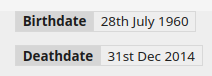
I have a similar setup, however I’m wanting to expose multiple fields and display them in a single table. However in both those syntaxes (I’ve just switched from the <$list to the <%if version as it seems more logical for me to read) I get one table (with one line) per item. How would I join them into a single table, ensuring each line only shows if it exists and without relying on any other field existing (as would be the case if I nest the blocks)
<%if [<currentTiddler>has[birthdate]] %>
<!-- above line must be blank so the below line is interpreted as wikitext -->
|! Birthdate| {{!!birthdate}} |
<%endif%>
<%if [<currentTiddler>has[deathdate]] %>
|! Deathdate| {{!!deathdate}} |
<%endif%>
Wikitext table formatting (using “|”) is somewhat limited in that it only works when formatting static tables where every specified row is unconditionally rendered. Thus, you could write:
However, for your use-case (where you want to conditionally display a given row only when there actually is a value to show) this cannot be achieved using wikitext table formatting. To get the rendered results you want, you will need to fallback to using HTML table syntax instead. Something like this:
I use a lot of conditionally-rendered content, and I’ve found it convenient to define some procedures to make this sort of repetitive construction a little neater. For instance, to build on Eric’s answer, I might do something like this: