Conditional Filtering

I have this dynamic table set up, but I cannot figure out how to incorporate a certain variable in the filter. I have one tiddler that has a field ‘PMI’ and it has ‘x’ in it. How do I have it show up in the list if it fits all the other criteria AND the user selects Yes in the PMI dropdown, but not show up if the user selects No?

Program: <$select tiddler="$:/state/myProgramInput" field="text">
            <option value="Fixed">Fixed</option>
            <option value="ARM">ARM</option>
            <option value="HELOC">HELOC</option>
            <option value="Construction">Construction</option>
        </$select>
Package: <$select tiddler="$:/state/myPackageInput" field="text">
            <option value="Prequal">Prequal</option>
            <option value="Initial">Initial</option>
            <option value="Redisclosure">Redisclosure</option>
            <option value="Pre-Closing">Pre-Closing</option>
        </$select>
PMI: <$select tiddler="$:/state/myPMIInput" field="text">
            <option value="x">Yes</option>
            <option value="">No</option>
        </$select>

<hr>

    <$vars ProgramInput={{$:/state/myProgramInput!!text}}>
    <$vars PackageInput={{$:/state/myPackageInput!!text}}>
    <$vars PMIInput={{$:/state/myPMIInput!!text}}>

<table>
  <thead>
    <tr>
<th> </th>
      <th>Name</th>
      <th>Code</th>
      <th>Stack</th>
    </tr>
  </thead>
  <tbody>
<$list variable=stack filter="[{StackingOrder}enlist-input[]]">
    <$list filter=" [tag[Documents]has:field<ProgramInput>has:field<PackageInput>stack<stack>] " variable="tiddler">
      <tr>
<td><$checkbox></$checkbox></td>
        <td>
          <$link to=<<tiddler>>>
            <$text text={{{ [<tiddler>] }}} />
          </$link>
<$text text={{{ [<tiddler>get[caption]] }}} />
        </td>
         <td>
            <$text text={{{ [<tiddler>get[code]] }}} />
        </td>
        <td>
            <$text text={{{ [<tiddler>get[stack]] }}} />
        </td>
      </tr>
    </$list>
</$list>
  </tbody>
</table>

    </$vars>
    </$vars>

I’ve searched the forum and the tiddlywiki site but I’m still too new at this to get it I guess :frowning:

Welcome to the talk community @mswho42! (Any relation to mswhatsit? :wink: )

I am not positive I understand your requirements, but my best guess says that this would fix it:

<$list filter="""
  [tag[Documents]has:field<ProgramInput>has:field<PackageInput>stack<stack>]
  :filter[get[PMI]match<PMIInput>]
""" variable="tiddler">

All I’m doing is adding the filter run :filter[get[PMI]match<PMIInput>] to the end of your filter expression. You’ve already done the work of converting the Yes into an x for your variable, so we can do a simple match test. (Note that the triple quotes and the spread into multiple lines is only to make the change more obvious. This would work just fine on a single line.)

Please let us know if that captures your requirements correctly. Good luck!

Second cousins, twice removed I believe? LOL :wink:

The filter run isn’t working for me, but I’m sure I didn’t explain the situation clearly enough. I created an example site: https://mswho42.tiddlyhost.com/. Tiddler ’ Worst Case Amortization Schedule’ should show up when the Program is Fixed and the Package is Initial, but only when PMI is also Yes.

Thank you for putting up the example. It almost always helps, and is worth it if it doesn’t require a huge effort.

Again, I think I get it. I would approach this with two filter runs in one expression. The first includes the Document if it does not include the PMI field. The second one includes it if has the field and its value matches your PMIInput variable:

    <$list filter=""" 
        [tag[Documents]has:field<ProgramInput>has:field<PackageInput>stack<stack>!has[PMI]] 
        [tag[Documents]has:field<ProgramInput>has:field<PackageInput>stack<stack>PMI<PMIInput>]
    """ variable="tiddler">

I added the PMI field to the “Worst Case” tiddler, with value of x, and it hides and shows as you toggle the PMI dropdown. I’m pretty sure that this captures some of the cases.

But I don’t know exactly what you want in the case the tiddler has the field PMI with a blank value. If that can’t happen, then this may not matter. Right now, it would show that document regardless of the toggle. We could change the !has[PMI] to !has:field[PMI], and then it would show depending on the state of the toggle. If neither of these behaviors is right, then we might need to fill in this chart to determine what to do:

PMI field Toggle Include?
(no field) Yes No
(no field) No No
x Yes Yes
x No No
(blank) Yes ?
(blank) No ?
(other) Yes ?
(other) No ?

The (blank) and (other) can likely be combined into other, but I’d want to be sure before making that call.

Our two cases should be mutually exclusive, but if for some reason they are not, we can add the filter run +[unique[]] to the end of the filter expression…

2 Likes

Wow, yeah it would be helpful to have the PMI field on the Worst Case tiddler wouldn’t it? :roll_eyes: That’s my bad.
Tiddlers should only have the PMI field if it’s going to have an x in it, so your code looks like it’s going to work flawlessly!! Simple and brilliant!! I can’t thank you enough!

2 Likes

Clearly, you’ve got yourself set up with html tables, framed with variables in such a way as to output dynamic content. And @Scott_Sauyet has helped out with your specific challenge.

In case it’s useful, I’ll point out that your phrase “dynamic table” always makes me think of this gold-standard tool: Shiraz dynamic tables.

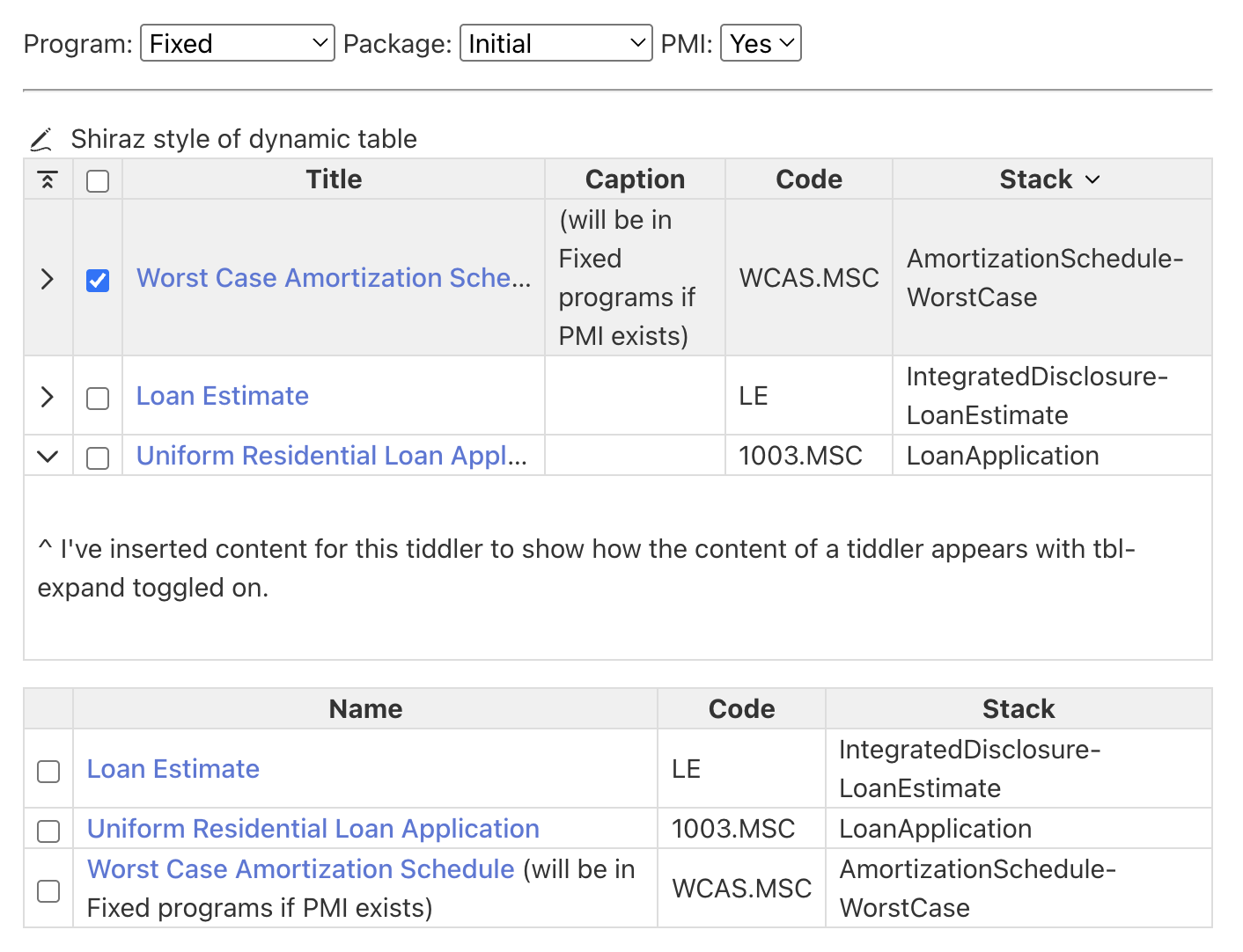
In case you’re interested, the dynamic tables in Shiraz plugin allow super-fast creation of (sortable, live-editable) tables in row=tiddler column=field structure. So in your case all you’d need to type is something like:

<<table-dynamic 
caption:"Shiraz style of dynamic table"
filter:"[tag[Documents]has:field<ProgramInput>has:field<PackageInput>]"
fields:"tbl-expand tbl-checkbox title caption code stack"
>>

which, for your mockup data which I dragged to Shiraz demo site, looks like this (with your html tables below for comparison):

The advantage is that you can change the filter or the set of fields on the fly — or even dynamically! — and sort by any of the columns by clicking on its header. Details for any row can be expanded with a tbl-expand toggle. It’s also got some summary footer options. And, anything can be edited in place.

Lots of customizability is possible (in how things appear, what the templates are for column headers, cells, etc.), so even if something doesn’t look exactly as you’d want, odds are that this tool can be tweaked so that it gets you the look you want, AND allows intuitive modifications once configured…

[Edit to add: as noted on another thread, one tricky frontier with dynamic tables is how to get something like your column for the stack field to sort according to a custom “brute” order stored elsewhere (without converting that sequence into something machine-sortable, say by adding numbers to each line). I can get a simple(ish) function to do what you want, but still can’t (yet) get the dynamic table to sort by that order without adding layers…]

Of course this may not be the right tool for your task, and you’ve got a working solution already!

But I always give a shoutout to Shiraz as one of the best packages for upgrading the interface of a TiddlyWiki and getting spreadsheet-like harnessing of fields.

4 Likes

It really is a great tool! I came across it while trying to build my table initially, but honestly it felt above my current skill level. It probably can do everything I need and then some, so it’s still on my radar for sure.

Later on after @Scott_Sauyet posted the answer I realized it unfortunately is not perfect. It does solve the problem I had, but in a way created another one. The ‘Worst Case Amortization Schedule’ tiddler needs to always show if the program is ARM, regardless of PMI status. The PMI field is only a factor on Fixed programs. So if Program = ARM and PMI = No, the tiddler isn’t showing up but should. I’m researching on whether there’s a simple If/Then way of doing filters but keep finding stuff on a higher level again LOL.

1 Like

If you haven’t gotten it by then, I’ll try to look tonight. But this should have a similar technique to what I did above. Just add another filter run which captures your new case. (And possibly add +[unique[]] to the end in case one is selected by multiple rules.)

(It might help if you added a few more test-cases to your example as well.)

I cloned the Doc Package Check to tinker on. I’m struggling but I’m trying :slight_smile: I also added some more documents but honestly the Worst Case tiddler is the only real issue. At least that I’ve come across haha
I’m sorry if I added to your workload by suggesting more Documents. I misunderstood the rules in my quick reading earlier and thought we’d need more tests.

I got a version I think is working. But there’s magic involved that I don’t quite understand. I had a fundamental misunderstanding that I didn’t recognize until after I had developed this version.

<$let
    doc1={{{ [tag[Documents]has:field<ProgramInput>has:field<PackageInput>stack<stack>!has[PMI]format:titlelist[]join[ ]] }}}
    doc2={{{ [tag[Documents]has:field<ProgramInput>has:field<PackageInput>stack<stack>Fixed[x]PMI<PMIInput>format:titlelist[]join[ ]] }}}
    doc3={{{ [<ProgramInput>match[ARM]] :map[all[tiddlers]tag[Documents]has:field<ProgramInput>has:field<PackageInput>stack<stack>format:titlelist[]join[ ]] }}}
>
    <$list filter="[enlist<doc1>] [enlist<doc2>] [enlist<doc3>] +[unique[]]" variable="tiddler">
      <tr> <!-- ... --> </tr>
    </$list>
</$let>

The magic had to do with this: I had ignored the whole stack mechanism and thought each of my filter runs as selecting a group of documents. So in my <$let>, I formatted the elements of the group and joined them into a title list. Then when I used them in a filter, I used enlist to reconstitute the individual items from these lists.

However, once I realized that I was only choosing an individual item, I tried to remove the titlelist and enlist, and it broke things. So I restored them, but they feel odd. I haven’t spent the time to determine why it broke, since I really think that regardless of whether Shiraz is used, @Springer is right that this could be better done by selecting all matching documents, and them sorting them appropriately using your StackingOrder. So I will turn my attention to that thread for now.

But first, I do want to point out that in doing this, I made a discovery in doing this that makes me very happy. I’ve often wanted in a filter some sort of conditional check that’s doesn’t involve the current titles. I’ve never figured out how to do this. I managed it here: I wanted the results of a filter only if the
value of the variable ProgramInput was ARM. I used :map to make that work, starting :map's filter with [all[tiddlers]]:

[<ProgramInput>match[ARM]] :map[all[tiddlers]...more[criteria]]

This is a problem that’s stumped me for some time. I’m very glad to have a technique for it. So thank you for your interesting challenge!

I’ll just caution that this will work if and only if you only want the first result of the :map filter, as “vanilla” :map returns only one output per input value. Your working example uses format:titlelist[]join[ ] to join all the results of the :map run into a single title list, so this didn’t become an issue — but I wanted to mention it in any case, lest someone else try it and find they’re missing most of their expected results.

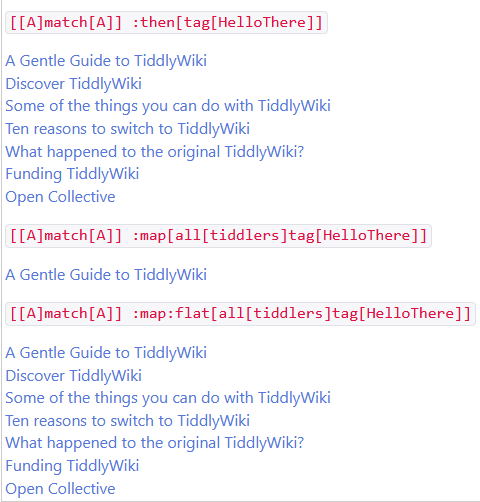
Luckily, you can recapture all the results of the :map run by using :map:flat instead… or (my preference) switching to :then in place of :map. I made a quick demo with a simpler filter to illustrate these differences:

Code
`[[A]match[A]] :then[tag[HelloThere]]`

{{{ [[A]match[A]] :then[tag[HelloThere]] }}}

`[[A]match[A]] :map[all[tiddlers]tag[HelloThere]]`

{{{ [[A]match[A]] :map[all[tiddlers]tag[HelloThere]] }}}

`[[A]match[A]] :map:flat[all[tiddlers]tag[HelloThere]]`

{{{ [[A]match[A]] :map:flat[all[tiddlers]tag[HelloThere]] }}}

As an an additional bonus, you can omit the all[tiddlers] step when using :then, as (unlike :map) it doesn’t take the output(s) of the previous run as its default starting values.

Oh, even better! Clearly I didn’t really understand why I got it to work. I was just so happy when I did, as I’ve missed this arbitrary-predicate-in-a-filter mechanism for some time. Thank you for the much improved version!

2 Likes