
TiddlyWiki 5.3.7 with a bunch of plugins including CodeMirror installed
Tiddloid 2.5.0
I’ve noticed this behavior on two different smartphones already, hence the topic.
When I’m typing text in Edit Tiddler mode with CodeMirror editor, it would randomly swallow typed characters. I look at the keyboard while typing a whole word, then look at the editor and sometimes I see random letters missing.
When the typed letter gets swallowed, in slow motion it looks like this:
I tap the key on the on-screen keyboard
I see it appearing in the editor textarea
after a visually noticeable fraction of second it gets auto-deleted, like if I’ve would explicitly pressed Backspace
Is this a known problem?
So far I have two blind assumptions, two suspects for the cause of this problem:
The keyboard app. I don’t use the vanilla Google keyboard, I use Hacker’s Keyboard. But I never noticed this problem when typing in any other app.
CodeMirror Autocomplete subplugin. I did not try to disable it yet (and frankly, I’m not really using it, I think I installed it together with the rest of subplugins, out of curiousity), I’d like to get some feedback first before attempting a test drive with this subplugin disabled.
No. I did read about this phenomenon the first time here.
As you suggested, you should try to disable plugins and see what happens. But …
This hints a different synchronisation problem. If the code mirror editor is shown, in reality there are 2 editors active. The default text input field is hidden, but needs to be updated. Since you can see, that character in the cm-editor and it disappears after some time it seems the sync between cm-editor and the hidden text input field is corrupted.
Are there any other plugins, that may have / need access to the default text-input in the edit template?
Did you change the Hidden Setting: Typing Refresh Delay to a very low or very high number?
Do you use throttle.refresh field in those tiddlers?
How old is the android device?
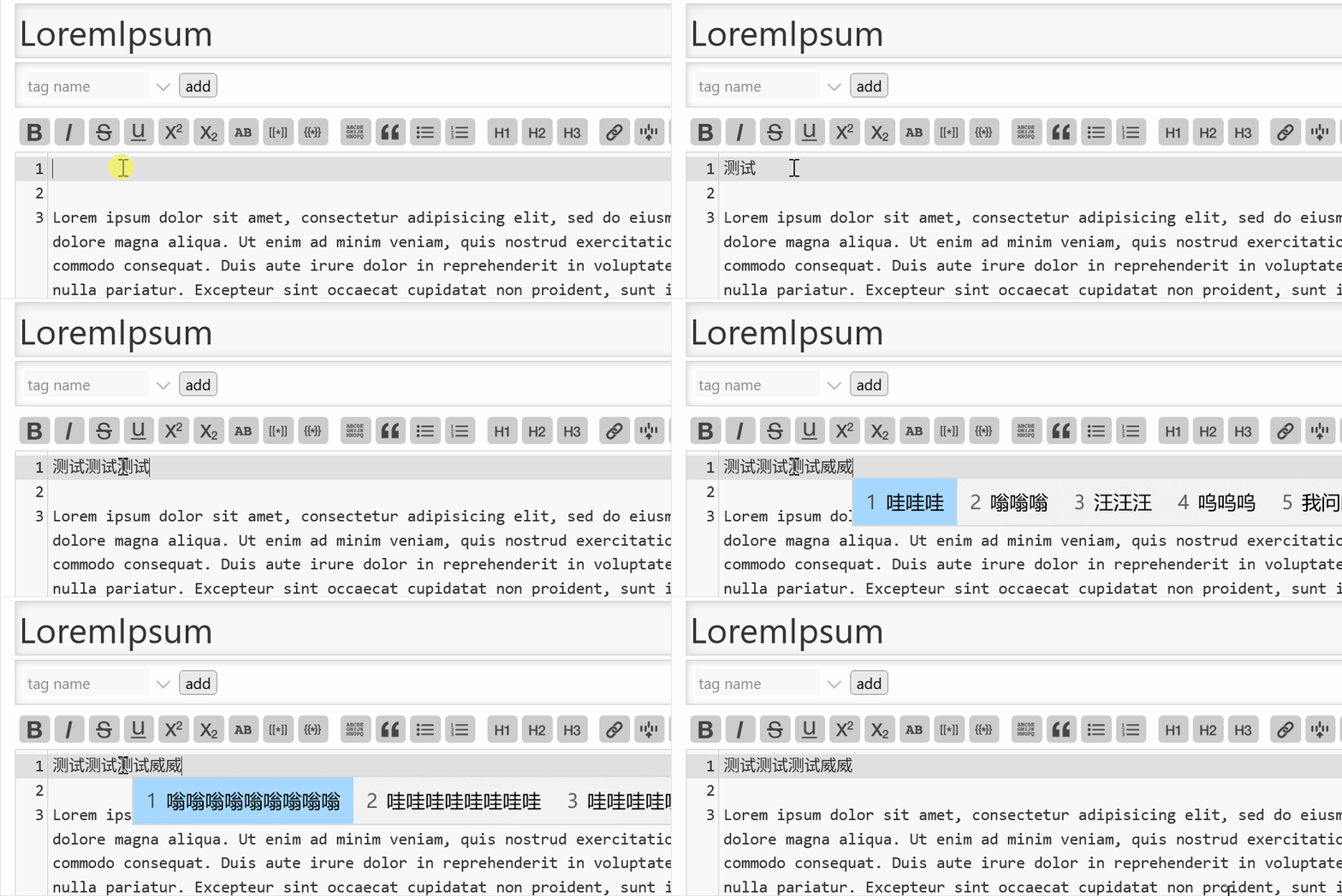
I do know this problem. When setting $:/config/inputStyle to contenteditable, both on iPadOS and on Windows swallows typed latin characters if you types a Chinese word with pinyin then type some latin characters.
IMO the bug affects IME’s autocompletion. I don’t know how it behaves when using English input mehod, this is how codemirror behaves when using Chinese pinyin input method:
On v5.3.7, you can go to ControlPanel → Info → Wiki Information to generate a wiki report. The report will generate wiki’s information, including all the plugin you installed.
I know, and 400ms is the default value, which updates the TW store.
@vuk … may be you try 1000 or 2000 for $:/config/Drafts/TypingTimeout – Just as a test. May be you see something. If the “character overwrite” changes accordingly, than we definitely know, there is syncing problem between the editors.
Been driving a wiki for a week with 2000 TypingTimeout (see above). While I’m not 100% sure this completely fixes the issue, the situation is much, much better. Thanks for the suggestion @pmario