I’m currently making more configuration options runtime-updatable.
Now switching the tiddler type doesn’t fully refresh the editor anymore.
There’s a new Editor-Toolbar button to enable / disable indentWithTab (which is also configurable in runtime)
Plus a keyboard shortcut ctrl-Tab but I now realize that that’s used in Browsers to switch Tabs … XD
So, what would be a good kb shortcut to enable / disable indenting with Tab?
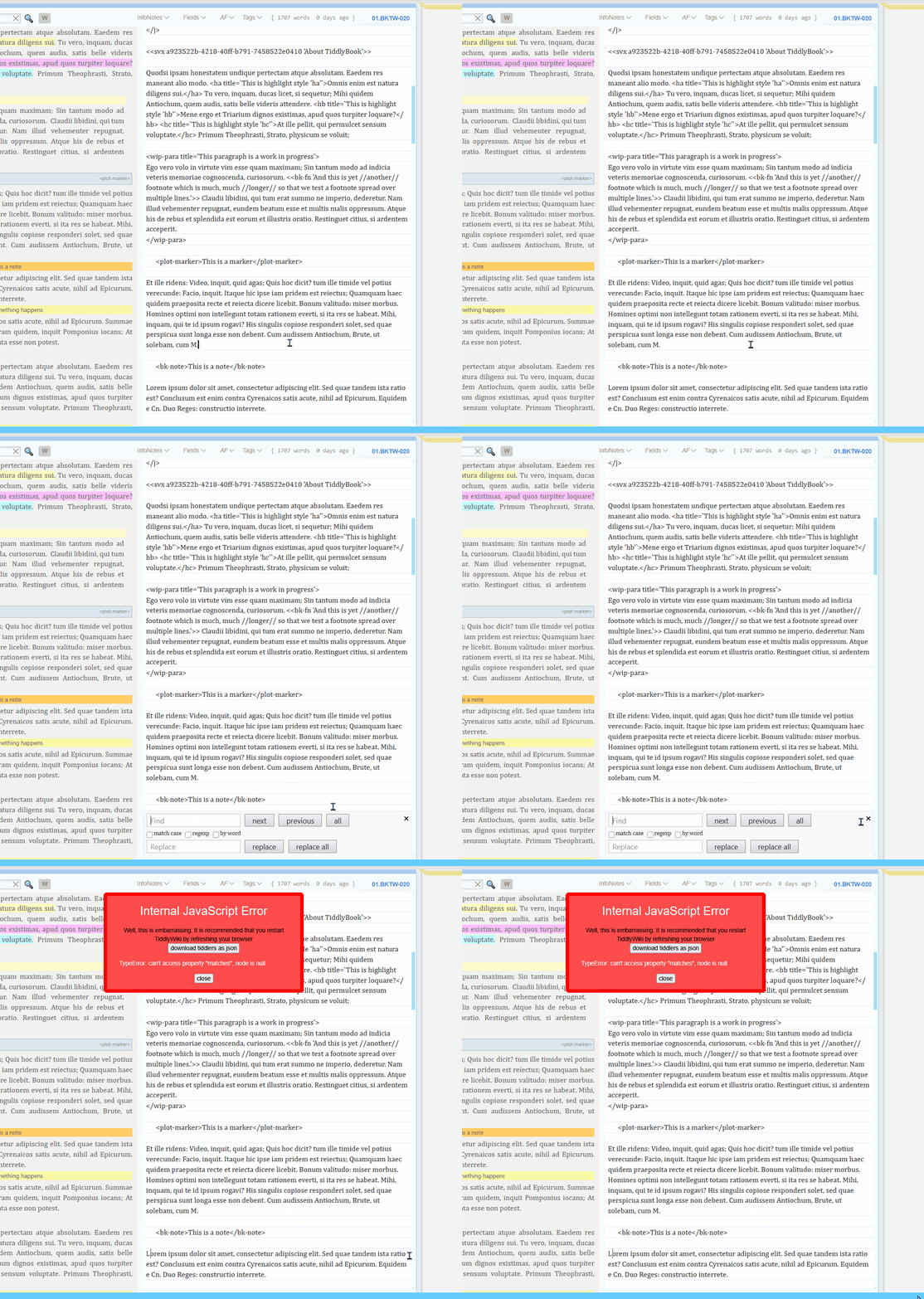
RSOE: TypeError: can’t access property “matches”, node is null
This has been around since 0.5.x. I figured you’d have found/fixed it but maybe that’s not part of your workflow. It used to be the case that the Esc (key) had the same problem but you’ve certainly fixed that.
Meanwhile I went down the rabbit hole creating a TiddlyWiki5 syntax highlighter and autocompletion system for Codemirror 6
It will be a new Codemirror 6 plugin which ships the editor (around 800kb) and everything else comes as a plugin:
TiddlyWiki language
Line Numbers
Snippets
Linting
Multi cursor support
Link preview
Search
Folding
Toolbar (yes, the fancy one)
Javascript language
Markdown language
ecc.
I have a working editor with many plugins and TiddlyWiki5 syntax works very well and it doesn’t overwrite any core tiddlers.
The coming days I’ll post a new thread for this
The question for you folks here is if you have some feature requests and ideas for the new plugin?
Because autocompletion for tiddlers, widgets, macros and filters will work context-aware, I believe the Codemirror-Actions will not be needed anymore. Or do you still want them?
Here are some questions you could possibly answer:
What do you expect from a basic TiddlyWiki5 editor?
What do you expect from a full-featured TiddlyWiki5 editor?
What kind of plugins would you want for the Codemirror 6 editor?
What features should be shipped with the core editor? Should it include the TiddlyWiki5 language (around 140kb) ? Should it include the search and replace panel? Should it include multi cursor support?
ecc.
I hope you are interested in this and if you like, please answer to some of my questions
@CodaCoder - could you please reproduce this error, then open the developer console (F12) and go to “Konsole”, then copy the error in red and paste it here or send it to me via pn?
@BurningTreeC - thanks for the work you’re putting into this! I have looked at CM6 plugins in the past, but they’ve always done “too much” and overwritten too many things for me to use them. Instead I use @Maurycy’s Auto Complete plugin and @saqimtiaz’s Editor Autolist within my editor. I’m a minimalist, so anything that makes TiddlyWiki look different is out for me.
While I don’t think I’m representative of the community at large, I’ll selfishly give my (unapologetically opinionated) thoughts. I just went through your link and took some notes after trying to use it:
Dislike all the format changes (editor size not respected, huge buttons that takes multiple rows)
Love the full-screen button
Filter for auto-completions is good, but would never use as I’d really only want for links with the [[..]] which it doesn’t do automatically
Love the tab indenting, especially the multi-line
Popup coming up all the time was really annoying, figured out how to disable
Found the settings to turn most everything else off like icons, editor font size, etc. which helped
Search replace functionality is great - formatting is a bit funny - very tiny text here compared with way too big everywhere else
Didn’t understand how to use the color macros, think it has to do with tweaking things, but they’re shown as macros? Maybe should be a control panel thing like the Palette area?
Keyboard shortcuts like Alt up/down for rearranging lines is great!
Many of the other ones didn’t do anything - Mac centric language which I don’t understand, never used a Mac before. When I tried a few things went funny as I think they have different uses in Windows
Commenting didn’t seen to work - must be a markdown thing? (;)
Looking at your post for what your “new” plugin will entail:
TiddlyWiki language - great! For me I’d only want TiddlyWiki, HTML, and CSS - no other languages
Line Numbers: Don’t need this but can turn off
Snippets: Very helpful
Linting: Would need an example to understand better
Multi cursor support: This would be very helpful for me
Link preview: Sounds heavy, I wouldn’t want this
Search: Like search & replace I assume?
Folding: Would be nice to have
Toolbar: Meaning like current plugin? Fine other than want basic format - hate the large size / 3d effect
Javascript / Markdown: Don’t use them myself
Other thoughts on “dream editor”:
More auto-complete for widgets (maybe and procedures)
Example: type <$list and then hit “tab” enters: <$list filter="" variable=""></$list> with cursor inside the filter string (I think I can probably do this with actions today?)
Maybe the parameters aren’t auto-entered, but made visible in tooltip - like Excel does?
Auto-complete for filters would be amazing
Some complex ones like search-replace [search-replace:gim:regexp[search],[replace]]
The good bits from the current Auto Complete plugin and Editor Autolist plugins above.
Core plugin very limited and minimal, extras to be added or enabled afterwards
Again - while the above is purposefully nitpicky since you asked for input, I’m very grateful for your efforts, just giving you a different perspective as someone from a very different background.
The fullscreen button will be shipped with the base plugin, aka “Zen Mode”
It will do autocompletions fully context-aware, which means that when you type [[ or {{ it gives you a list of tiddlers, when you type {{{ [ it gives you filter operators and again as an example {{{ [tag[ gives you a list of tiddlers. <$ gives you a list of widgets and the attributes of the widget after <$list for example.
<<my-macro gives you the attributes of my-macro to autocomplete. And so on.
That’s a base feature
I can make that configurable. Popup automatically when context-aware autocompletions are there or popup only with ctrl-Space
Will be a separate plugin and will be styled more TiddlyWiki5 style
They will be gone
I think they will be shipped in a separate plugin, I don’t know yet
I want to make all the keyboard shortcuts configurable
Is ; a TiddlyWiki5 text/vnd.tiddlywiki comment?
You can then pull the plugins lang-html, lang-css and lang-tiddlywiki in
Will probably ship as a separate plugin but very useful though if you edit Javascript tiddlers for example
Snippets will be suggested automatically when you type a matching term and I will make them configurable by the user. It’s then possible to tell where the cursor should “end” after inserting the snippet and there will be tab-navigation within the snippet from one anchor to another for fast inserting.
Linting checks your code for errors and tells you where they are.
I don’t know if I can make that possible for text/vnd.tiddlywiki, but for Javascript for example it should be doable. Let’s see.
Will probably ship in a separate plugin or land in the base plugin, to decide.
Will be a separate plugin and on hover over a link or tiddler title it will display the content in a popup.
Yes exactly.
Folding will come as a separate plugin. For text/vnd.tiddlywiki I’ll have to experiment what can be folded and what not.
Toolbar will be something fancy that styles the toolbar in different ways (choosable) but will be a separate plugin. The base plugin will not style the toolbar.
I’d be interested in how many users do
I believe I’ve covered large bits of what you’re expecting.
Stay tuned for this weekend, when I show the prototype.
Thank you for your reply again,
best wishes,
Simon
For now, at least, you can relax. The bang is in $eventcatcher code, not your stuff. Your name=close button does not consume the click, it bubbles up and out of cm code. Since I have a few $eventcatchers in the tree above the cm6 editor, I’ll need to figure out which one is causing the issue. Intriguingly, wrapping an $eventcatcher immediately above the $edit widget (i.e. wrapping your cm6 code) with stopPropagation=always, didn’t help at all.