Has anyone an idea how this solution can be used with generated field names?
If there would be an opposite of the get-operator, one which only returns true for empty fields, I would be glad. But I’m afraid that there isn’t one (yet).
I think it’s easiest to do this with nested filters.
The first filter builds the list of field names you want to check; I used [fields[]], but you could replace it with something like [[MyDataTiddler]indexes[]].
The second filter returns a list of all tiddlers that have a field by that name (has:field<field> — note the suffix!) but don’t have any content in that field (!has<field>).
If you’re only interested in checking the fields of a subset of tiddlers, you can add any additional steps you like before has:field<field>, e.g. [!is[system]has:field<field>!has<field>].
<$list filter="[fields[]sort[]]" variable=field>
<!-- ^ any filter that produces a list of field names you want to check -->
	<% if [has:field<field>!has<field>] +[format:titlelist[]join[ ]] %>
<!-- ^ builds a title list of all tiddlers with an empty field by that name
	   & displays the following content only if there is at least one matching tiddler -->
		''<<field>>''
		<<list-links "[enlist<condition>]">>
<!-- ^ if you want to immediately edit any empty fields you find, you could replace <<list-links>> with something like the following:

		<ul>
		<$list filter="[enlist<condition>]">
			<li><$link/>: <$edit-text field=<<field>> placeholder=<<field>> /></li>
		</$list>
		</ul>
-->
	<% endif %>
</$list>
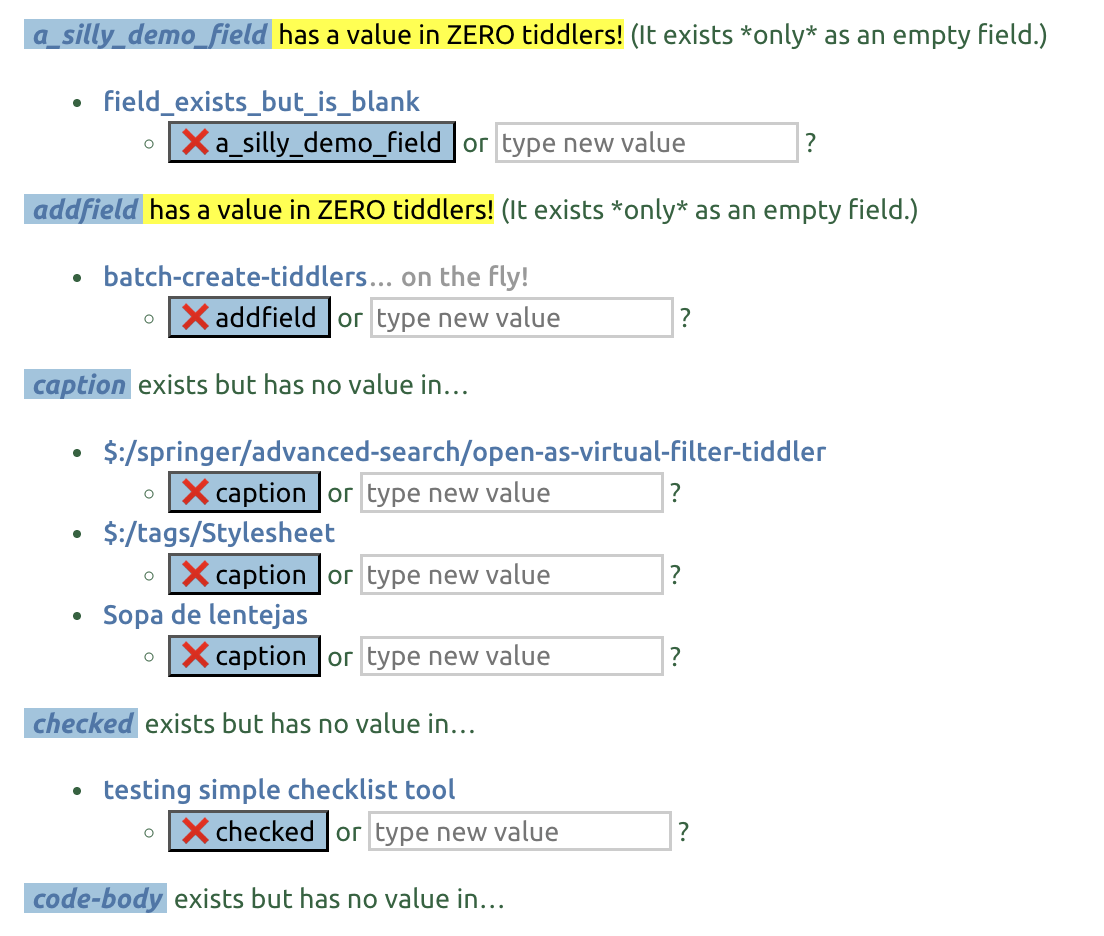
<$list filter="[fields[]] -[{!!remove-fields}enlist-input[]] +[sort[]]" variable=field>
<!-- ^ any filter that produces a list of field names you want to check -->
	<% if [!prefix[$:/plugin]has:field<field>!has<field>] +[format:titlelist[]join[ ]] %>
<!-- ^ builds a title list of all tiddlers with an empty field by that name
	   & displays the following content only if there is at least one matching tiddler -->
		<$link to=<<field>> >''<<field>>''</$link>
		<ul>
<div style="break-inside:avoid;">
<$list filter="[enlist<condition>]">
			<li><$link/>:  <ul><li><$button actions="<$action-deletefield $field=<<field>> /> ">❌ <<field>> </$button> or <$edit-text field="temp-field-data" placeholder="type new value"/><% if [<currentTiddler>get[temp-field-data]] %><$button><$action-setfield $field=<<field>> $value={{!!temp-field-data}} /> <$action-deletefield $field="temp-field-data" />  <$text text={{{ [{!!temp-field-data}addprefix[SET to ]] }}}/> </$button> <% else %> ? <% endif %> </li></ul>
</li>
		</$list>
</div>
		</ul>
	<% endif %>
</$list>
I’ve removed some fields (text, tags, list-before, list-after, and dependents, which are common empty fields that clutter the results — an empty text field is common for utility tiddlers, and its edit box wants to take up so much space).
There’s not only an edit area, but also a delete-field button. (Half the time, I realize an empty field — if it’s not list-before or list-after — is a relic of some old process, so it’s nice to be able to nix the useless field on the fly.)
EDIT: the “edit-field” variant as initially suggested by @etardiff needed a tweak, because as soon as keystroke input started, the target tiddler would lose its status in the list (would no longer have an empty field there!).
So the version above now has an inline edit-text widget for a temp-field-value field, with a separate button to set the target field based on that input (and wipe the temp field).
Good catch, thank you! I do build a lot of ad hoc inline editing tools, but I admit this one was something of an afterthought to the filter, and I didn’t really test it.
Your other enhancements are also very nice. If you want a more robust inline editor, @RetRoland, I’d certainly recommend starting from @Springer’s base.
One additional thought to supplement @Springer’s work:
If you’re like to introduce an “are you sure?” step to prevent any mistakes, you could wrap $action-deletefield in an $action-confirm widget, which will prompt you to confirm before it actually deletes anything. Here, for better legibility, I’ve also moved the actions into a separately-defined procedure, which needs to go at the top of the tiddler (i.e., before any non-pragma) content.
\procedure delete-field()
<$action-confirm $message=`Do you wish to delete the "$(field)$" field?`>
<$action-deletefield $field=<<field>> />
</$action-confirm>
\end

... <$button actions=<<delete-field>>>❌ <<field>> </$button> ...
Personally, I don’t always add a confirmation step for single-use tools, especially if I’m trying to modify a lot of tiddlers quickly — and I wouldn’t necessarily bother if I’m only deleting empty fields. But if you’re prone to clicking absentmindedly, it can be a good safety net.
Right. I think by removing a certain subset of fields where existing as an empty field has an meaningful role different from not-existing (namely list-before, list-after, and dependencies), I removed that concern enough for my own satisfaction, for this kind of use.
But given that people may want to adapt this kind of solution to other purposes, illustrating the confirmation makes sense. Compared to seeing how to splice in an additional step, it’s always easier for a learner to see how to bypass an unneeded part.
ALSO now highlights fields that may be “pure clutter” — fields that have no occurrences that are not blank. If you use the dropdown to select fieldnames, cleaning up old variants (note vs notes, etc.) can help maintain a useful menu of fieldnames.
Finally had some time left to try out your suggestions.
The combination [has:field<field>!has<field>] was exactly what I needed. Although it is all well documented, I don’t realize all the possibilities, sometimes. I tried to get a reasonable result using the is-Operator (has:field[]is[blank], but in vane.
Maybe it would make a useful extension, if the is-Operator supports empty for empty fields?
Great code samples, very well documented - Thank you, you saved me quite some headache.
You both deserve a “solution”-mark, but for fairness sake I give it to @etardiff, because her reply was first.
Very nice demo page, @Springer - I will delve into the details later, otherwise I risk loosing track on my current projects. That’s definitely one weakness of me, always interested in new things
But please tell me, which plugin is it that generates the literature tiddlers (and the tag-menus in it)?