You can also just add the field with the value already specified (typed out) within the field-editor’s add-new-field interface, or by using Commander and other utilities. I also have tried such things, and have tried lots of “clever” variations in an attempt to make a “smarter” (more palette-friendly, or just more condionally savvy) color for a tag … 
D’oh! Sometimes the obvious is just not obvious! Usually if I want something like this, I export the tiddler, change it in a text editor and reimport it… silly!
Actualy I have played with similar changes before and think this may be easier to do that you would think. The trick to maintain backwards compatibility to to check if the color is a valid code or name and use that and if not wikify the field and use the result.
One way may be to use filters that resolve the color value as a function may.
Another approach may be to give the user another layer of control, a custom pallet, one when can reference existing pallets, a pallet whos values can be retrived by macro/procedure, function or more.
- For example one could set a border around a tiddler according to if a field value is positive or negative, but automaticaly leverage a day/night switch.
I’m thinking it may be even simpler than that: always wikify.
There are many different formats of CSS colors, but I don’t think any of them use syntax that would invoke wikitext processing, so they would simply be left alone by $wikify. (I’m not certain about this, but I think if there are cases, they’re pretty rare.)
I know there are some plans for better color handling in 5.4.x. I wonder if this would fit with those plans.
thank you very much for that indeed !
I also am looking at my organically over-grown set of tags, and needed some inspiration / inputs on how to bring some structure to it now
groups of tags is something that I am STILL not sure if I need or not, the question being is
- is it better to have those common group tags such as
website:garagewebsite:personal - OR is it more clean to have separate granular tags -
websitepersonalandgarageand then you can just mix them up, and filter by them?
A VERY common case is using hex color values (e.g., #rrggbb). When wikified, the leading # is processed as a “numeric bullet”.
-e
I understand the concerns regarding the use of special symbols in tags. I wanted to give an update:
I’ve simplified the tag prefixes. I have my
-
main (Who/What/When/Where) items tagged as:
./
eg../AFOF26-DCDC01(=AlfieAOffices2026-DocumentsDocuments-January) -
sub (description:Why/How) items tagged as:
[%
eg.[%2601DC-ACPR00(=2026JanuaryDocuments-ActivityPriorityActive,Priority(0="+",1="-", so Active,Non-Priority would be “01” and Inactive,Priority would be 10, etc.) Why not the other way around? Because 0 comes up first in lists, usually. -
creation-modifications items are tagged as:
[:
eg. [:202601:202602 (modificatied in February) -
geolocation items are tagged as:
[;
eg. 5.958839/116.068577 (obtained from OpenStreetMap: Kota Kinabalu train station: OpenStreetMap)000595-883900–011606-857700 →[;000595;011606 -
readable details are tagged accordingly:
[/AlfieA ,[\TiddlyWiki,[@CafeMan-JP@EmailService.JP,[;Kota-Kinabalu;Train-Station[:2026-January, etc.[?for queries,[$for values,[#for codes (bar codes, IDs, etc).
Works great. No problems. And tags get categorized with the pseudo-“folders” coming up in the tag manager.
Just ideas. Hope you share some of yours.
PS: sorry for the edit!
I think this comes down to where you find the granularity most useful. For the way organising things makes sense to me, I find website:garage is more useful than having them all tagged both website AND garage. otoh, if I’d grown my thinking around this stuff differently, I could (probably) easily have ended up the other side of the “which way to name and group them” question. (I can’t even guarantee I wont change my structure even further down the track one day)
Anyway, tl;dr: I dont think there is a right or a wrong answer overall. Pros and cons - and find what works best for you.
Great thread. Good questions. Good answers.
Two things unexplained …
-
TW Taggery is fundamental to organisation. Yet still liberal.
Explain that ?? -
Question: HOW does a TW Tag differ from a #Hashtag?
Explain that for an in-tiddler string: #My-Hash
Pacifist Cross-Cutter
TT
And I find myself very much on the other side. I find it easy enough to write [tag[website]tag[garage]] when I want the combination, but to also use [tag[website]] or [tag[garage]] and to mix and match with [tag[book]tag[garage]] or [tag[garage]tag[band]] as needed.
If I used such tags often for TOC entries, I might have to rethink this, but so far that hasn’t really been an issue.
I think in my use case it’s that I don’t need to write filters for tags very often, but I have an automatic tag-cloud in my sidebar which I use heavily (or maybe lazily is a better description).
If I was writing filters directly more often, I’m sure I’d prefer the flexibility of the seperate tags
aha thanks! yeah I am so far leaning to keep my current tags, which have just grown being separate ones, which I add as needed
however this also sometimes results in a tiddler with like 10-15-20 tags 
We call this “tag Pollution”, too many tags making the wiki or tiddlers harder to use. Tags are an easy to use way to organise information, I personally avoid them if I can and use fields and list fields and my flags solution (a no-touch form of tags). We can also use alternative tags fields or hide some tags from visibility. I do not feel combination tags is going to help much as it does not change the amount of information in the tags field.
I hope one day to release a set of tools which are Tag adjacent one day. I just need to find a set of User Interface elements to accompany them, see this discussion on flags
I have a fairly different notion of tag pollution. To me, tag pollution is when the wiki as a whole has too many tags. I’ve done this on several occasions when I used tags to manage a large table of contents. For instance in my King James bible wiki, you can see that there are over 1250 tags. I have since found better ways to manage my tables of contents for such wikis. For instance the TOC for a policy manual. When I get around to revisiting the bible wikis, I will probably use something like this, reducing my tag count below 20, I imagine.
I don’t think I’ve personally ever had more than 10 tags on a tiddler, and rarely more than a handful. But of course different wiki designs will have different outcomes. For what it’s worth, tiddlywiki.com has these counts today, among all tiddlers and shadows:
| Tags | # of Tiddlers |
|---|---|
| 0 | 2139 |
| 1 | 1566 |
| 2 | 511 |
| 3 | 98 |
| 4 | 26 |
| 5 | 8 |
| 6 | 0 |
| 7 | 3 |
| 8 | 0 |
| 9 | 1 |
| 10 | 3 |
| 11 | 2 |
| 12 | 5 |
| 13 | 3 |
| 14 | 0 |
| 15 | 2 |
So, yes, this could get out of hand if many tiddlers have a lot of tags. I think it’s less of a problem, though, than having too many tags across the wiki. This is another reason for [tag[website]tag[garage]]. It avoids the proliferation of tags.
tag pollution is when the wiki as a whole has too many tags.
I don’t think I’ve personally ever had more than 10 tags on a tiddler, and rarely more than a handful.
different wiki designs will have different outcomes.
Right. Your chart of tiddlywiki com tag use is interesting to see!
My own takeaway is simply that “Tag function” in TW is incredibly flexible—for structuring, finding and everything else.
FWIW, in my typical usage, I mostly …
-
… use TW tags to aid Structure;
-
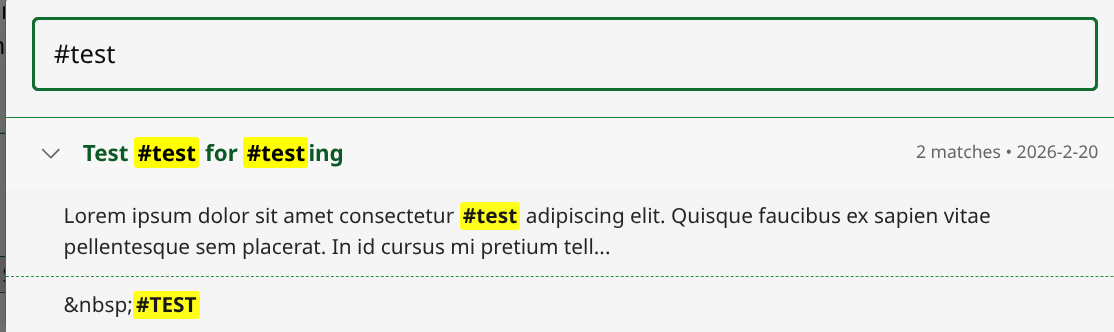
And I the use (not TW tags) #hashtags in plain text in the body for Categorizing content.
TBH, a competent researcher of Information Design could easily spend a year figuring out all the ramifications of TW Tagging—it’s that good.
TT
#scott - #taggery - #tw
sorry what - hashtags? 
do you then have filters and etc kind of organisations tools using hashtags, that’s another whole dimension to this !
And I the use (not TW tags) #hashtags in plain text in the body for Categorizing content.
Have you adopted a solution to support these?
Wrapping such hastags to turn them into missing tiddler titles [[#hashtag]] would be a start.
I have “played” for altering the parser and the $link widget to detect #title in content and make it into a link
- Along with the above title method this makes hashtags visible as
links[]andbacklinks[]and missing tiddlers (if missing) in which caseprefix[#]allows you to list all “hash tags”.
The key advantages with turning hashtags into titles is opening them up to further use all without filling the tags fields up.
I have a fairly different notion of tag pollution. To me, tag pollution is when the wiki as a whole has too many tags.
That is my default position, that “too many tags in the wiki is tag pollution”, however if a lot of tiddlers require a lot of tags, especially if the number of tags causes a new line in the list of tags on any given tiddler indicates the wiki is being “driven” by mostly tags only. I think it fair to consider this a different case of “Tag Pollution” or overuse.
The key advantages with turning hashtags into titles is opening them up to further use all without filling the tags fields up.
A tool to find one or more hash tags in a tiddler text when viewing that tiddler would be helpful but if they are titles, even missing titles, then freelinks plugin can highlight them (unnecessary If the parser made them links)
somewhat related to the topic, you can create a tiddler icon cascade template to show the permalink-button icon to all tiddlers or specific ones that meet a filters criteria.
I used to do this, though I was a bit bummed by it not actually adding the tiddler title of the permalink-button to the icon field of the tiddler.
same can be applied by automatically coloring tiddlers.
I used to group my tiddlers based on ‘topic, category, status’ where every tiddler was a topic, if a tiddler was tagging any others, it would be a category, and some category tiddler tags were status categories, i.e. ‘topic > category > status’ and thus would apply colors and icons defined by this.
I don’t remember if manually adding a tiddler title to the icon field would override the Tiddler Icon cascade or not, but im sure if it doesnt you could just add a condition in the filter like [!blank[icon]then[....]] or something to that effect.
(sry, doing this from my phone, might be some typos)