Announcing Tidbits — a community recipe edition (v1.0.0)

Note: more general discussions about community editions have been moved to a separate topic. This will be kept here to focus on the Tidbits recipe edition itself.

A while back, @SnapSam kicked off a series of conversations about whether TiddlyWiki gives new users too much freedom — that the empty wiki, for all its potential, is a hard place to start. The follow-up threads (curated editions coordination, which editions to build first, a recipe edition specifically) sketched the shape of an answer: community-curated editions, each narrowly focused on a common use case, that work out of the box and let a user grow into TiddlyWiki rather than being dropped into the deep end of it.

I’ve been chewing on that for months. (Okay, years. Sue me!) Today I’m releasing a first concrete attempt:

Tidbits

      A TiddlyWiki edition for storing, browsing, and cooking from your own recipes.


A stake in the ground

Tidbits is meant as a stake in the ground, not a finished product. Along the way I tried to distill the threads above into a list of properties every community edition ought to have. That list lives in the repo as Philosophy/EditionCriteria.md, and I’d like for the conversation to be at least as much about those criteria as about Tidbits itself. Here is the short form, ordered roughly from most to least important — when principles conflict, the earlier one usually wins:

Slightly updated based on discussions below

A community edition:

  1. must serve a useful and relatively common purpose.
  2. should have a clear, narrow scope and a complexity ceiling — roughly 1,000 words of explanation should suffice to understand the whole thing.
  3. should work out of the box without configuration.
  4. should be self-documenting from within.
  5. should ship with illustrative sample content — ideally as a separate JSON bundle so the empty and populated artifacts are both first-class.
  6. should make common customizations easy — palette-based theming, user-facing strings in well-named tiddlers, no hardcoded UI strings or colors.
  7. should showcase idiomatic, modern TiddlyWiki — educational as well as functional; modern techniques preferred but not pushed.
  8. should be maintainable — prefer core TW and established community plugins over custom wikitext.
  9. should follow TW namespace conventions — keep implementation details someplace like $:/community/recipes/....
  10. should be deployment-agnostic — single-file HTML, but nothing that breaks under Node or a server.
Original, longer version

A community edition:

  1. must serve a useful and relatively common purpose.
  2. should have a clear, narrow scope and resist feature creep.
  3. should work out of the box without configuration.
  4. should be self-documenting from within.
  5. should ship with illustrative sample content — ideally as a separate JSON bundle so the empty and populated artifacts are both first-class.
  6. should have a complexity ceiling — roughly 1,000 words of explanation should suffice to understand the whole thing.
  7. should make common customizations easy — palette-based theming, user-facing strings in well-named tiddlers, no hardcoded UI strings or colors.
  8. should showcase idiomatic TiddlyWiki — educational as well as functional.
  9. should be maintainable — prefer core TW and established community plugins over custom wikitext.
  10. should follow TW namespace conventions — keep implementation details someplace like $:/community/recipes/....
  11. should prefer modern TW techniques but not go out of its way to promote them.
  12. should be deployment-agnostic — single-file HTML, but nothing that breaks under Node or a server.

Plus a few accompanying decisions: documentation lives inside each artifact; every edition ships as an empty wiki plus one or more companion JSON content collections; full internationalization (right-to-left text, locale numbers, plural rules) is out of scope, although individual editions might tackle it; critical plugin dependencies are bundled, with a future “phone-home” check to surface compatibility-tested updates.

These are proposed guidelines. I think they’re roughly right, but Tidbits is the first edition that has actually been built against them, and I’m sure some won’t survive contact with a second or third edition. Push back.

What’s in Tidbits

Comprehensive but not exhaustive — the in-edition documentation fills in the rest, and stays inside the ~1,000-word ceiling (almost :frowning: ).

Reading and cooking

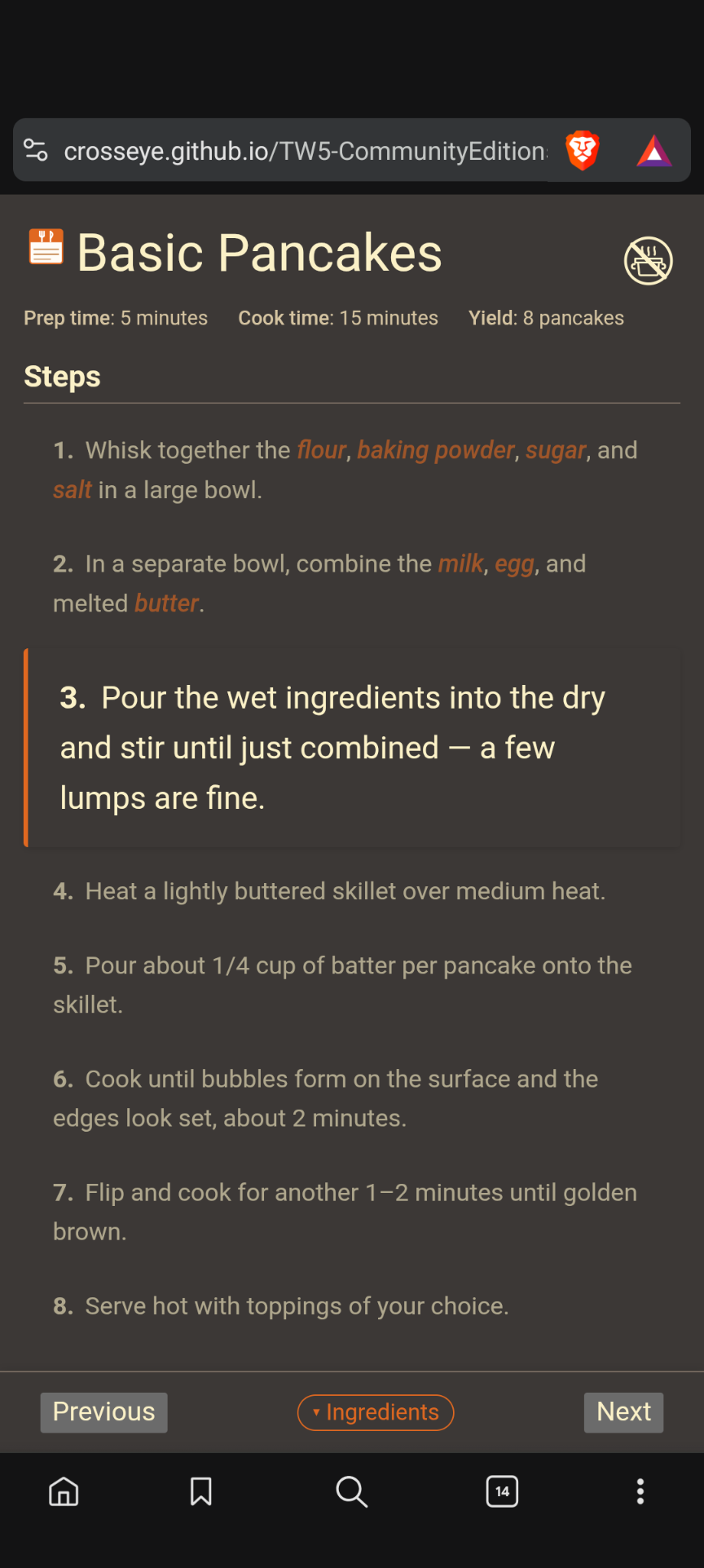
The reading view is split into three parts: a primary single-column view, an ingredients/steps split, and a step-by-step view that emphasizes the current step. A separate cooking mode hides the chrome, boosts the font, sticks the step-nav to the bottom of the viewport, and on HTTPS or localhost will keep the screen awake on mobile. Designed to be readable at arm’s length while your hands are messy.
Recipe Box dashboard

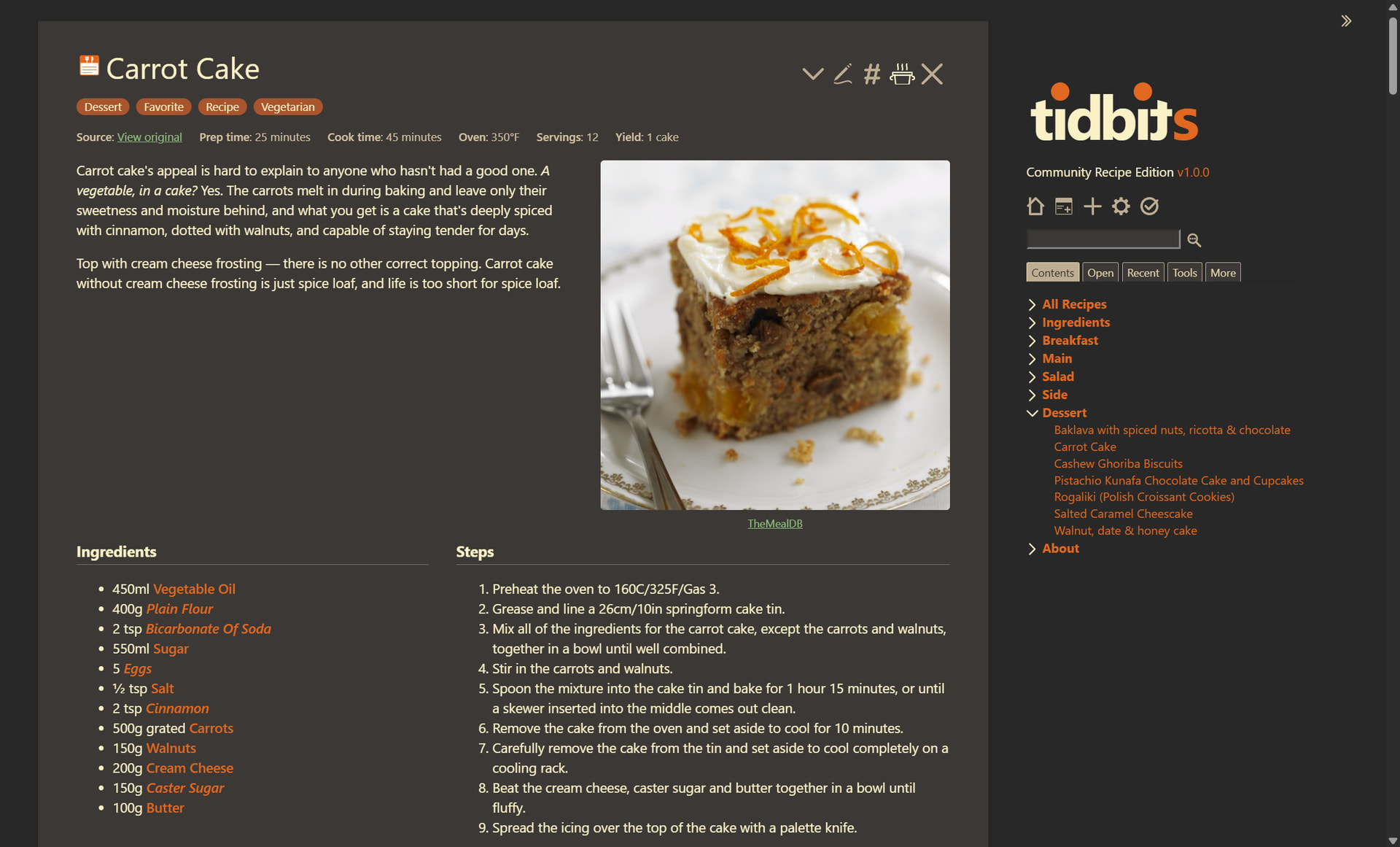
The default landing view. A grid of cards: Favorites, Categories (an expandable TOC), Popular Ingredients, Tags. Cards are extensible — anything tagged $:/tags/community/recipes/recipe-box-card shows up. Standard list / list-before / list-after ordering.

Recipes, ingredients, photos

A recipe is a tiddler tagged Recipe. The body uses three sections: !! About for prose, !! Ingredients as a bulleted list (*), and !! Steps as a numbered list (#). Beyond that, recipes carry photos and any supplemental fields you care to add (prep-time, oven-temp, yield, …). The supplemental-field set is registry-driven and configurable from a Tidbits Control Panel tab — add a field, give it a caption and an optional placeholder, optionally a tiny wikitext template for how it should render, and it appears on the view template and in the field-add autocomplete in edit mode. Ingredient tiddlers carry photos, descriptions, and a backlinks list (“Used in”). Case and plural variants are handled by an aliases field rather than a free-for-all of stub tiddlers.
Palettes

Two custom palettes: Tidbits Dark (default) and Tidbits Light, both derived from Gruvbox with brand-orange accents. Every TW core palette is also still selectable. It looks fine in Vanilla, if a little bland.

Localization (First Pass)

Every UI string in the templates is externalized through something similar to TW’s <<lingo>> macro. English defaults ship under $:/community/recipes/language/. An example French language pack ships as a separate JSON drop-in:

https://crosseye.github.io/TW5-CommunityEditions/recipes/samples/fr-FR/lang.json

To try it: open the empty edition, drag the lang.json onto the wiki, save.

What’s covered: every in-template UI string, button label, empty-state hint, Control Panel caption. What stays English in this first pass: the load-bearing tag names (Recipe, Ingredient, Category, Favorite) and the recipe-body section headings (!! About, !! Ingredients, !! Steps). Parameterizing those is part of the post-1.0 roadmap, which for now remains mostly in my own head.

Plugins

Two bundled: Relink (so renaming a tag tiddler doesn’t silently break user content) and AutoComplete (so writing a recipe steers you toward existing ingredient tiddlers rather than creating case-variant duplicates). Pinned versions in the release artifact; future “phone-home” check is stubbed but not wired.

Sample-content reset

Every demo tiddler — every recipe, every ingredient, every photo — carries demo: yes. A checkbox UI lets you selectively prune them, by recipe, by ingredient (with a separate toggle for the ingredient’s photo if you want to keep it), or by category. The whole demo set can be removed in one click; you can also keep “the salt and pepper tiddlers, but not the rest.” I’m hoping that other editions can emulate this; I think it’s a very beginner-friendly affordance.

Compatibility

Verified against TiddlyWiki core 5.3.6 and current 5.4.0. min-tw-core floor is 5.3.6. I haven’t yet tested earlier versions, but it probably doesn’t matter as this is an edition, not a plugin. The TW version is built-in.

How it fits the criteria

There’s a verification table below. The short version: all twelve are met, with full i18n consciously deferred. The 1,000-word documentation ceiling is the one I sweated over most — and in fact, at the moment it’s slightly over. “I didn’t have time to make it shorter.” - Pascal

# Criterion Status Notes
1 Useful, common purpose Recipes — broadly recognisable.
2 Clear narrow scope Futures list parks unit conversion, parsing, meal planning.
3 Works out of the box Empty edition opens to Recipe Box + Tidbits docs; five Category-tagged tag tiddlers (Breakfast/Main/Salad/Side/Dessert) ship in the empty build.
4 Self-documenting Ten Tidbits: … sections under one parent tiddler, indexed by list field.
5 Sample content tidbits.html includes 32 recipes, 31 ingredients, 63 photo tiddlers, 1 system config.
6 Complexity ceiling (~1k words) 998 words across the Tidbits sections (trimmed from 1,026 during this verification).
7 Customizations easy / localization-friendly Palette colours throughout the stylesheet; user-facing strings in dedicated tiddlers; Control Panel tab. Template-internal English UI strings deepen this in the current version and tag-name / section-heading parameterization in the roadmap.
8 Showcase idiomatic TW <% if %>, <<list-links>>, ConfigPanel pattern, view-template cascades, palette colours, edit-template cascade.
9 Maintainable Three small custom JS modules (phone-home stub, wake-lock, action-attach-photo); rest is wikitext + pinned plugins.
10 Namespace conventions Edition tiddlers under $:/community/recipes/.
11 Modern TW techniques <% if %>, \procedure, \parameters, conditional shortcut.
12 Deployment-agnostic Single-file HTML build via --build empty; tiddlyweb/filesystem are dev-only via the build profile. Custom JS guarded for browser context.

Feedback wanted

I emphatically do not want to be Tidbits’ sole contributor. I’m happy to keep gatekeeping the recipe edition — somebody has to, and the criteria above are easier to defend with one consistent hand on the tiller — but the project is meant to be a community project, not mine.

Three kinds of feedback I’d particularly like:

  • The criteria. Twelve is a lot. Are any of them wrong? Missing? In the wrong order? The “complexity ceiling” one in particular is a personal hobby horse and I’m not sure how portable it is to other domains.

  • Tidbits itself. Bugs, design choices that grate, things you’d cut, things you’d add. Especially from anyone who actually cooks from it for a couple of weeks — kitchen use is the real test.

  • What comes next. A bibliographic database edition, a note-taking edition, a TTRPG-tools edition all came up in the original threads. If anyone wants to take a swing at one — using Tidbits as scaffolding, or starting fresh and informing the criteria from a different angle — I’d love that. The repo is set up to host more than one edition; the second one will probably teach us most of what’s wrong with the first one’s structure.

If something in the empty edition makes you say “oh, I could see how that pattern would work for my domain,” that’s the signal I’m hoping for.

Source: https://github.com/CrossEye/TW5-CommunityEditions. Issues, PRs, or forum replies — all welcome.


Pinging those who participated in the earlier conversations: @SnapSam @TW_Tones @Springer @vilc @etardiff @jonnie45 @Justin_H @CodaCoder @Mark_S
(And this forum won’t let me ping everyone, so also:) #EricShulman #saqimtiaz #DaveGifford #Charlie_Veniot #markkerrigan #simon #clsturgeon #wikster #pmario #Ittayd #atronoush #linonetwo #oeyoews #chaosweaver #hoelzro #Scribs #Mario #Ste_W.

But I also want to hear from you — yes, you! This is meant for the entire community.

And @jeremyruston, any feedback would be most welcome.

:backhand_index_pointing_up:
Pinging @EricShulman @saqimtiaz @DaveGifford @Charlie_Veniot @markkerrigan @simon @clsturgeon @wikster @pmario @Ittayd.

:backhand_index_pointing_up:
Pinging @atronoush @linonetwo @oeyoews @chaosweaver @hoelzro @Scribs @Mario @Ste_W.

This looks great! Coincidentally, I just started a recipe wiki yesterday and this is already doing almost everything I planned to implement.

The general idea for community editions seems good to me. I don’t think 12 criteria is too many, as each has a good justification.

Nice work ! I love it.

Two things though

  1. I used the french translation, everything is fine but you forget to put the <<t xxx>> in the caption fields of the Recipe-Box-Card tiddlers and even add a translation for the Recipe Box caption itself.
  2. The color palettes are nice, but with the dark palette, the buttons in tiddler edition mode (add tag, add field..) are not constrasted enough. they render beige text on a light blueish grey…

But this is just to ice the cake.

For Tiddlyhost users, you can try Tidbits on Tiddlyhost here.

How neat! :face_savoring_food:I may have recipes to contribute myself.

Very cool. If you decide to base yours on this edition, do please keep me informed of your progress, and of any missing capabilities or pain points. I’ve built this, but haven’t really used it yet myself, so I’d love to see how it goes for you.

Thanks. I was sure there were misses in that, but I just couldn’t see where they were. I expect to be doing a pass at more complete translation mechanism soon, a little short of full internationalization but useful for many cases. I will include this there.

I have a favor to ask, though. Would it be all right if I passed further machine translations to you for human review? I am sadly monolingual. I chose French as my first translation simply because my vaguely remembered few years of high school French is much better than my one semester of college Russian. I would love to have a French speaker review.

That palette was the very last thing I did on this, and it was a little hurried. I expected some issues. But I don’t see this one. I’m sure I’m looking in the wrong spot.

This isn’t where you meant, is it?

or this?

At least to my eyes, the contrast there looks reasonable. Am I looking in the wrong spot?

Ok, for that you’re going to need a recipe edition. I happen to know this nice one!

This is a great Scott! I’ll surely take some ideas from this and implement in my own recipe wiki (which I think you’ve seen in the previous discussions) or the other way around. The basic design principles (links to ingredients, headings) are practical and easy to use from my perspective, I imagine it can’t be much simpler than that while using TW’s power.

I’ve many minor specific suggestions to Tidbits, but I’ll play with it a bit more to rethink them.

As to the grand scheme of thing, here are my thoughts:

  • Why use edition rather than pack it all in a plugin? (I mean for the final product, not now in the design stage.) Maybe it’s just me, but the editions make me feel uneasy with how it’s possible to break something or how will they be updated in the future. We could publish an “edition” that contains a couple of plugins, but pure non-pluginized custom content makes me feel somehow uneasy.
  • Points 2&6 and 8&11 of the guidelines seem to overlap, maybe the could be merged for readability?

Again, great work overall! And a nice logo. I’ll let know if have more feedback.

Very interesting. 2 posts.

A minor issue First. On Chrome (latest) on Chromebook with truncated tag drop-downs …

TT

RETWEET …   

Good use of “tidbits” — in use since 1641 …

That wiki is a juicy-morsel.

TT

I agree they are v. proximate.

But @Scott_Sauyet seems to have a 5-Phase Grand Plan and may need them distinct in his futures?

TT

My Second point (after segues) …

Questions …

1 - How is Tidbits more than a really nice (reproductive!) example helper for a TW Chef?

2 - How can your 5-Step-Plan step onwards?

TT

Just to make clear what I meant with the edition vs plugin:

  • I think that for new users it would be more inviting to tinker and customize the UI if they had the comfort of not being able to break anything (like when modifying the plugin, just delete the shadows and its all back to normal). Right now to modify the Recipe Box, one would have to keep a copy of it to be able to go back to the original.
  • There is some effort underway (or is it finished already?) for an official method for translating plugins, this could help keep things standardized.
  • Perhaps some components of an “edition” like Tidbits would be so use case agnostic, that they could be made standalone plugins. Like I guess the add image UI and the registered fields seem to have nothing to do with the Tidbits. I mean, apart from the pre-populated fields like oven temp., the system itself is pretty universal.

Now some specific feedback on Tidbits:

  1. The layout with ingredients/steps side by side on a large screen and the cooking mode are great! The only issue I have, is that the steps have to be one-level numbered lists, all other formatting ways seem to be ignored. I don’t know the limitations of the current setup. It’d be nice to allow other ways of writing steps.
  2. Image management UI is great for beginners I think. One issue I see is that it is not easy to scale for more than one photo per recipe. We can keep the UI as simple as possible, focused on one photo per recipe, but make the system so that its easier to modify for more. I used to have a similar system where a field would hold a title list of images associated with this tiddler (for recipes and for one other wiki), but it was difficult to managed. I switched to tagging the image with the related tiddler. Feels more TW-way. If we stay with current system, the photo field should be registered in Relink.
  3. Wouldn’t the instructions in a new recipe better be placed in the editor UI above the text editor (similar to the registered fields info below) rather than inside the text as an html comment?
  4. In my recipes wiki I use transcluded section headings, so instead of !! Ingredients I have {{$:/wilk/templates/headings/Ingredients}}. This is future proof in case I would like to style them differently or use a different level heading or whatever; for Tidbits probably better for translation too. The title of the template doesn’t have to be so scary, it could just as well be {{Heading: Ingredients}}.
  5. The cards folding/unfolding UI in Recipe Box works on mobile, but I don’t see the tiny triangle indicators on the folded cards on my phone.
  6. About/Customizing – I thing links to system tiddlers would work better than code-formatted non-interactive titles.
  7. I’m torn on what to think about the aliases (like Butter having an alias butter). It’s handy to see the backlinks from recipes that use the alias (e.g. Butter shows recipes where [[butter]] is linked), and it might be easier on new users, but I imagine it can lead to chaos and unexpected things e.g. if aliases of different ingredients overlap. Maybe there could be some visual clue next to the alias backlinks, reminding that “you see this alias backlink for your convenience, but it is better to use the proper ingredient names”.

Some initial thoughts from my first uses, both as on my MWS development instance and on Quine3:

  • Importing my existing (and very small) recipe set worked with minimal effort. I already had lists for Ingredients, and after tagging the imported tiddlers with the Recipe tag and a few small edits to headings, everything “just worked”.
  • The aliasing feature for Ingredients is clever, although I may be using it differently than the described use case:
    • I have a generic ingredient name (like “Egg”), which has aliases (“Egg white”, “Egg yolk”), so that I can link whichever specific ingredient from a recipe, but the recipes collect upward into the base Ingredient in addition to appearing on the specific alias.
  • I had already decided on a naming convention for ingredients (title is singular, first word capitalized, etc) and create links using a named link (3 [[egg whites|Egg white]]). This fits my mental model for organizing everything while also making the ingredients list read like a typical recipe, but did require some up-front planning.
  • Tagged ingredients. I’ve applied a few tags to categorize ingredients (“Spice”, “Herb”, “Dairy”, “Meat”, etc), and noticed that there’s no real discoverability for those in the current version. I modified the Ingredient tiddler to do something similar to the Recipe tiddler where it displays all relevant tags as a clickable button that filters the list.
    • Would it be reasonable to include Ingredient tags in the “Tags” card of the Recipe Box, or perhaps have separate cards for Recipe and Ingredient tags?
  • I didn’t really use the cooking mode while cooking, although I have opened it a few times just to try it out. On mobile, I completely overlooked the button to expand the Ingredients list in cooking mode.

My own thoughts are that the core functionality can (and possibly should) be bundled together into a plugin. The “edition” is simply a pre-configured TiddlyWiki instance with the plugin bundled in. The sample content could also be a separate plugin, so that it is easy to test out the edition with some relevant tiddlers, but the sample content is also easy to disable if the user wants to then get to work on their on content without setting up a separate empty instance.

EDIT to add: Also, so far as having “editions” goes, here’s a personal anecdote. A few days ago my girlfriend saw me editing my ToDo list in a wiki I’ve set up with Projectify, and wanted to have her own. When I showed her Tidbits and some of the things it could do, she was also impressed. So having something that looks nice and meets a common, practical use case does attract interest from a (mostly) non-technical user.

One other thought / issue for consideration:

The source field is designed to work with a URL and renders as a link, which makes sense for any recipe found on the Internet. However, if I’ve taken a recipe from a book or my grandmother’s Rolodex, the URL behavior is obviously not the desired outcome. I’m not sure the best way to tackle this. Having separate fields for a URL versus citation is probably the simplest solution, but the redundancy of having two fields that do almost exactly the same thing irks me slightly.