Has anyone created a simple page footer for a TiddlyWiki, displayed after all open tiddlers and the sidebar have run their course? The kind of thing often found on blogs with copyright information, contact links, etc.
When I try creating a tiddler and tagging it $:/tags/PageTemplate, it ends up overlapping other features in the wiki, and I thought I’d check to see if others already have something that works before I go diving into a bunch of complicated CSS.
I haven’t found anything on the topic except this thread from 2006, which isn’t super-helpful at this point!
It’s not quite what I envisioned (I was thinking about putting it below the sidebar as well, as mentioned in my OP), but I think this works even better, actually! Thanks. And +1 for the SystemTags tiddler in tiddlywiki.com as mentioned by @PaulH, I didn’t know that existed and it’s super useful.
There are a number of other ways to place content in tiddly wiki but they start with system tags but alternative switchable layouts are now possible. The sidebar segment tag using the list-after field lets you address the side bar.
There is a neat trick you can use in situations where you need to add something to the beginning or end of a core template and don’t want to worry about overriding a core shadow tiddler and having issues upgrading to newer versions of TiddlyWiki in the future.
For example if you want to use @telumire’s approach to adding a footer without creating a new layout, you could just modify $:/core/ui/PageTemplate to:
You transclude the original shadow tiddler instead of including its original text, thereby ensuring that any core updates to that shadow tiddler will get picked up.
@Birthe I’ve wondered for YEARS how to do that! Note that when I tried your instructions initially I read “create a stylesheet tiddler” to mean change the type to stylesheet, but when I saw the reveal there, I realized instead I needed to switch it back and add the system tag $:/tags/Stylesheet instead. Posting this here for potential others.
@telumire thanks for the link, I will review and see what I can extract, I am interested in an additional side bar, and have achieved this in my blog site
Off line I have a project to collate what I am calling “additional elements” basically making and collecting additional page elements to use on tiddlywiki. These contributions so far in this thread are very helpful. We have the existing elements accessible by tags, the menu plugin (which is difficult to use); From this thread we have;
Footer
Left Sidebar
In my own collection I have
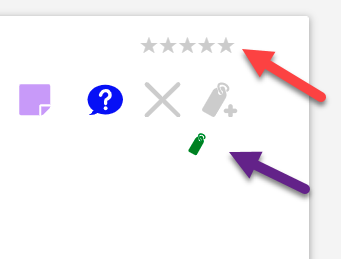
Above viewToolbar (Red arrow)
*Second small toolbar (Purple arrow)
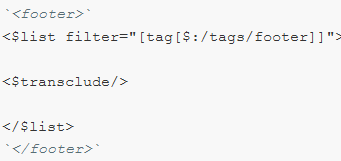
Sorry for the necro, but I think I’ve found a better way to add a footer to a tiddlywiki, this time without the need to create a custom layout. For this we only need to use the tag $:/tags/RawMarkupWikified/BottomBody.
$:/tags/RawMarkupWikified/BottomBody marks tiddlers included as wikified text at the bottom of <body> - https://tiddlywiki.com
@telumire All this time and I missed the $:/tags/RawMarkupWikified/BottomBody tag.
When wikification is not possible all you need is html content and place that since that is rendered by the browser.
There are two ways to do this;
Install the internals plugin
Use the preview HTML on the tiddler you want to capture a html version of
Copy the resulting html and place in your footer tiddler.
Attached is a utility (not yet published) called snapshot, that takes a html snapshot of a rendered tiddler and displays that instead of the wikified tiddler (which is refreshed with wiki changes), it was designed for large report tiddlers so they did not need to continuously refresh, and to record as at date/time reports. Note it folds the tiddler to hide the view template.
Once you click the camera/snapshot icon click on the small file icon above the content, it will open the snapshot tiddler, where you can copy it to the clipboard, and past in your raw tiddler. It will include images etc..
@TW_Tones , @Mohammad , did you wrap the <footer> in backticks ? This is necessary otherwise the footer tags get wikified (in that case, it get deleted) and the html cant be styled.