That’s good to know! So I could basically rename “attachments” to “files” and that’s it. Only problem I have with it is, that “files” could be overused as folder name and therefore cause conflicts.
v0.5.35 on Linux Manjaro
I was able to link without an error message. Seems like it didn’t immediately bring over changes that had happened while unlinked, but need more testing to confirm.
The little peers indicator appears on the single-file wiki, but not on the node.js wiki.
Pasting image data into either node.js or single-file gives an import dialogue, but actually imports a blank image. This happens whether or not external attachments is toggled off.
Thanks!
Contradictory message?
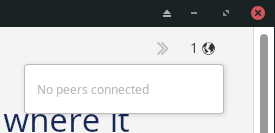
I am connected to a peer here – I can see changes being transferred between phone and laptop.
Linking
When re-linking an existing file, a tiddler shared between two instances is left the same as on the current device – it is not updated to the latest tiddler of the two. Not sure if that is intended or not. Once the two are linked, you can force the one you want by making some change.
Thanks!
The dropdown is currently not showing the peers. Next release within 20 minutes!
It may be that the wiki is not yet added to the room or something else is off. Normally by checking if both peers are connected to the room and have the wiki checked as available in that room solves it. Otherwise close and reopen the wiki. It should sync the tiddler. But you said it didn’t and that’s another point for my list of things to check.
This would be the expected pattern as it is the same as any website, as they typically have access granted in the wiki folder and below, not where else. the images folder is another common folder.
I downloaded from the above link/Github only to discover it was a superseded version. Rather visiting the releases folder Releases · BurningTreeC/tiddlydesktop-rs · GitHub is more helpful if seeking the latest version. It seems it installs correctly over an existing installed version.
[Edited] On opening 5.40 in Windows 11 latest, the prior wikis are no longer configured, I created a room but wanted to open wikis including a folder wiki and can no longer seem to do so.
I’ve now created a second room, but am having trouble sharing a file. Or rather a file doesn’t show up in “Available from Peers”.
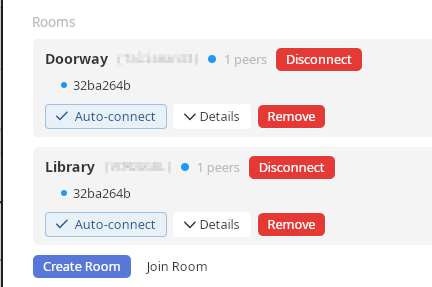
I’m wondering what the code is that comes after the Disconnect button. It’s the same code for both rooms, making me wonder if the rooms are failing to be unique.
And as long as I’m asking questions, what is the checkbox next to the relay URL supposed to do?
So I have one room and one document that seem to be communicating, but now I can’t get a second document in a separate room to communicate. Among other things, I wonder if there is a way to tell if the relay is down.
Thanks!
Hi @TW_Tones
since I changed quite some things in the WikiList config and how Rooms work I guess you’re having stale .json configs in your %appdata%\com.burningtreec.tiddlydesktop-rs folder … just close the app and delete the folder then reopen the app. It should recreate the directory correctly and adding wikis and Rooms should start working.
Hi @Mark_S … that’s the device ID of the device that is connected. I need to hash it.
It’s meant to configure your own relay server address.
Did you check “Sync” on the document you want to make available in your other Room and checked the Room in the “Room:” dropdown?
Edit: The relay is NOT used if both devices are in the same network. A “Relay-status” indicator would be nice, that’s true!
I Suspect I have permissions issues, although rare on Windows, I am opening an address/folder on an I: drive and get the following when trying to create an empty wiki.html
Failed to create wiki file: Access to system directories is not allowed
- Even C:\data\TestTDTS seems to not be permitted
Hi @TW_Tones
I added a gate that checks for user-accessible paths and excludes others.
But in your I: drive case there’s something wrong.
I think I know what it is and will fix it soon.
Thanks, I am researching the permissions, on the folder C:\Program Files\tiddlydesktop-rs and NUC\Users (NUC is the device) is only read/execute however I seem to have full effective access
Is the same error 
within 20 - 30 minutes a new version is available which should solve the I: access.
For system paths - everything outside user-accessible paths, including C:\data\TestTDTS, there’s still a gate not allowing access. Must be either on a drive with user-access permissions or in the dedicated user directory. Actually, let me rethink this. I’ll make access to C:\data\TestTDTS possible but will exclude known system paths and have the check for user permissions on the given path.
So wait a little bit, then it should work for you.
I tested creating wikis under my document and it was fine. The issue for me was I could not access my existing wiki(s) such as the folder version under I:!Master\TiddlyWiki-app which the earlier version did.
No Hurry @BurningTreeC
It should now work using the latest version
It is now thanks @BurningTreeC , the experiments start for me
For safety is there a built in way to backup a folder wiki? Or just zip the folders?
Hi, note that for compatibility with android you’ll need to wait for android app version v0.0.52 … it takes a while until Google has checked the release.
For folder wikis there’s no backup mechanism.
Important note regarding the Relay server
I’ve now switched to GitHub OAuth authentication on the Relay-server.
The new Desktop app is building with support for it, the Android app (v0.0.54) will be available later today I assume.
Room creation and synchronization will still work over LAN without GitHub OAuth. But if you want to sync through the server, you need to set it up once.
You need a GitHub account for that.
This enables a Room-creator to manage the allowed peers, to remove a peer or to destroy a Room.
This also prevents unauthorized use of the Relay-server.
You will need to clear your appdata folder this time 100% … I don’t have a mechanism that merges old config formats into new ones, and the configs have changed a bit.
So it is %appdata%\com.burningtreec.tiddlydesktop-rs on Windows that needs to be deleted.
~/.local/share/com.burningtreec.tiddlydesktop-rs on Linux.
~/Library/Application Support/com.burningtreec.tiddlydesktop-rs/ on macOS.
Who doesn’t have a GitHub account already - create one  … then don’t miss giving TiddlyWiki5 a star!
I think Google also has an OAuth API. I’m wondering why you didn’t select that. Is it more difficult? It’s just that everyone using the app will by definition have a relationship already with Google, whereas Github is a whole other, sometimes confusing world.
Hi @Mark_S
I’ve added the options for Google, Microsoft, GitLab auth and others server-side but need to add the actual implementation for them.
But yes, Google would be a strong go-to option.
I haven’t updated my software yet – still at 5.35. Have both devices on the same LAN. In the terminal I can see 401 errors, which makes sense since the relay has changed. I have a document in room Library on the desktop, and have sync on. But it doesn’t show up in the peers on the phone.
I’m wondering if when it can’t use the relay it then skips connecting locally?
Guess I should go ahead and update the desktop, but figure that might take awhile.