Hi @Watt ,
Can you clarify if you’re working with TiddlyWiki files or folders?
About LAN-sync, it should work between two computers too.

Hi @Watt ,
Can you clarify if you’re working with TiddlyWiki files or folders?
About LAN-sync, it should work between two computers too.
Testing on a node folder wiki called ‘mynodder’ stored in ‘wiki-rs’ directory (/home/time/Desktop/wiki-rs/mynodder/tiddlers) - the tiddlydesktop-rs-0.3.65-linux-x86_64 directory is /home/time/Desktop/tiddlydesktop-rs-0.3.65-linux-x86_64/bin etc. I created a single file wiki via dashboard in that bin folder as an experiment and it seems to like the paths better for text imports at least. Everything is used as a portable install but I put it on the hard drive, not a usb.
@BurningTreeC it would be nice if there is in-app update … Instead of having to download the .exe file everytime
v3.66 on Linux Manjaro.
Things that now work:
The one thing that is now working worse than before is pasting image data. Before you could paste if you turned off external attachments. Now you can’t paste with or without external attachments turned on. This applies both to local and nodejs files.
Is there an explanation of how the LAN sync works? Is this for working with Android? Is it too late to become part of the Android testing group?
Also, is there a nodejs serving running somewhere in the background? In which case it would be handy to see the port somewhere, so that we could access it from a web page (mainly because that’s the only way to use BJ’s web clipper).
That reminds that one of the things I didn’t like about TD and now also TDrs is that you can’t change the view size using control+scroll. On TDRS control+scroll just scrolls.
I like how quick TDrs comes up. It feels like it’s hardly taking any resources at all.
Thanks!
Version 0.3.66 crashes when opened on Mac OS 12.7.4 (iMac).
Hi @Ellen ,
can you tell me when it crashes? Does the app not open at all or do wikis not open and the landing page does?
Thank you,
Simon
@Ellen , could you please check if the latest release fixes the crash?
If not, could you please run it from the terminal and look for output of the app?
You can eventually paste it here…
Thank you very much,
Simon
Hi Simon
Testing tiddlydesktop-rs-0.3.67-linux-x86_64.tar.gz on LinuxMint
Portable version extracted to /home/time/Desktop/tiddlydesktop-rs-0.3.67-linux-x86_64
Big success!
Tested
Node wiki stored in /home/time/Desktop/wiki-rs/mynodder/tiddlers
.txt
import works, creates canonical_uri with dot notation, (if I delete the _canonical_uri the text is still there as type text/plain?)
.tid
import works, fields saved as expected.
.jpg
import works, creates canonical_uri with dot notation
.mov/.mp4/embedded online video
import works, creates canonical_uri with dot notation but video is a no show. Video controls appear but no video or poster image. Might be my system but they play outside of TD-RS. The embedded video shows controls and poster image but doesn’t play.
.mp3/.ogg
import works, creates canonical_uri with dot notation. Plays!
External weblink - opens page in firefox browser.
Export works!
Plugins - as advertised you do these a different way. No time to test yet but I’m optimistic.
Single file wiki stored in /home/time/Desktop/wiki-rs/mywiki.html
All formats same results as above but …
Export does not work.
Plugins - control panel - get plugins - official library → does not open plugin list
If I open the single file wiki in firefox, not using TD-RS then the embedded video plays! The other video formats do not.
Thanks very much Simon - Very positive feedback, big kudos! I’ll keep trying the updates and the LAN - maybe the Android too. Best wishes.
App does not open at all. Saved the error report, if you’re looking for sth. specific.
Hi, latest release (67) crashes, too. Don’t have time now for further tests. Just quickly copied from the report (see pm).
HOpe it helps, e
The next release, available within about 30 minutes, should solve:
New features:
A) Real-time conflict-free collaborative editing on draft tiddlers over LAN (fully optional):
B) A new “Plugins” button for each wiki that lets you install plugins to your already created wikis, reads also plugins from your $TIDDLYWIKI_PLUGIN_PATH and from the “plugins” directory in the appdata.
Within 30 minutes a new build is available which sorts out issues with real-time collaborative editing sometimes working, sometimes not.
You will have to reinstall the “Codemirror 6 Collaborative Editing” plugin since it has changed a bit. The easiest way to do it is to install it from the “Plugins” button in the landing page.
The Android App gets the same update, it will only take a little bit longer until it’s available since Google has to approve the release.
Best wishes,
Simon
0.3.69 opened on Mac – thank you! 
For all guessing where the CodeMirror6 Collaborative Editing plugin is, i forgot to bundle it with the desktop app. It’s bundled only with the Android App for now. I will solve this tonight
Do you want me to add this collab plugin to the CM6 demo site as well? Or is it only going to be bundled with the apps?
I’ve installed the v0.4.8 portable on Windows 10 and I get the following error message when trying to create a single file wiki:
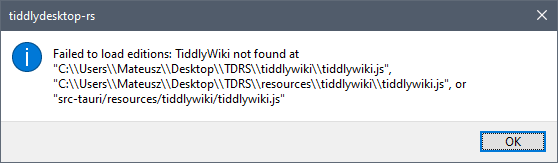
I suspect the paths are wrong? I don’t see the install_folder\resources\tiddlywiki\tiddlywiki.js file for example, but there is install_folder\resources\tiddlywiki\TiddlyWiki5\tiddlywiki.js.
Opening a wiki file works without a problem.
