When I say it was slow on Windows, I mean it took almost two minutes to come up. So it would probably be good if someone with a “good” windows system checks it out.
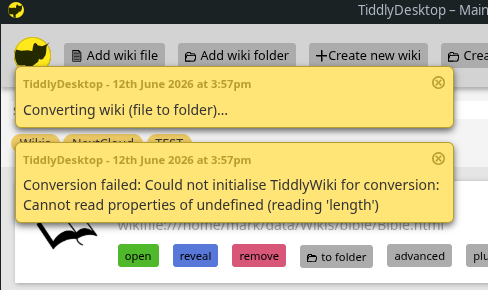
Title changes in a folder wiki don’t propagate back to the dashboard.
Hi @Mark_S
Thanks for your bug reports! Helps a lot!
This is fixed now.
Should be fixed now.
I’m testing on a very slow Windows system where it boots up in some seconds.
That’s a bug, I’ve fixed it.
That was a pre-existing TiddlyDesktop limitation. Fixed.
Thank you @BurningTreeC, your work on TiddlyDesktop is very much appreciated.
I use TiddlyDesktop everyday day, but I’ve been concerned for a while that it needs more love and attention. Meanwhile, TidGi is being actively developed, and has more ambitious functionality. However, in it’s present form it can’t replace TiddlyDesktop because it doesn’t offer support for single file wikis.
So, I think the ideal outcome for end users is that we find a way to combine these efforts. There are several ways we could approach doing this. I had mentioned to @linonetwo the possibility of extending TidGi with the single file functionality, but we could also extend TiddlyDesktop with TidGi’s support for Node.js wikis. It would be great if you could put your heads together.
Just to add that I have been attempting to document some community roles in the “Community” tiddler, and it would be terrific if we could formalise ownership of TiddlyDesktop.
Best wishes
Jeremy
Has there been any thought, or is there already, a way to have the loaded folders or files available on the local network?
For many people, the phone is mightier than the desktop. But the options for the phone are much more limited these days. On iPhone you have a paid option, and on Android you have Tiddloid, which will disappear for most people in September. And of course you have the problem of synching the two.
A local server option might form a useful stopgap, at least within safe (home) networks.
Hi @jeremyruston and thank you for your reply.
I don’t know what Node.js support TidGi has but my TiddlyDesktop branch does:
- add an “Create new wiki folder” button
- add the functionality to convert between wiki types (file or folder)
- add external attachments support to folder wikis
- add the ability to install plugins from the landing page e.g. from the TIDDLYWIKI_PLUGIN_PATH
Further it adds functionality not related to Node.js:
- search panel
- fullscreen support
- support for the collab plugin
The collab plugin is a Codemirror-6 plugin
It adds the ability to connect to a room where more members can sit inside
One can share tiddlers through the room, then members get a button they can use to get the tiddler. From there on that tiddler is sync enabled through a change listener and live editing.
There’s also a chat functionality to chat with all or specific members.
That said, I’d be happy to talk to @linonetwo if we can combine his ideas and mine!
Thanks
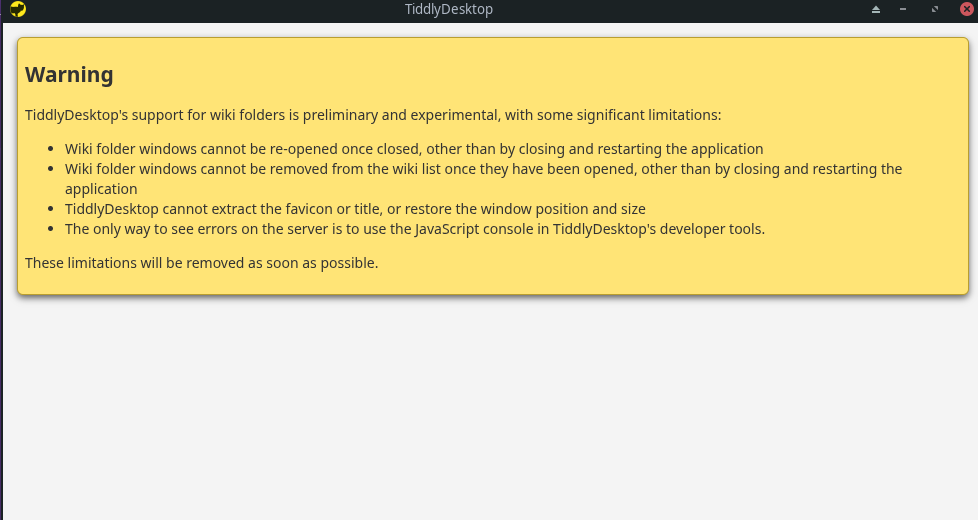
Oh, I see you can already do that with node. Now it just needs a built-in webdav for single-file.
@BurningTreeC Hi, TidGi Desktop did a little thing on NodeJS wiki, it simply provide IPC from webview to the nodejs side, by an ipc-syncadaptor. Most of things are handled in vanilla tiddlywiki core-server code.
And a filesystem-adaptor to sync disk change back to nodejs server.
I don’t have time to touch other feature, I tried implement “boot” part in TidGi-mobile, and it takes too many time to test it and make it compatable with tiddlywiki core-server. TidGi-mobile is using folder structure so sync between desktop and mobile could be handled by git, but nodejs can’t boot in mobile environment without consuming too much CPU and battery, so I have to write my own version, and that prooved to be very expensive.
@jeremyruston So you don’t use nodejs wiki quite much? But how do you deal with git backup and huge wiki? Mobile app like Tiddloid will crash when save if wiki HTML is larger than 300MB.
In the advanced section, it might be useful if there was a field for submitting parameters. I’m thinking in particular about wanting to run lazy-loading.
Tidgi is also available on android.
Tiddliod and qinoid are also available.
None of these are available in the PlayStore. In September, G00gle plans to shut down side-loaded apps. There will probably (hopefully) be a work-around, but it might require using ADB from the desktop.
Hi @Mark_S
I believe I have addressed all these issues, just not the last one but that is foreseeable
Running a folder with node.js options, if you leave in the “(anon)” token, you will never be given the authentication dialog and thus will not be able to write.
Just remembered that the other reason I don’t use TD often is the lack of zoom capability.
I’ll try to make it work 
TiddlyDesktop Overhaul — Changes
A summary of everything the tiddlydesktop-overhaul branch adds on top of upstream
TiddlyDesktop (v0.0.22). It is organised by feature area rather than commit-by-commit.
The headline addition is a full real-time collaboration system (CodeMirror 6 + Yjs,
end-to-end encrypted, with relay + LAN transport), alongside a large set of wiki-window,
wiki-list, conversion, security and build improvements.
Real-time collaboration (new plugin: codemirror-6-collab-nwjs)
Peers in the same room edit shared tiddlers together, chat, and exchange attachments.
All content is end-to-end encrypted; the relay only ever sees ciphertext.
- Live co-editing — character-level sync of shared tiddlers via CodeMirror 6 + Yjs
(CRDT). Field and tag changes sync too, including ones committed only at save time. - Transport — discovery/relay over a WebSocket relay server (a separate project),
plus direct, encrypted LAN connections between peers on the same network for lower
latency (relay is the fallback). Single-file wikis reach the LAN/WS through a parent
bridge; folder wikis use Node directly. - End-to-end encryption — AES-256-GCM room key (derived from a room token that is
never sent to the relay), pairwise ECDH (P-256) keys for 1:1 messages, ChaCha20-Poly1305
for the LAN channel. - Authenticated peers — OAuth sign-in (GitHub / Google / GitLab / OIDC). The relay
admits only authenticated users and signs a per-connection membership certificate
(ES256) that peers verify, so in token mode you only exchange traffic with verified users. - Connection reliability — automatic reconnect with backoff, a client-side liveness
watchdog (detects half-open/dead sockets the relay’s pings can’t surface), sleep /
resume recovery, anonlinehandler, and a ghost-member reaper that prunes peers
left over from unclean disconnects. Catch-up on connect/reconnect re-pulls subscribed and
owned tiddlers. - Tiddler sharing — share a tiddler to the room (you become its owner), others Get it
and subscribe to live updates; manifests advertise what’s available; conflict resolution
by modified-time with a conflict dialog; rename propagation; ownerless serving when the
owner is offline. - Attachment transfer — fetch a tiddler backed by a file (
_canonical_uri) or an
embedded binary as an attachment, streamed privately and chunked to the requester
(paced under the relay rate limit), with a configurable size cap. Integrates with the
External Attachments plugin: received files can be saved to disk (save-as) and
recorded per the plugin’s relative/absolute settings, or embedded inline. - Chat — room-wide (encrypted with the room key) or an exclusive 1:1 conversation
with a chosen peer (pairwise-encrypted so no one else can read it). - Security (folder wikis run with Node, so this is an RCE boundary):
- A single safety guard (
collab-safety.js) refuses executable content (JavaScript,
raw-markup tags, plugins), protected titles, the collaboration/External-Attachments
config, and disabled-plugin payloads — on every write path (coarse sync and the live
Y.Map field sync). _canonical_uriis stripped in every direction (never sent, never accepted, never
in the shared doc), closing a local-file-read (file://) / SSRF (http://) vector.- Owner consent prompt before any attachment leaves the machine (shows requester,
tiddler, and the exact file path), and a receiver inspection prompt to review a
received attachment (name, type, size, destination, extra fields) before it is written. - Deletions never propagate as deletions through sync.
- Opt-in sharing of
$:/system tiddlers (off by default; executable ones always refused).
- A single safety guard (
- UI — a sidebar Collab tab, a bottom-right dock (Get / Chat / Status, hideable),
per-tiddler share buttons (blue when Got), a shared-edit banner showing co-editors,
settings (relay URL, room code/token, name, colour, max attachment size, relay-only,
allow-system-tiddlers), a conflict dialog, the attachment request/inspection prompt, and
a plugin-version-mismatch warning.
Per-wiki plugin management (tiddlydesktop plugin)
- A Plugin Chooser modal (
PluginChooser.tid+plugin-manager.js) to browse, search,
enable/disable and apply plugins for a given wiki from the wiki list.
Wiki windows (single-file and folder)
- Fullscreen — F11 and the TiddlyWiki fullscreen button toggle the native window
(the HTML5-document fullscreen doesn’t work in NW.js and is blocked inside the single-file
iframe). - Page zoom — Ctrl/Cmd +/-/0 and Ctrl/Cmd+wheel, with a fixed reset control shown
only when not at 100%. - Window position & size persisted per wiki and restored on (re)open.
- Find-in-page — a browser-style Ctrl/Cmd+F bar (CSS Custom Highlight API, match count,
next/prev) that defers to a focused editor that claims the shortcut (e.g. CodeMirror 6),
with a fix for freezing/wrong-jump on long<pre><code>blocks. - Cross-browser drag-and-drop import interceptor so tiddlers dragged from other browsers
keep their fields. - Folder wikis now show their title and favicon in the wiki list (live, pushed from
the folder process and watched by the backstage), can be re-opened and removed just
like single-file wikis, and expose server options (below). The obsolete “experimental
folder wiki” warning was removed.
Wiki list / backstage
- Redesigned wiki-list rows: favicon thumbnail, title + URL, and a toolbar (open, reveal,
remove, convert, advanced, plugins, tags). - Convert between single-file and folder formats, carrying the title and favicon across,
adding thetiddlywiki/filesystem+tiddlywiki/tiddlywebplugins when converting to a
folder and stripping them when converting to a single-file. - TiddlyWiki Classic wikis are detected (no TW5 version meta) and have their convert /
plugins buttons hidden (both are TW5-only). - Advanced options panel — restyled, semantic, and faster to open (a
$:/temptoggle
instead of the popup mechanism). Folder wikis expose real--listenserver options
(host, port, path-prefix, root-tiddler, anonymous username, gzip, credentials, readers,
writers) for serving over the LAN. - Create new wiki always saves single-file wikis with a
.html/.htmextension. - Wiki tags to tag and filter wikis in the list.
- Consistent missing-favicon placeholder for wikis without a favicon (both window types).
- Dark-mode styling and various style refinements.
- Responsiveness — the wiki list’s TiddlyWiki logic runs in the hidden controller
window; Chromium background-throttling flags are disabled so it stays snappy.
Build, packaging & platform
- CI (
.github/workflows/ci.yml) builds and packages for linux x64 / arm64, win x64 /
ia32 and mac x64 / arm64, builds with Node.js 24, produces Linux AppImages, and drafts
a release on tag. bld.sh/package.shupdated (bundles TiddlyWiki5 + the plugins, propagates the version,
embeds the Windows icon viabin/set-win-icon.js).- Bumped the bundled nw.js version; TiddlyWiki5 pinned via npm (GitHub).
- App
chromium-args: file-access flags (so external attachments and single-file wikis load
local resources), mixed-context, and the background-throttling flags noted above. - Added
LICENSE, app icons (icons/app.ico,source/images/app-icon256.png), and mac
InfoPlist.strings. - README documents the collaboration feature and the plugins needed for it (CodeMirror 6
editor,codemirror-6-edit-text,external-attachments).
Notes
- The collaboration relay server is a separate project (Rust / axum); self-host or use a
shared one, and point the Relay server URL setting at it. - On Linux/Wayland, run with
--ozone-platform=x11if you hit drag-and-drop or window-frame
glitches (see the README troubleshooting section).
What does the new option “prefix” do? I thought it might let me make a path like
127.0.0.1:8300/mypath
But that doesn’t seem to be what it does. Adding the prefix makes it so either the server isn’t running, or I can’t find the path of the server (not sure which).
There doesn’t seem to be a “CodeMirror 6 edit-text” plugin in the plugin drop down.