
State tiddler dependent on tiddler title

Hello all,

Below is a ViewTemplate tiddler that I use for all tiddlers tagged with DXQTH. QTH is an amateur radio term for listening post basically. So in my case, each location is where I’ve done some shortwave listening and logged stations. This view template using dynamic tables to show all logs of a given class heard from each location. The title of each QTH tiddler is the address for that QTH. This all works great as it is.

However, I would like to change this so that the state tiddler for the class selection is unique for each QTH. Right now, $:/state/qthviewclass is used for all. The reason I would like to do this is because I don’t always listen to the same class of station from each location. I would also like the state tiddler used for the dynamic tables to be unique per QTH. I’ve tried various ways I found through search here, but I haven’t found the right combination that would work. Any suggestions on the right way to go?

Thanks in advance!

\define is-dx-qth()
[<currentTiddler>tag[DXQTH]]
\end

<$set name="thisqth" value=<<currentTiddler>> >

<$list filter=<<is-dx-qth>> >

<fieldset style="margin-bottom: 5px;">
  <legend style="font-size: 0.8em; margin-left: 1em; padding: 0 0.5em 0 0.5em;">Enter Search Criteria</legend>
  <table class="table-borderless" style="font-size: 0.85em; accent-color: CadetBlue;">
    <tr>
      <td>Class:&emsp;</td>
      <td><$radio tiddler="$:/state/qthviewclass" field="text" value="MWBC"> MWBC</$radio></td>
      <td><$radio tiddler="$:/state/qthviewclass" field="text" value="NDB"> NDB</$radio></td>
      <td><$radio tiddler="$:/state/qthviewclass" field="text" value="FM"> FM</$radio></td>
      <td><$radio tiddler="$:/state/qthviewclass" field="text" value="SWBC"> SWBC </$radio></td>
      <td><$radio tiddler="$:/state/qthviewclass" field="text" value="NOAA"> NOAA </$radio></td>
      <td><$radio tiddler="$:/state/qthviewclass" field="text" value="AirVHF"> AirVHF </$radio></td>
      <td><$radio tiddler="$:/state/qthviewclass" field="text" value="Aircraft"> Aircraft </$radio></td>
      <td><$radio tiddler="$:/state/qthviewclass" field="text" value="Time"> Time </$radio></td>
      <td><$radio tiddler="$:/state/qthviewclass" field="text" value="TimeV"> TimeV </$radio></td>
      <td><$radio tiddler="$:/state/qthviewclass" field="text" value="Spy"> Spy </$radio></td>
      <td><$radio tiddler="$:/state/qthviewclass" field="text" value="WeaV"> WeaV </$radio></td>
      <td><$radio tiddler="$:/state/qthviewclass" field="text" value="WeaD"> WeaD </$radio></td>
      <td style="padding-left: 20px;">Total Logs: <$count filter="[tag[DXLog]dx-qth<thisqth>]"/></td>
    </tr>
  </table>
</fieldset>

<fieldset style="margin-bottom: 10px; padding: 5px 10px 0 10px; display: grid; font-size: 0.8em;">
  <legend style="margin-left: 1em; padding: 0 0.5em 0 0.5em;">Logs</legend>
    <table class="table-borderless" style="width: 20%; margin: 0;">
      <tr>
        <td>Class: {{$:/state/qthviewclass}}</td>
        <td>Logs Returned = <$count filter="[tag[DXLog]dx-qth<thisqth>dx-class{$:/state/qthviewclass!!text}]"/></td>
        <td>
          <$button class="tc-btn-invisible" tooltip="Reset Pagination">{{$:/core/images/refresh-button}}
            <$action-setfield $tiddler="$:/keepstate/dynamictables/$:/state/qthview/pagination/page-number" text="1" />
            <$action-setfield $tiddler="$:/keepstate/dynamictables/$:/state/qthview/pagination/entry-per-page" text="25" />
          </$button>
        </td>
      </tr>
    </table>
    <<table-dynamic filter:"[tag[DXLog]dx-qth<thisqth>dx-class{$:/state/qthviewclass!!text}]" fields:"dx-date dx-time dx-freq-khz dx-exact-khz dx-station dx-slogan dx-sinpo dx-language dx-mode dx-tx-location dx-state dx-country" pagination:"yes" editButton:"no" sortOp:"sortan" stateTiddler:"$:/state/qthview/pagination">>
</fieldset>

</$list>

</$set>
Is this the sort of thing you’re looking for?

\define is-dx-qth() [<currentTiddler>tag[DXQTH]]

<$let
	thisqth=<<currentTiddler>>
	state=`$:/state/qthviewclass/$(thisqth)$`
	class={{{ [<state>get[text]] }}}
	table-state=`$:/state/qthview/$(thisqth)$/pagination`
>
<$list filter=<<is-dx-qth>> >

<fieldset style="margin-bottom: 5px;">
  <legend style="font-size: 0.8em; margin-left: 1em; padding: 0 0.5em 0 0.5em;">Enter Search Criteria</legend>
<$tiddler tiddler=<<state>>>
  <table class="table-borderless" style="font-size: 0.85em; accent-color: CadetBlue;">
    <tr>
      <td>Class:&emsp;</td>
      <td><$radio field="text" value="MWBC"> MWBC</$radio></td>
      <td><$radio field="text" value="NDB"> NDB</$radio></td>
      <td><$radio field="text" value="FM"> FM</$radio></td>
      <td><$radio field="text" value="SWBC"> SWBC </$radio></td>
      <td><$radio field="text" value="NOAA"> NOAA </$radio></td>
      <td><$radio field="text" value="AirVHF"> AirVHF </$radio></td>
      <td><$radio field="text" value="Aircraft"> Aircraft </$radio></td>
      <td><$radio field="text" value="Time"> Time </$radio></td>
      <td><$radio field="text" value="TimeV"> TimeV </$radio></td>
      <td><$radio field="text" value="Spy"> Spy </$radio></td>
      <td><$radio field="text" value="WeaV"> WeaV </$radio></td>
      <td><$radio field="text" value="WeaD"> WeaD </$radio></td>
      <td style="padding-left: 20px;">Total Logs: <$count filter="[tag[DXLog]dx-qth<thisqth>]"/></td>
    </tr>
  </table>
</$tiddler>
</fieldset>

<fieldset style="margin-bottom: 10px; padding: 5px 10px 0 10px; display: grid; font-size: 0.8em;">
  <legend style="margin-left: 1em; padding: 0 0.5em 0 0.5em;">Logs</legend>
    <table class="table-borderless" style="width: 20%; margin: 0;">
      <tr>
        <td>Class: <<class>></td>
        <td>Logs Returned = <$count filter="[tag[DXLog]dx-qth<thisqth>dx-class<class>]"/></td>
        <td>
          <$button class="tc-btn-invisible" tooltip="Reset Pagination">{{$:/core/images/refresh-button}}
            <$action-setfield
		$tiddler=`$:/keepstate/dynamictables/$(table-state)$/page-number` text="1" />
            <$action-setfield
		$tiddler=`$:/keepstate/dynamictables/$(table-state)$/entry-per-page` text="25" />
          </$button>
        </td>
      </tr>
    </table>
    <$macrocall $name=table-dynamic
	filter="[tag[DXLog]dx-qth<thisqth>dx-class<class>]"
	fields="dx-date dx-time dx-freq-khz dx-exact-khz dx-station dx-slogan dx-sinpo dx-language dx-mode dx-tx-location dx-state dx-country"
	pagination="yes"
	editButton="no"
	sortOp="sortan"
	stateTiddler=<<table-state>>
    />
</fieldset>

</$list>
</$let>

Here, I defined two state tiddlers (and the <<class>> variable, derived from <<state>>) as variables at the beginning of the tiddler, using substituted attribute values (note the backticks!) to generate a state title that includes <<thisqth>>/the current tiddler. Then I replaced all the hard-coded tiddler title references with the variables (using $tiddler to temporarily redefine the <<currentTiddler>> variable around the block of $radio widgets, so you don’t have to set tiddler=<<state>> on each individual $radio.) Finally, since your dynamic tables keepstates also included the name of the tiddler used as the dynamic table’s stateTiddler, I used two more substituted attribute values to define the $action-setfield $tiddler=... titles.

I think I caught all the spots that needed replacements, but it’s possible I’ve made a typo or two. If so, I hope the general technique is clear enough that you can catch it.

3 Likes

@etardiff

Thank you very much for the solution! That worked just how I wanted it to. I think the thing I was missing was the use of the tiddler widget.

1 Like

I’m glad it worked for you!

It occurred to me very belatedly that you could further simplify your $radio widgets by nesting them in a $list. If you like, you can replace

<$tiddler tiddler=<<state>>>
  <table class="table-borderless" style="font-size: 0.85em; accent-color: CadetBlue;">
    <tr>
      <td>Class:&emsp;</td>
      <td><$radio field="text" value="MWBC"> MWBC</$radio></td>
      <td><$radio field="text" value="NDB"> NDB</$radio></td>
      <td><$radio field="text" value="FM"> FM</$radio></td>
      <td><$radio field="text" value="SWBC"> SWBC </$radio></td>
      <td><$radio field="text" value="NOAA"> NOAA </$radio></td>
      <td><$radio field="text" value="AirVHF"> AirVHF </$radio></td>
      <td><$radio field="text" value="Aircraft"> Aircraft </$radio></td>
      <td><$radio field="text" value="Time"> Time </$radio></td>
      <td><$radio field="text" value="TimeV"> TimeV </$radio></td>
      <td><$radio field="text" value="Spy"> Spy </$radio></td>
      <td><$radio field="text" value="WeaV"> WeaV </$radio></td>
      <td><$radio field="text" value="WeaD"> WeaD </$radio></td>
      <td style="padding-left: 20px;">Total Logs: <$count filter="[tag[DXLog]dx-qth<thisqth>]"/></td>
    </tr>
  </table>
</$tiddler>

with

  <table class="table-borderless" style="font-size: 0.85em; accent-color: CadetBlue;">
    <tr>
      <td>Class:&emsp;</td>
    <$list filter="MWBC NDB FM SWBC NOAA AirVHR Aircraft Time TimeV Spy WeaV WeaD" variable="value">
      <td><$radio tiddler=<<state>> field="text" value=<<value>>> <<value>></$radio></td>
    </$list>
      <td style="padding-left: 20px;">Total Logs: <$count filter="[tag[DXLog]dx-qth<thisqth>]"/></td>
    </tr>
  </table>

Since the label used for each $radio matches its value when selected, we can use a $list to generate one table cell per $radio, which will be automatically populated with the correct values. This also lets us remove the $tiddler widget and replace it with a single tiddler=<<state>> in the list template.

Ooh. Very interesting. I may have to give that a whirl! Thanks.

I would love live bespoke Radio in TW.

I’m trying to understand HOW.

TT

Very interesting thought. I think it might be very complicated, however. My description below is probably not what you were referring to, but here goes.

At present, I have an external software defined radio (SDR) that I use with special software specific for use with SDRs (in my case, I use two: SDR Console and SDR#). I either listen to the stations live via the SDR software or I use the software to make recordings that I can go through in detail later. I have a spreadsheet where I log all of the stations that I’ve heard. I then export a csv used for mapping the stations I’ve heard and a json for importing into my Radio Tiddlywiki. I use this wiki for summarizing all of my logs in various ways.

I think having the tiddlywiki interfacing to the SDR is quite interesting, but the SDR software has huge amounts of signal processing in it. This may or may not be too much for a tiddlywiki. I am NOT a DSP expert.

(By the way, with this workflow, I can do an all night recording of the AM band and listen to it months later as if I was listening to it live. It’s quite fun! The recordings however are huge. One file is in the neighborhood of 800 GB!)

Great. How can I listen to it too?

TT

I mainly use two SDRs: the Airspy HF+ Discovery and the SDRPlay RSPdx R2. They are both relatively inexpensive with the Airspy being in the range of $170 or so. The SDRPlay device is somewhere in the neighborhood of $250.

The software used to interface to the SDRs are typically free. SDR Console and SDR# are both free. There is also SDRConnect which is also free. These software packages interface and control the SDR and allow you to listen to any station within their bandwidth.

There are also web based SDRs that folks have kindly shared where you can listen to their SDRs via the internet. Here’s a good link to start with: http://kiwisdr.com/.public/. You can also search for web based SDRs to see what else is out there. This might be a good way to get going to see if it’s something you really want to get into.

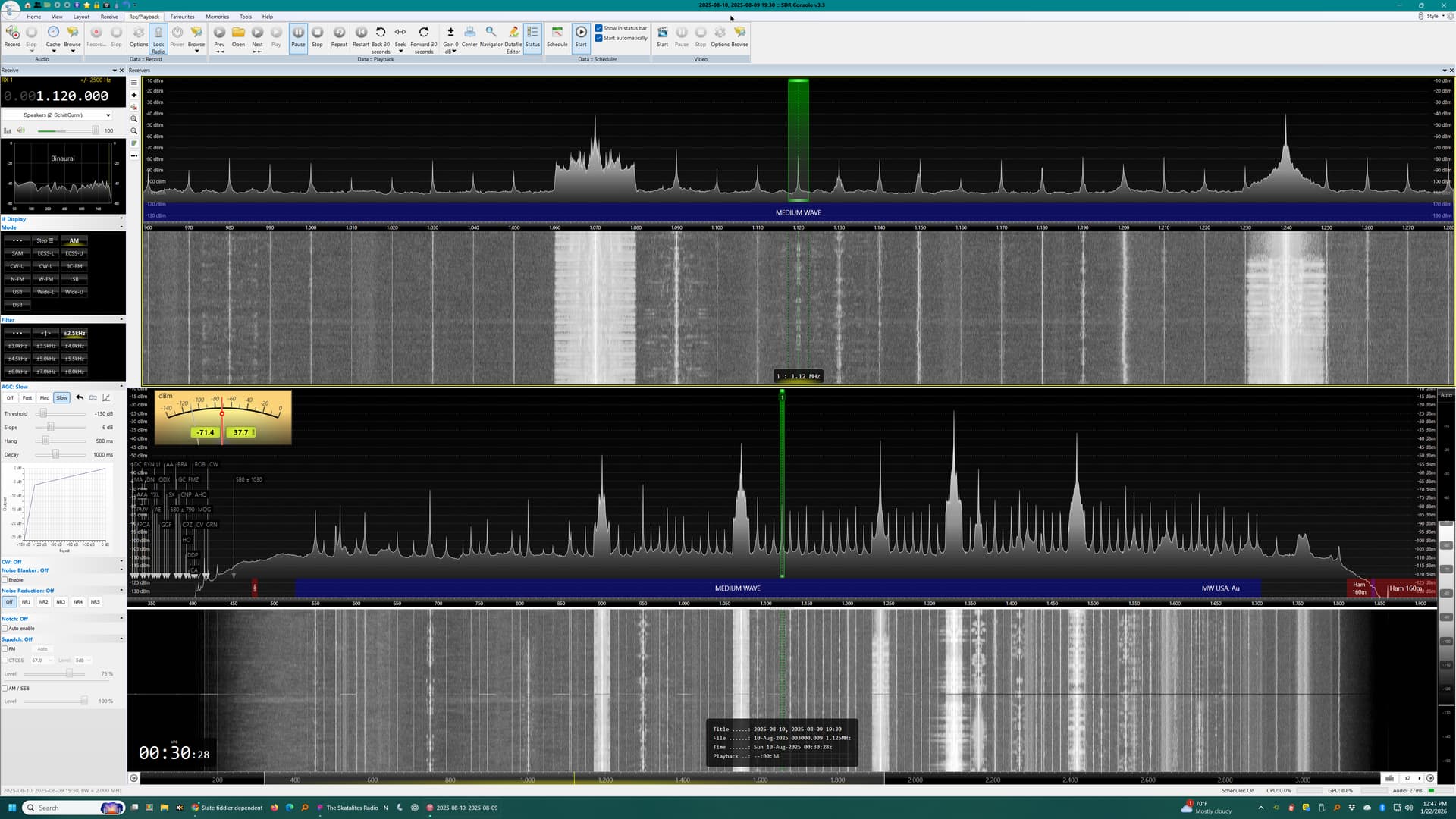
Below is a screenshot of SDR Console with the entire AM band shown in the section where the signal strength meter is.

Damon