New CodeMirror 6 TiddlyWiki5 plugin (2026)

No, in the link you mentioned it does not happen in any input.

I created a new tiddler in your link and typed/deleted in all the fields (title, tags, text, type, field name, field value). No alerts.

In my al-cm6 link from above, tried the same thing and it issues an alert when I hit the backspace only in the text field (main text area).

Hitting backspace on the same field when it’s empty does not generate the alert.

1 Like

As a side note, based on my experience, attempting to replicate various Rose-related bugs on the Tiddlyhost platform is not advisable.

1 Like

That’s very interesting, can you elaborate please? I’ll try to set one up somewhere else, maybe something git-backed.

Updates!

I hope you all are having fun with the CodeMirror 6 plugins!

I just bumped the version numbers to version 0.0.23

The Syntax Parsing / Highlighting got a substantial update, it now recognizes much more edge cases and valid Syntax!

The Linter got substantial updates, too. So he’s now detecting the scope of variables for example.

The click-navigate plugin lets you click on macro names / widget names ecc. and it will open the definition tiddler for you!

CSV support has been added, too!

That’s it for now,
best wishes from Pustertal/Southtyrol/Italy/Europe/Earth,
Simon

5 Likes

Looking for Code that breaks the Parser / Highlighting

Hi all!

I’m looking for Test-Code that is very bad written and 100% breaks the parser but works within TiddlyWiki

If you have some examples to test it, I’d be very happy!

Hello! Just doing some tests, and I’m sure I’ll be exploring for a while. For now, I’m happily confirming that (so far) your CodeMirror 6 — set to show trailing spaces — plays very nicely with @pmario’s space-space-newline plugin.

I’ve regularly used that plugin to make it quick to include brief snippets of lyrics or verse (etc.) without having to assign a special class or type out <br>… but had sometimes been frustrated that I couldn’t visually confirm those trailing spaces within the editor. No more!

Many thanks.

2 Likes

@BurningTreeC thanks this is awesome. I can see you are putting in substantial effort.

I would suggest each feature that makes using the editor to write and build TiddlyWiki, and for that matter writing other code, is introducing substantial productivity tools. You may not get to see it personally but the help it is giving and time savings that is going to be available indefinitely to the community and of extreme value. Better highlighting of wikitext and TiddlyWiki script is a key love of mine.

Just a little question, or something to think about,

Things like link preview and navigating to tiddlers from edit mode are wild. I am wondering if there could be a way to bring the link preview into the viewTemplate with a simple tweak that makes use of your existing code? There may be other cases where the internal code makes sense to bring forward into the view template, optionally and perhaps in a dedicated plugin “Reuse codemirror6 code in the viewTemplates”.

An issue

However I see this happening in links within “WikiText Syntax Sample Tiddler” on the demosite.

2026-01-12_09-26-00
Then I create the missing tiddler I get;
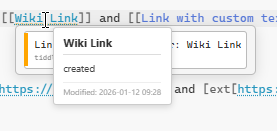
2026-01-12_09-29-10

I remain curious as to the underlying message.

[Edited]
I also wanted to say having the linting (new word for me) is fantastic, I see in this example the ability to correct the error
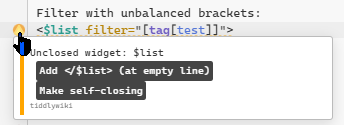
2026-01-12_10-05-39

  • Once selected the options disappear. I am wondering if one could have access to this when refactoring code without errors?. An example would be selecting the application of a closing widget to a self closing and never mind the new error message that occurs, its will be easy to correct.

Thanks again

2 Likes

I’m hugely impressed with all your work here, @BurningTreeC — and not least with your speed and frequency of updates!

I do hope @Maurycy is able to give you the guidance you need to get it working with Auto Complete. I’ve used CM5 for a long time and would love to try CM6, but Auto Complete is really integrated into my workflow.

2 Likes

I’ve updated the Link to the prototype Demo page

https://deploy-preview-9556--tiddlywiki-previews.netlify.app/

1 Like

Hello @Springer
Great that it works with the space-space-newline plugin!

Thanks

Hi @TW_Tones

Thanks for your kind words!

I’ll look into your reported bugs.

Thank you, Simon

1 Like

Hi @BurningTreeC, could you integrate your plugin combiner in the demo page, to make it a bit easier to transfer a bunch of plugins for testing?

Thank you @etardiff , very kind!

Hi @Yaisog … I don’t know, it’s the preview page of the “official” pull request, I don’t want to add the plugin combiner there… hmmm

You could remove it before changing the PR from draft to ready.
For the time being you could also integrate the description and overview tiddlers from the original site and set them as DefaultTiddlers. Just add a final commit to remove them again before merging.

From what I remember the main issue wasn’t that the plugin’s API changed - it’s CM6 having a completely different API from the previous version which meant it wasn’t possible to just change a few lines and be done with it. I have it in the back of my head to look into this more, I just don’t have the time at the moment :slight_smile:.

2 Likes

Another breaking change is that codemirror no longer publish browser library builds. You have to build the libraries on nodejs by yourself: CodeMirror Bundling Example

Yes exactly, and that’s what I’m doing. I’m building only the needed libraries

Helloo,

Coloured KaTeX is now working with your update. Thank you.
However… :slight_smile:

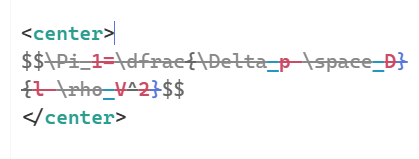
image

Anything between tags (I havn’t checked other tags) gets crossed out!

Deleting either the opening or closing tag removes the strikethrough.

1 Like

Hi @Ste_W , thanks for reporting! I need to look into this nasty bug! :laughing:
Also, the <center> tag is missing from autocompletions!

1 Like