As I suspected, changing the ct-sum values of one of the tiddlers in the table to <<currentTiddler>> shows that your filtered transclusion isn’t accessing the right tiddler. Within the context of the table, the filter is looking for fields with the ct- or cect- prefix on a tiddler called “field”, which doesn’t exist.
So this seems likely to be an issue with the dynamic table, not the filter transclusion.
I’m afraid I find your wiki very difficult to navigate to troubleshoot, but I hope this gives you someplace to start looking.
Seems to work (for those tiddlers that actually have any matching fields.)
How I figured this out, in case it helps you with your own future troubleshooting:
Your month template uses the table-dynamic macro, so I looked it up in Advanced Search → Shadows to find the tiddler where the macro was being defined.
I got two results and found that the content of each cell is defined in the second, $:/plugins/kookma/shiraz/templates/body/type, which populates each non-header/footer table cell as follows:
Here we can see that the field data is being pulled from the tiddler defined as <<currentRecord>>, NOT from <<currentTiddler>>.
I replaced the references to <currentTiddler> in the filtered transclusion with <currentRecord> where appropriate, and that gave me the expected result.
So if you’re not using the field ct-sum except within the dynamic table, you could replace the content of each ct-sum field with the corrected version above. Alternately you can create a custom column template (Mohammad provides some guidance on how to do that here in the Shiraz tutorial) and put your text widget there, and then it won’t be dependent on the ct-sum field at all.
Personally, I’d suggest the latter; it seems redundant to have a field containing an identical widget on potentially hundreds of tiddlers. I generally prefer to keep field data as simple as possible and do any formatting and/or filter manipulations within a view template.
Sorry I didn’t see this thread earlier; the <<currentRecord>> trick for dynamic table templates is one that I’ve been using for a while, and sharing on other threads here.
But in light of a different recent thread, I want to make sure you realize that getting the calculated sum to appear in a dynamic table is still not going to make the calculated content “dynamic” as sortable content (which is often the appeal of a dynamic table).
If that’s your purpose, I believe you’d have to do make some kind of “set field” script (perhaps temporary, perhaps triggered by rendering the dynamic table and/or editing certain tiddlers’ fields – to avoid baking in values that ought to change dynamically).
Of course @Mohammad knows best… but my impression is that the superpowers of dynamic tables are still finite ; they can sort only over the straightforward content-values of the cells being displayed.
I don’t want to sort based on the calculated sum, I am using this table to get an quick overview of every month’s data.
Is there any other way to do it rather than using the dynamic table.
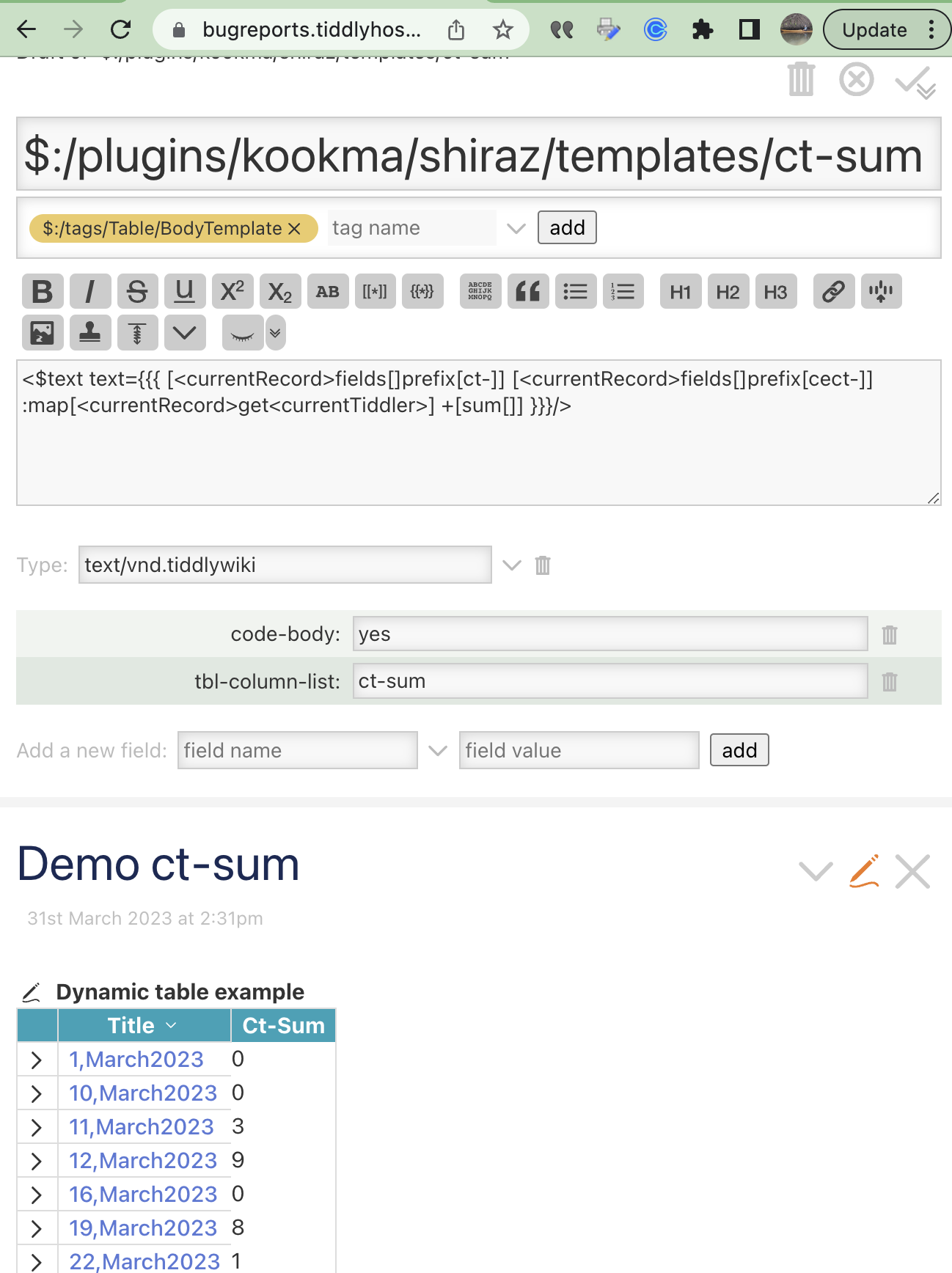
I tried to create a column template for ct-sum here, I don’t whether that is the correct way of doing it ? Also how to use it in the table code? Here is a sample table I tried.
Simple problem (for future sake) was that the tbl-column-list field on the template didn’t have ct-sum listed. Maybe you already figured that out…
More complex problem is that you’re trying to sum fields that are themselves already complex calculations.
Your custom column now seems to work ok for working with the value from ct-brain field of 4,March2023 because it’s the only actual field-content that can be worked with (directly).
Ignore all the reveal-widget stuff… it’s mostly about handling the ability to toggle into edit mode, which you won’t be able to do with this column anyway.
(Edited to add the <td> and </td> tags that make it render better within table.)
From this reply of @etardiff I understood how to solve my problem by using a ct-sum field. But I was trying to use a custom column template as @etardiff suggested to avoid complex code within tiddler fields.
I didnt understand this part.
My Brain isn’t working I guess . Where am I suppose to enter this code ?
Paste it as the full content of your column template tiddler (which you seem already to have created, using the title $:/plugins/kookma/shiraz/templates/ct-sum)
(Full disclosure: something seemed to be tripping the process up for me, perhaps your old template in the background. So I deleted all versions already there, and started from scratch by cloning a different templates/body tiddler, vacuuming it out, and pasting in the content above.)
Do make sure to delete your existing ct-sum field at some point, since it’s coming under the scope of the column-template filter (looking for fields starting with ct-)…
That was the source of my confusion at one point – thinking that the ct-sum field was among the ones whose values you wanted to include in your table’s calculated column.
You still have a few tiddlers with the ct-sum field.
I highly recommend the Commander plugin by @Mohammad for being able to remove or rename a field (across your whole wiki) quickly, and all sorts of other batch manipulations…
Without that, I just quickly pasted
{{{ [has[ct-sum]] }}}
to see that the ct-sum field is still hanging out in a few places. Not a big deal (they’re not tiddlers being drawn into your dynamic table as far as I can tell)… This is just a bit of cleanup as you move toward the more efficient solution.
I am not following the whole thread, but I would absolutely recommned to create your own template for fields contain complex wikitext. Creating a template is not a big deal and by reading the Shiraz doc you can create your own templates easily! Most of the time you need a body template (not header nor footer templates are required). The column template simply tells Dynamic Table what and how to display a field for a tiddler (tiddler is a record or a row in table).


 ; they can sort only over the straightforward content-values of the cells being displayed.
 . Where am I suppose to enter this code ?