I find EventCatcher very useful but struggle with the documentation on how to use it. Today I needed to figure out how to use for essentially a custom tooltip - a hover event instead of a click event. My actual usecase is that I have a calendar built in an HTML table and want it to show me my appointments as I hover over each date. Once I figured it out, I realized I should save this as a template for myself later, and then decided I’d paste it here for others to reference.
I see Scott was way ahead of me (I greatly appreciate the people that post tips like the above!), but since my implementation is a bit different, I’ll just paste it here as another example.
Here’s a little demo:
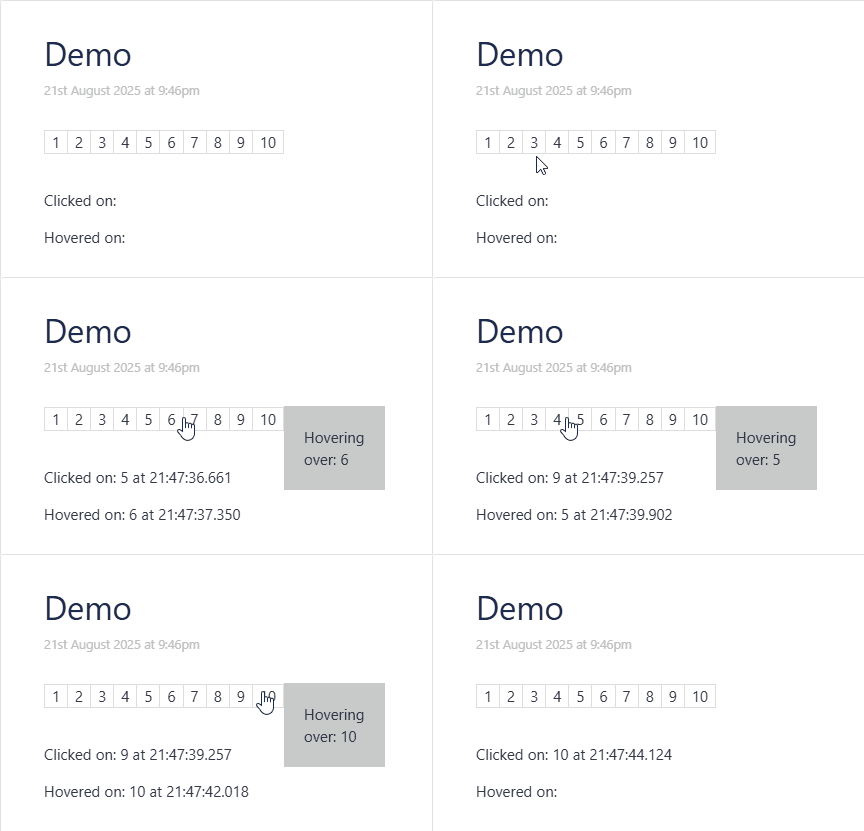
And here’s the code that you can copy/paste into TiddlyWiki or elsewhere. I added some extra stuff as you can see.
- I had it write the time with milliseconds to prove to myself that the
mouseoveronly ran once per the area, not for every pixel within the area. - I also wanted to remember that you can put multiple events into one eventcatcher, in this case I have
click,mouseover, andmouseout. - You’ll see I named the main bit as
xxxxxwhich is purposefully a bit obnoxious but I find helpful to remind me what is NOT a keyword. Sometimes when things are nicely named, I can’t tell what part is custom vs. standard.
\procedure xxxxx-click()
<!-- Because the td that has class xxxxx also has xxxxx-id, a dom-xxxxx-id is automatically created -->
<$action-setfield $tiddler="$:/temp/xxxxx/click" $value={{{ [<now "0hh:0mm:0ss.0XXX">addprefix[ at ]addprefix<dom-xxxxx-id>] }}} />
\end

\procedure xxxxx-hover()
<!-- Because the td that has class xxxxx also has xxxxx-id, a dom-xxxxx-id is automatically created -->
<$action-setfield $tiddler="$:/temp/xxxxx/hover" $value={{{ [<now "0hh:0mm:0ss.0XXX">addprefix[ at ]addprefix<dom-xxxxx-id>] }}} />
<$action-setfield $tiddler="$:/temp/xxxxx/hover/value" $value=<<dom-xxxxx-id>> />
\end

\procedure xxxxx-hover-end()
<$action-deletetiddler $tiddler="$:/temp/xxxxx/hover" />
\end

<style>
.xxxxx { cursor: pointer; }
.xxxxx:hover { background-color: yellow; }
.xxxxx-tooltip { position:absolute; top:14px; left:100%; padding:20px; background-color:pink; }
</style>

<$eventcatcher selector=".xxxxx" $mouseover=<<xxxxx-hover>> $mouseout=<<xxxxx-hover-end>> $click=<<xxxxx-click>> >
<div style="position:relative;display:inline-block;">
<table>
<$list filter="[range[10]]" variable="x">
<td xxxxx-id=<<x>> class="xxxxx">
<$text text=<<x>>/>
</td>
</$list>
</table>
<$list filter="[[$:/temp/xxxxx/hover]is[tiddler]]">
<div class=xxxxx-tooltip>
Hovering over: {{$:/temp/xxxxx/hover/value}}
</div>
</$list>
</div>
</$eventcatcher>

Clicked on: {{$:/temp/xxxxx/click}}

Hovered on: {{$:/temp/xxxxx/hover}}