I just want to make an important point I think is often overlooked.
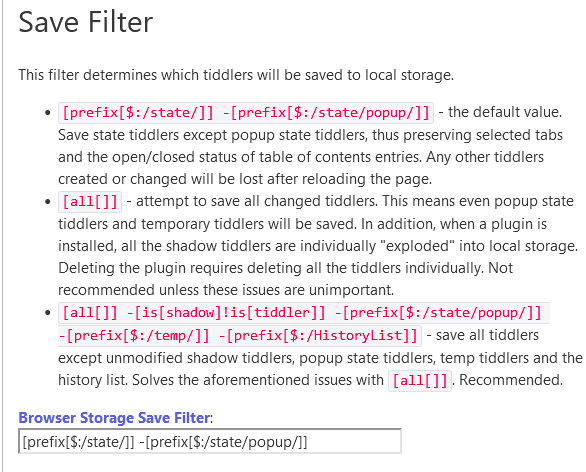
Until a save occurs the local storage plugin ONLY stores changed tiddlers in local storage.
As a result you can load a large wiki in the browser and with local storage active only those that match a configurable filter get stored in local storage.
As soon as a save takes place and or the user exports their changes and turns off the Local storage the space is reclaimed.
This means you would have to work very hard and operate off line, or import bulk content, before you will challenge available local storage.
I have always believed it would be possible to make TiddlyWiki robustly detachable/disconnected from where it is loaded and using local storage, IndexDB or PouchDB can remain safe in a device until reconnected.
Since most people have some form of internet connection daily we should be able to safely run tiddlywiki on any device with a browser and no app’s needed.
I also want to point out many of us use many single file tiddlywikis from file: addresses thanks to Timimi. TiddlyWiki’s can be as common as word documents for some of us.
@Justin_H: this TiddlyWiki permalink you posted refers to “Corner ribbon”, as if it’s an official plugin, but there’s no official plugin by that name. It would be great to fix that loose end on Tiddlywiki.com – meanwhile, can anyone reconstruct whether that plugin just got renamed, or how else we can follow up on it?
If we’re talking about newbies, let’s remember that they might drag in a huge image or two, without realizing that linking is wiser than swallowing… Also, student newbies could be working on a lab computer, where all sorts of things can interrupt those sessions or force a logout/login during which session data is automatically flushed. For students, I don’t see any other no-nonsense learning path besides tiddlyhost or similar cloud-based hosting, with auto-save.
I wish a mini-version of tiddlyspot’s old backup system were still possible, since it would be ideal to have something like a restore-from-recent option – in the event of unwise edits that mangle the interface or break basic functions.
This plugin was used with previous iterations of TW, now you can find something similar with the GitHub Fork Ribbon in the plugin library.
You can simply take the text of what I linked, remove the custom CSS in the divs, and add it to whatever you’d like, like I did by placing it in my subtitle.
All good! My response was not so much a “How do I do this?” question; it was expressing concern that this thread points to a tiddler at TiddlyWiki.com, which in turn recommends a plugin that isn’t there (at least as named), which is a potential source of confusion.
Despite huge (kudos) efforts by @Mark_S and others to try to tame the tiger of TW resources into something one could pet, I still find TW, overall, a very FRAGMENTARY experience when you need to find relevant resources to address an aim.
The frustrating thing is I know a solution exists somewhere.
If you follow the instructions in the link (Install the Plugin), and type “corner” into the Official Plugin’s search, you find:
GitHub Fork Ribbon: GitHub-inspired corner ribbon
About a dozen Official Plugins are searchable from the standard TiddlyWiki.com site, but not all of them (though they’re all documented once you install). I suppose this is just a matter of someone taking the time to make some public-facing docs.
I think the original topic became a bit sidetracked but as for the topic of autosave, it is true users have grown to expect saving to “just work”. But it is possible to have data loss merely by using “Undo” and “Redo” over and over again, so users should come to expect unless explicitly saved they could experience data loss.
Another example would be if you were editing a page on Wikipedia and you refreshed the page you would lose all your progress.
I’m intrigued by the idea of using local storage somehow. I would imagine there might be a way to only store the changed tiddlers instead of the entire wiki since there are size limitations.
I just tried it on FF. I only put in a handful of image files before I got the exceeded quota warning. So unless there’s some way to tell the browser to use the max amount possible, it doesn’t look very useful.
Edit: I think it is hitting a “soft” limit, which should result in a message allowing the user to OK the increased amounts. Possibly the plugin could be tweaked to bypass the soft limit.
For the limited inclusion of images I use I have never come across this problem, I will try and to replicate it,
Lets try and improve this
However if a wiki is intended to include media Image, Video and Audio beyond the occasional item then it is necessary to look at how its being hosted or served.
Most modern media files are equal to or greater in size that the empty tiddlywiki.
A single file wiki is a great feature of tiddlywiki but it is putting the whole site in one file.
Using another host and linking or embedding media is often the best approach eg YouTube embeds
There are great solutions available and one the way for server hosted TiddlyWikis from Bob to the File Uploads Plugin.
Local files do not have a need to depend on Local Storage because the file system in local storage.
It is internet and intranet facing wikis where the Local Storage Plugin becomes more useful but this is also when other factors must be taken into account.
I guess you can kill any Wiki that way. Perhaps it would be a good idea to add a warning if a media-file to be imported exceeds a certain size anyway - and that if users wish to continue adding such files it would be good practice to link them externally.
These were small images that I used so I didn’t have to spend all day creating tiddlers. The total size was probably less than 5 megs. This is well within TW’s abilities, even on small devices.
There is a soft limit and a hard limit with local storage. It appears to me that the local storage is throwing up its virtual hands when it hits the soft limit. When the soft limit is reached, the app/browser is supposed to verify with the user that they want to exceed the limits. But there is no dialog offered to the user.